목차
반려동물 동반 가능 레스토랑 소개 및 Google 지도의 중요성
반려견과 함께 왔다는 이유로 반려동물 친화적인 레스토랑을 찾았다가 거절당하는 경험은 시간을 낭비하고 멋진 외출을 망칠 수 있는 익숙한 좌절감입니다.
반려동물 소유율이 7%에 육박하며 사상 최고치를 기록하고 있습니다.미국 가구의 0% 반려동물을 키우는 사람들이 늘어나면서 외식 옵션에 대한 수요도 증가하고 있습니다.
이 가이드는 정확한 검색어와 특정 Google 지도 기능을 통해 반려동물 동반이 가능한 장소를 매번 확인할 수 있도록 안내합니다. 안심하고 식사하는 데 필요한 몇 가지 매우 효과적인 단계를 배우게 됩니다. 이 방법은 정식 레스토랑, 캐주얼 카페, 양조장, 아이스크림 가게, 야외 좌석이 있는 바 등 모든 유형의 환영 장소를 찾는 데 효과적입니다.
Google 지도에 집중하는 이유는 무엇인가요?
최신 정보를 가장 빠르게 얻을 수 있는 방법입니다. Google 지도는 본질적으로 지역 기반이며 다른 사용자에 의해 지속적으로 업데이트되며 비즈니스의 공식 프로필과 직접 연동됩니다.
반려동물 소유자 중 가장 많은 비율을 차지하는 반려견 소유자에게는 “반려견 동반 가능 파티오” 또는 “반려동물 동반 가능 식당'과 같은 검색어를 빠르게 검색하는 방법을 아는 것이 매우 중요합니다. 고급 검색 방식을 적용하여 검증 가능한 답변을 즉시 얻을 수 있는 방법을 알려드립니다.
핵심 전략: 중요한 유일한 필터
모든 추측을 멈추려면 Google에서 가장 정확한 최상의 결과를 제공하는 특정 검색어를 사용해야 합니다. 대부분의 사용자는 신뢰할 수 없는 데이터를 가져오는 광범위한 검색에 의존합니다. 보다 직접적인 접근 방식을 사용하면 시간을 크게 절약할 수 있습니다.
두 가지 필수 검색어
검색할 때마다 이 두 가지 용어로 시작해야 합니다:
검색어 1(정확도 높음): 내 주변 반려견 동반 가능 레스토랑. 일반적으로 반려견 동반자를 중심으로 시설을 분류하기 때문에 “애완동물” 대신 “반려견'을 사용하는 것이 좋습니다. 이렇게 하면 기존 비즈니스 속성과 직결되는 더 좋고 신뢰할 수 있는 결과를 얻을 수 있는 경우가 많습니다.
검색어 2(광범위한 범위): 내 근처에 야외 좌석이 있는 레스토랑. 이것은 전형적인 허점입니다. 많은 레스토랑은 공식적인 “반려견 동반 가능” 지정이 없더라도 야외 파티오에서만 반려견 동반을 허용합니다. 이 경우 프로 팁 섹션에서 설명한 대로 파티오 규정을 직접 확인해야 한다는 점을 기억하세요.
“반려견 허용” 속성
가장 신뢰할 수 있는 확인 방법은 전용 비즈니스 속성입니다: “반려견 동반 가능” 또는 때로는 “반려동물 동반 가능”입니다. 이는 신뢰할 수 있는 검증된 단일 데이터 포인트입니다.
찾을 수 있는 위치(단계별):
- 연구 중인 특정 레스토랑 목록을 탭합니다.
- 비즈니스 프로필 내의 “정보” 또는 “편의시설” 섹션까지 아래로 스크롤합니다.
- 체크 표시가 있는 “반려견 동반 가능” 배지를 찾습니다.
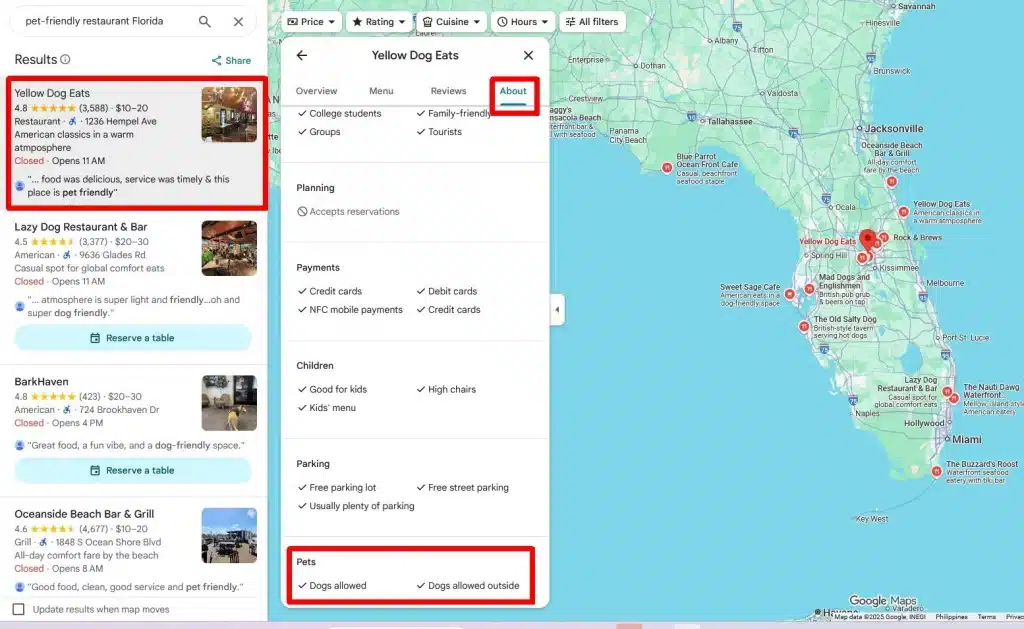
이 배지는 비즈니스 소유자가 정보를 확인했거나 Google 시스템에서 확인했음을 의미합니다. 이것이 유일한 공식 확인 표시입니다.
5분 검색 체크리스트
주요 속성을 이해하면 검색 프로세스 자체를 빠르게 완료할 수 있습니다. 이 체크리스트는 이동 중에도 빠르고 정확하게 확인할 수 있도록 번호가 매겨진 워크스루입니다.
1. 지도를 열고 위치를 설정합니다: 기기에서 Google 지도를 열어 시작하세요. 현재 위치를 설정하거나 식사를 하려는 특정 지역이나 구역에 핀을 놓습니다.
2. 타겟 검색 쿼리를 사용합니다: 기본 검색창에 정확도 높은 문구인 ”반려견 동반 가능 레스토랑”을 입력합니다. 이렇게 하면 Google이 찾고 있는 속성을 정확히 파악할 수 있습니다.
3. 결과를 스캔합니다: 즉시 지도와 목록 보기를 확인합니다. 높은 사용자 평점(별점 4.0 이상)과 현재 영업 시간을 표시하는 목록에 집중하세요.
4. 필터를 확인합니다: 결과가 로드된 후 화면 상단에서 “필터” 또는 “속성” 버튼을 확인합니다. 이 버튼을 탭하면 특정 지역에서 “반려동물 동반 가능” 옵션이 활성화되어 있는지 확인할 수 있습니다. 이 필터를 적용하면 결과가 즉시 구체화됩니다.
5. 속성을 확인합니다: 유망해 보이는 상위 3~5개의 결과를 클릭합니다. 비즈니스 프로필의 “편의시설” 또는 “정보” 섹션으로 바로 아래로 스크롤하여 확인 표시 배지가 있는 “반려견 동반 가능” 상태를 확인합니다.
프로 팁: 정책 재확인하기(파티오 및 내부 규칙)
일반적으로 Google 속성에만 의존하는 것이 효과적이지만, 이러한 확인 단계를 추가하면 도착한 후 실망하는 일을 방지할 수 있습니다. 이 팁은 특히 반려동물이 실제로 허용되는 장소와 관련된 정책 세부 정보를 확인하는 데 도움이 됩니다.
증거 상호 참조(“3포인트 확인”)
완전히 확신하고 싶다면 집을 떠나기 전에 이 간단한 점검을 완료하세요:
- 사진을 확인합니다: Google 목록의 “사진” 탭을 살펴보세요. 특히 파티오, 대기실, 테이블 근처에서 쉬고 있는 개가 선명하게 보이는 사용자가 업로드한 이미지를 검색하세요. 시각적 증거는 강력한 확인 수단입니다.
- 리뷰를 스캔합니다: 후기 섹션에서 검색 기능을 사용하여 반려견, 파티오, 강아지, 물그릇 등의 키워드를 찾아보세요. “직원이 반려견에게 물그릇을 바로 가져다주었다”는 후기가 있다면 해당 정책이 적극적으로 시행되고 있다는 신호입니다.
- 웹사이트를 확인합니다: Google 데이터가 명확하지 않은 경우 해당 레스토랑의 메인 웹사이트를 클릭하세요. 자주 묻는 질문 또는 연락처 페이지에서 특정 반려동물 정책에 대한 안내를 찾아보세요.
Understanding the Details: Patio vs. Inside
A crucial distinction to remember is that “pet-friendly” typically means patio-only dining. This is due to local and state health codes that prohibit non-service animals from being inside dining areas and kitchens.
Note that the legal difference for service animals is critical. A legally defined service animal is allowed everywhere, while emotional support or companion pets are subject entirely to the restaurant’s own policy, even if they allow dogs generally.
What to Bring for the Best Experience
To make the outing quick and easy for everyone, come prepared with these essential items:
- Collapsible water bowl
- Favorite chew/toy (for distraction during long waits).
- Blanket (to define the dog’s dedicated space under the table).
Enrich Pet-Friendly Contacts
The Power User Move: Why You Need to Scrape Google Maps Data
Finding a single dog-friendly restaurant is easy with the checklist, but what if you need a permanent, customized list for an entire weekend trip or a large neighborhood? This is where the power user approach comes in.
When the Native Search Isn’t Enough (And What Tool to Use)
The native Google Maps search is limited. It’s constrained by the immediate distance around you, and there is no simple way to export data in bulk to a spreadsheet. Scraping addresses this limitation by allowing you to create a complete local list instantly.
If you need a specific tool to do this, services like Outscraper’s Google Maps Scraper allow you to quickly gather the critical data points you need—including addresses, hours, and those crucial “Dogs allowed” attributes—across a wide area.
Use Cases and Target Audiences for Bulk Data
Using scraped data opens up multiple possibilities beyond a single dinner plan:
- Use Case 1: Building a “Weekend Dog-Friendly Route” You can scrape a large list of restaurants in a city or neighborhood, then filter the results by 4+ stars, Outdoor Seating, and the Dogs Allowed attribute. This process helps you map out a guaranteed, perfect day or weekend. Target Audience: Local Pet Owners/Enthusiasts who need guaranteed options for a planned outing.
- Use Case 2: Identifying New Pet-Friendly Hotspots Run a targeted scrape of recently opened businesses. This allows you to be the first to find new places that haven’t yet been added to niche, pet-specific applications. This insight is valuable. Target Audience: Local Bloggers/Content Creators or Pet Industry Businesses looking for fresh, unique content.
- Use Case 3: Creating a Detailed Pet Directory for Travel Gather phone numbers, addresses, and hours for a static, print-out, or offline-accessible list. This is essential for a road trip where cell service might be unreliable. Target Audience: Travelers/RV Owners and Tour Guides who require reliable, offline access to data across a wide geographic area.
Step-by-Step Guide to Find Pet-Friendly Restaurant Using Outscraper
Aside from doing the searching manually using Google Maps, you can also equip yourself with some tools that let’s you save time and efforts by using a web scraping tool. Outscraper is one of the most reliable Google Maps scraping platform you can utilize at a fraction of a cost but you could get the most updated and reliable data available online.
Here’s a How to Find Pet-Friendly Restaurants Using Outscraper:
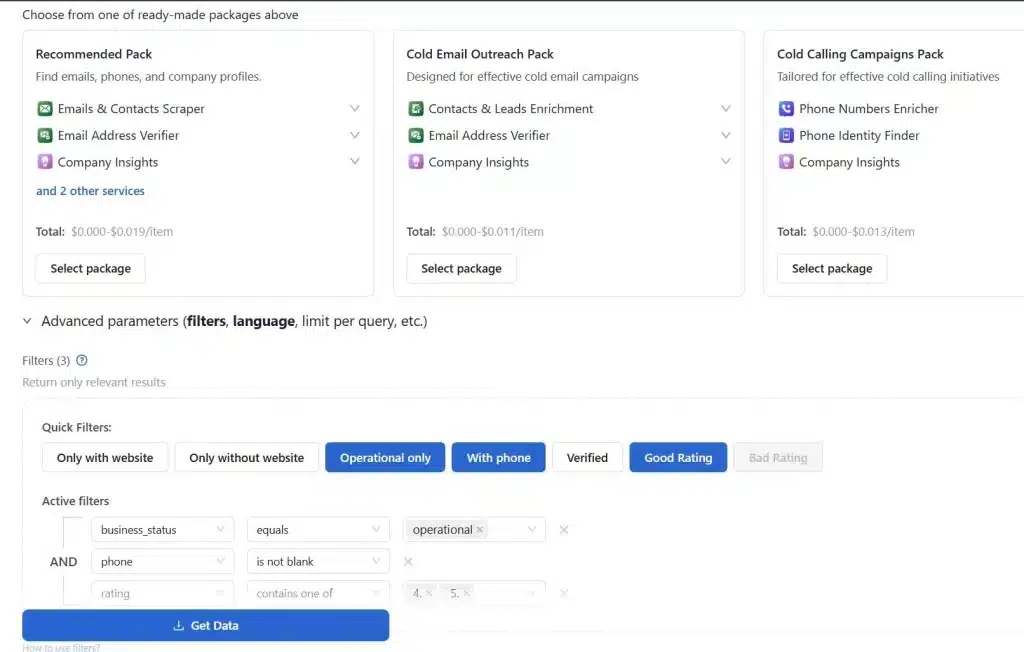
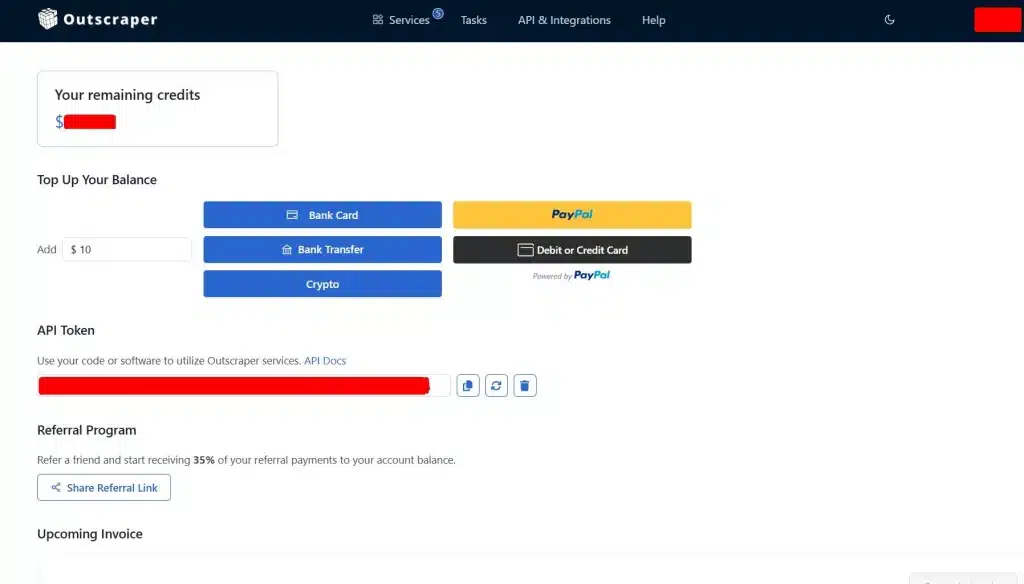
- Sign-up or Login with your Outscraper account and proceed to the Outscraper’s App dashboard and Select Services.
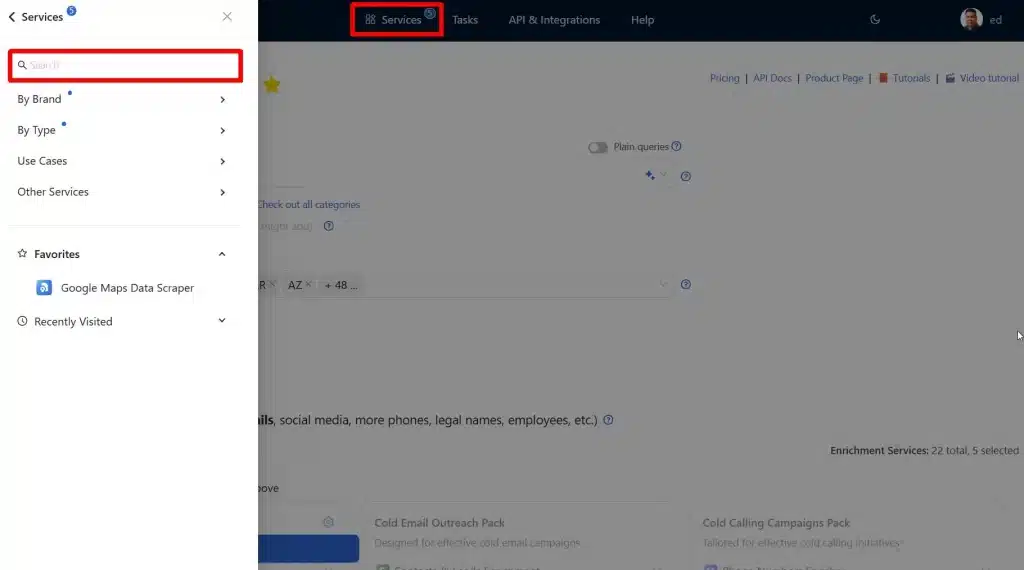
- After selecting Services input the scraper you want to use. We will be using Google Maps Scraper by typing it in the Search bar. You can also select Google Maps Scraper by clicking “By Brand” and searching and selecting “Google Maps Data Scraper.”
- Input “Restaurant” in the categories field, followed by location. In this case we will be searching pet-friendly restaurants in Florida. We will try 100 maximum results for this scrape.
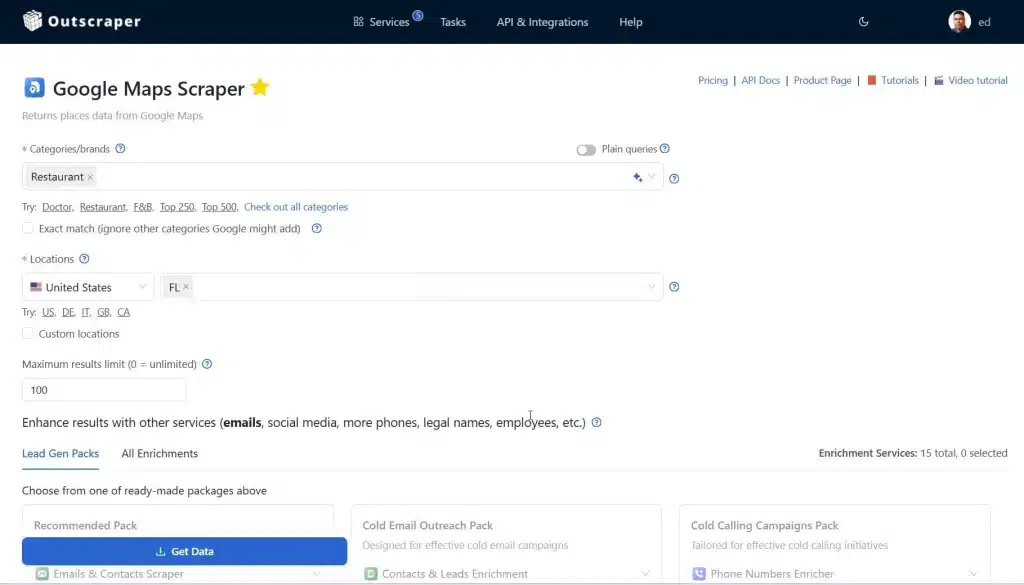
- We will not be adding any enrichments in this example but you can also use the tools if you want a more detailed results.
- With the Advanced Parameters and Filters we will just add the most commonly used filters, Operational Only, With Phone and Restaurants with Good Rating.
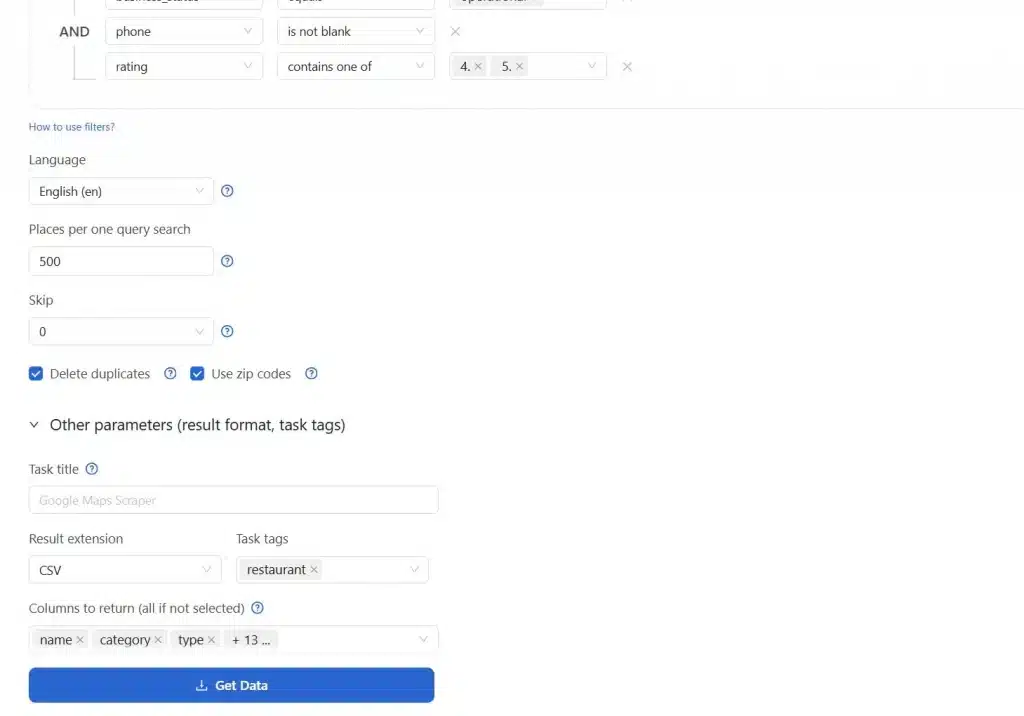
Let’s now proceed to the most important part, which is the Other parameters or the result format. This is where we will set-up our “Pet-Friendly” restaurant query. You can also add a Task title for reference, use CSV as the result extension and add Task logs. Next you should do is the “Columns to return. This is where the Pet-Friendly restaurant query should be set up.
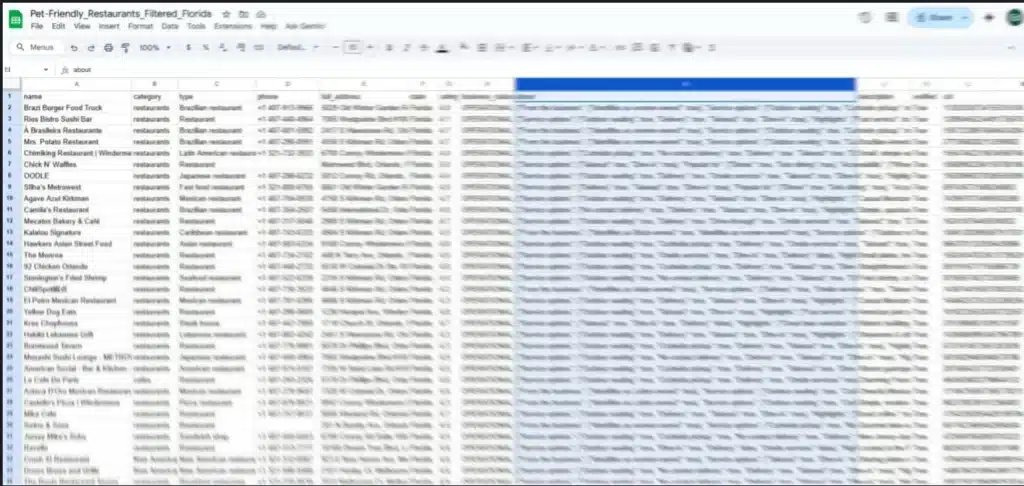
Select from the drop-down menu option the following details (name, category, type, phone, full address, state, business status, about and cid).
Because we only need the list of restaurants that allowed pets or their dogs to dine in with their owners, this is very important. The about section contains the details wither a restaurant is pet-friendly or dogs allowed. Sometimes the keywords will not be visible in the About section of a business but in the description of the business.
- Once all were set up, it’s time to start the task and get the data from Outscraper. The raw data should be cleaned by deleting all the entry that doesn’t have any keywords “pet-friendly,” and “dogs allowed” in the About or Description column. First we downloaded the data and delete all the rows manually. You can also upload your CSV file to ChatGPT and prompt it to clean up for you.
How to Build a Directory?
Beyond Google Maps: A Quick Look at the Other Apps
While the Google Maps attribute is the single most reliable verification source, it is useful to know how other platforms fit into your search approach. This quick look makes the guide complete.
Specialized applications like BringFido or some popular directory platforms like do offer dedicated “dog-friendly” filters. These services are strong resources for discovery as they help you find a broad list of places that claim to be welcoming to pets.
The key takeaway, however, remains the same: Use these other sites for discovery, but then use Google Maps (or your scraped data from Maps) for the verified, up-to-date policy via the “Dogs allowed” attribute. This verification step reduces the risk of arriving at a location with an outdated or unclear policy.
Analyze & Discover App Competitors
Conclusion: Verification Ends the Frustration
You now have a verified process to find genuinely pet-friendly restaurants.
The insight is simple and data-driven, you should stop relying on vague website mentions or hopeful assumptions. It really matters that you know the basics of Google Maps searching and finding the “Dogs allowed” or “pet-friendly” attributes in the about section of a business listing or in the Google Business Profile (GMB).
These data are official and verifiable data point that instantly removes the risk of ruining your outing. By applying the 5-Minute Search checklist and the 3-Point Check, you transition from a frustrated customer to an informed, confident pet owner.
Still, finding one restaurant is manual work. Finding a perfect, guaranteed route for an entire weekend trip or starting a business requires better tool.
If your goal is to permanently eliminate manual checks and build, custom, offline directories or pet-friendly places, complete with hours, addresses, and verified attributes, then scraping the data in bulk is the necessary next step. This allows you to scale your discover process beyond Google’s immediate search results.
Access the Full, Verified List. Stop Wasting Time
자주하는 질문
가장 자주 묻는 질문과 답변
The Google attribute is often more up-to-date and standardized, as it requires official verification through the Google Business Profile interface.
In almost all cases, “pet-friendly” means dog are only permitted in designated outdoor areas, such as patios, due to health code restrictions.
No, only legally defined service animals are guaranteed access to all public areas; ESAs are considered companion pets and are subject to the restaurant’s standard policy.
Businesses tend to use “dog-friendly” specifically in their official attributes, making it the more effective search term for accurate Google results.
Scraping allows you to overcome Google Maps’ distance limitations and export large lists of verified business data for permanent, offline use or custom filtering.
You should cross-reference by checking user-generated uploaded photos, searching keywords in reviews, or looking at the restaurant’s official FAQ page.