
요금제
No monthly fees. 당신이가는대로 지불 only for the records you extracted.
프리 티어
500개 기업 이전 사용량- Free for the first 500 businesses (places)
- CSV/Excel/Parquet/JSON
- Enrichments
중간 계층
500개 기업 이후 사용량- Price per 1k records for the usage from 501 to 100k businesses (places)
- CSV/Excel/Parquet/JSON
- 고급 필터
- Enrichments
- API 액세스
비즈니스 계층
100,000개 기업 이후의 사용량- Price per 1k records for the usage after 100k businesses (places)
- CSV/Excel/Parquet/JSON
- 고급 필터
- Enrichments
- API 액세스
- 무제한
데이터 사전
Google 지도의 열 이름 및 설명입니다.
- 이름 – name of the place on Google Maps.
- name_for_emails – name cleaned/normalised for email personalisation.
- 하위 유형 – all types of the place.
- 유형 – the type under which the place was found (can be any element from subtypes, search result context).
- 카테고리 – category defined by contributors (may be in a local language).
- 전화 – place phone number.
- 웹사이트 – website of the place.
- address – full formatted address of the place.
- 거리 – street address (e.g. house number + street).
- county – county/borough.
- 도시 – city of the place.
- 상태 – state/region/province name (when available).
- state_code – state/region code (e.g. NY for US; when available).
- 우편번호 – postal/ZIP code.
- 국가 – country name.
- 국가_코드 – country code (ISO 3166-1 alpha-2, e.g. US).
- 위도 – latitude of the place location.
- 경도 – longitude of the place location.
- h3 – H3 index (hexagonal spatial index) for the place location.
- 시간대 – timezone of the place location.
- plus_code – Open Location Code / Plus Code (works only for individual searches, e.g. query: “Hotel Colombo Berat”, “0x3e49a63f6b05fe3b:0xc73d6b1f31b2ccc8”, 자세히 알아보기).
- area_service – indicates if the place is a service-area business without a public storefront address.
- 평가 – rating of the place.
- 리뷰 – number of reviews.
- 리뷰_링크 – link to the place’s reviews on Google Maps.
- reviews_tags – most common review tags (works only for individual searches, e.g. query: “Hotel Colombo Berat”, “0x3e49a63f6b05fe3b:0xc73d6b1f31b2ccc8”, 자세히 알아보기).
- 리뷰_당_점수 – JSON object with reviews per score. Works only when using google_id or a business name/category as a query.
- reviews_per_score_1 – number of 1-star reviews.
- reviews_per_score_2 – number of 2-star reviews.
- reviews_per_score_3 – number of 3-star reviews.
- reviews_per_score_4 – number of 4-star reviews.
- reviews_per_score_5 – number of 5-star reviews.
- 사진 수 – number of photos.
- 사진 – main photo URL (when available).
- street_view – Google Street View image URL (works only for individual searches, e.g. query: “Hotel Colombo Berat”, “0x3e49a63f6b05fe3b:0xc73d6b1f31b2ccc8”, 자세히 알아보기).
- logo – logo image URL (when available).
- located_in – name of the parent place where it’s located (works only for individual searches, e.g. query: “Hotel Colombo Berat”, “0x3e49a63f6b05fe3b:0xc73d6b1f31b2ccc8”, 자세히 알아보기).
- located_google_id – google_id of the parent place where it’s located (works only for individual searches, e.g. query: “Hotel Colombo Berat”, “0x3e49a63f6b05fe3b:0xc73d6b1f31b2ccc8”, 자세히 알아보기).
- 비즈니스 상태 – current status of the business (e.g. operational, temporarily closed).
- working_hours – JSON object with opening hours.
- working_hours_csv_compatible – pipe-delimited CSV-compatible opening hours string (used by: Opening Hours Pro, Listing Pro, Business Hours Widget, StoreMapper).
- other_hours – JSON object with other hours (when available).
- 인기_시간 – popular times, including live status (e.g. little busy). Works only for individual searches (see 자세히 알아보기).
- typical_time_spent – how much time people typically spend (e.g. People typically spend 45 min to 2.5 hr here). Works only for individual searches (see 자세히 알아보기).
- 범위 – price range. Either “$$$” (general searches) or “€10–20” (available only when using place_ids as queries).
- 물가 – prices info from various hotel providers (available only when using place_ids as queries).
- 예약_링크 – reservation links (when available).
- 예약_약속_링크 – link to book an appointment (when available).
- 메뉴_링크 – menu link (works only for individual searches, e.g. query: “Hotel Colombo Berat”, “0x3e49a63f6b05fe3b:0xc73d6b1f31b2ccc8”, 자세히 알아보기).
- 주문_링크 – links to place an order (when available).
- 약 – additional attributes about the place (e.g. women-owned, LGBTQ+ friendly).
- 설명 – place description (works only for individual searches; 자세히 알아보기).
- 게시물 – JSON object with posts from the place (works only for some places; 자세히 알아보기).
- 확인됨 – indicates if the place was claimed/verified.
- 소유자_ID – unique identifier of the place owner.
- 소유자_제목 – title of the owner’s profile page.
- 소유자_링크 – link to owner profile on Google Maps.
- 위치_링크 – link to the place on Google Maps.
- location_reviews_link – direct link to the reviews tab (when available).
- 장소_ID – unique identifier of the place (Google may update it a few times per year).
- google_id – unique identifier of the place, also known as Feature ID (Google may update it a few times per year).
- cid – multi-platform ID of a listing in the Google ecosystem.
- kgmid – Knowledge Graph Machine ID (identifier Google assigns to specific entities).
- 리뷰_ID – unique identifier of the place’s reviews.
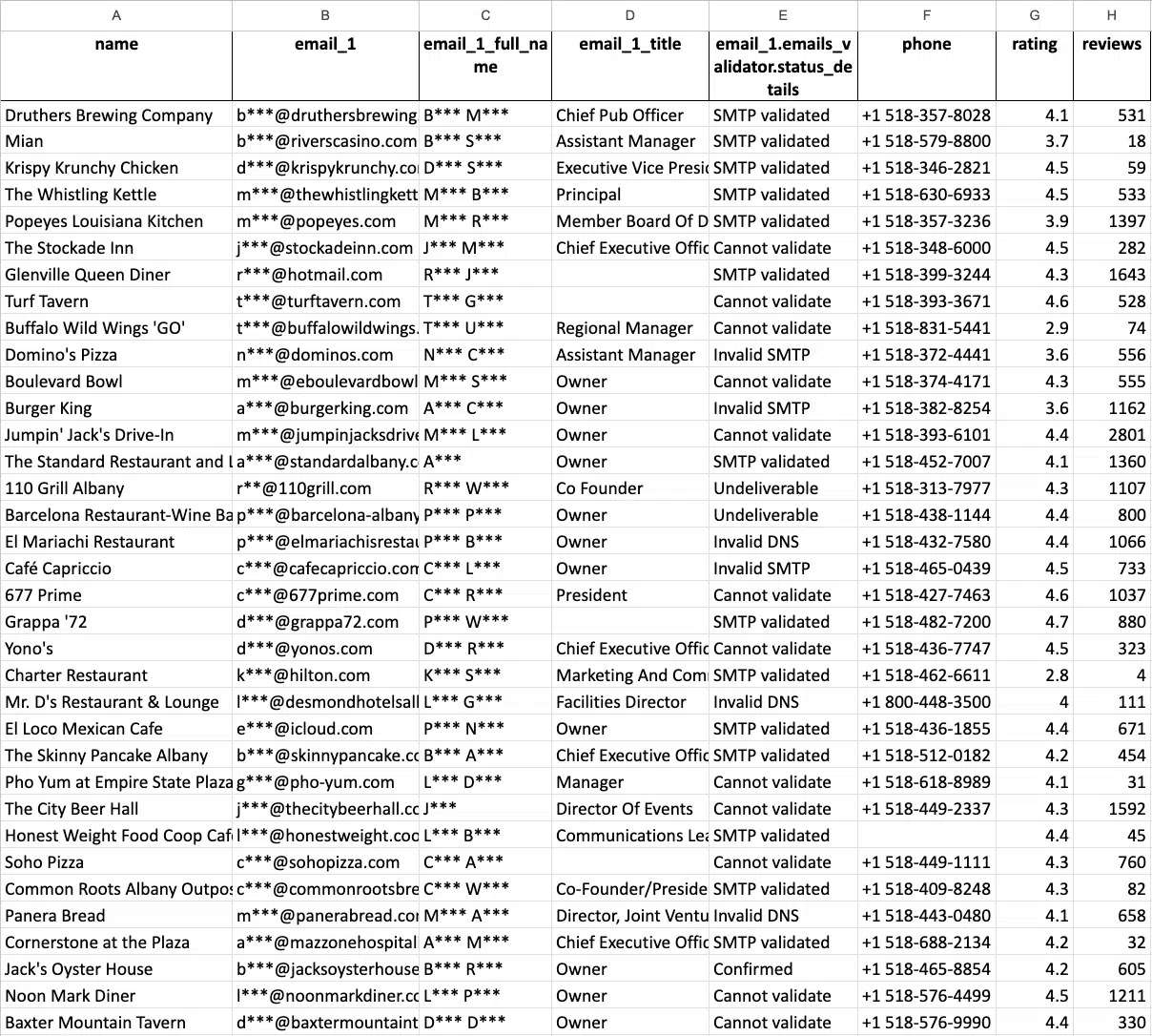
적용하여 추가할 수 있는 추가 데이터 이메일 및 연락처 스크레이퍼 enrichment (select it with UI or use the “domains_service” parameter with API). 인텐시티에 대한 자세한 내용은 다음에서 확인할 수 있습니다. 이 문서.
- 도메인 – website domain.
- email_1 – the first email found associated with the place.
- email_2 – the second email found associated with the place.
- email_3 – the third email found associated with the place.
- 페이스북 – link to the Facebook page.
- 인스타그램 – link to the Instagram page.
- 트위터 – link to the Twitter page.
- 링크드인 – link to the Linkedin page.
- 유튜브 – link to the Youtube page.
- phone_1 – first phone found from the website.
- phone_2 – second phone found from the website.
- phone_3 – third phone found from the website.
- 웹사이트_제목 – title of the website (meta tag).
- 웹사이트_제너레이터 – the platform the website is built on (WordPress, etc.).
- 웹사이트_설명 – description of the website (meta tag).
- 웹사이트_키워드 – keywords from the website (meta tag).
- 웹사이트_해당_FB_픽셀 – shows if FB pixel was found.
- website_has_gtm – shows if Google Tagmanager code was found.
API 문서
앱의 데이터를 사용합니다. 코드 예제를 보려면 API Docs에서 확인하세요.
비디오 튜토리얼
Why Scrape B2B Leads With Outscraper?
Diverse Data Sources
Gain access to a wide range of data sources, including business directories, social media platforms, and professional networking sites, ensuring comprehensive coverage for your B2B lead generation needs.
Advanced Search and Filtering
Utilize advanced search and filtering capabilities to refine your lead search criteria based on industry, location, company size, and more, enabling targeted prospecting and precise data extraction.
Time and Resource Efficiency
Streamline your lead generation process and save valuable time and resources with Outscraper's automated scraping solutions, allowing you to focus on high-value tasks and accelerate your sales pipeline.
Personalized Outreach
Leverage enriched lead data, including contact information and company details, to tailor your outreach efforts and engage prospects effectively, increasing the likelihood of conversion and sales success.
Centralized Data Management
Consolidate all your lead data in one centralized platform for easy access and management, facilitating seamless integration with your CRM system and enhancing collaboration across your sales and marketing teams.
Real-time Updates
Stay updated with the latest lead information and changes in your target market with real-time data updates, enabling you to adapt your sales strategies and stay ahead of the competition in a dynamic business environment.
매월 갱신되는 무료 티어로 Outscraper를 무료로 체험해 보세요.
고객의 의견은?
고객사
전 세계 수천 명의 행복한 고객이 신뢰합니다.


자주하는 질문
가장 자주 묻는 질문과 답변
A lead extractor is an online tool that extracts leads from the public sources like Google Maps.
Google Maps lead extractor is the tool that use scraping to generate lists of leads for b2b marketing.
- Google 지도 스크레이퍼에 로그인합니다.
- 추출할 카테고리를 선택하세요.
- 드롭다운에서 위치를 선택합니다.
- 언어를 선택하고 다른 고급 매개변수를 확인하십시오.
- "데이터 스크랩"을 클릭하십시오.
targeting specific industries or expanding your client base, our automated solution provides unparalleled efficiency and precision.
Key Features of Our B2B Lead Extractor:
- Efficient Lead Extraction: Quickly extract business contacts and decision-makers from various industries.
- Customizable Searches: Tailor your searches to find B2B contacts by industry, location, company size, and more.
- Real-time Data Access: Gain access to up-to-date business contact information for immediate outreach.
- Scalable Solutions: Easily scale your lead generation efforts with our automated extraction processes.
- User-Friendly Interface: Enjoy a straightforward setup with no technical expertise required.
- Secure Platform: Ensure data privacy and security with our reliable and compliant platform.
Start transforming your B2B lead generation strategy today with B2B Lead Extractor tool. Streamline your sales pipeline, uncover new opportunities, and drive business growth effortlessly. Contact us now to request a demo or begin your free trial!