목차
아웃 스크레이퍼 returns multiple contacts for the same company because Leads & Contacts Enrichment can find several people associated with one business. Outscraper’s API documentation lists a default of 3 for Contacts per Company, allowing up to three contacts per company when matching contact information is available.
As a result, the same business may appear in multiple rows with different contact names, job titles, or email addresses. These are not necessarily duplicate business records. Each row may represent a separate contact associated with the company.
If you only need one contact per company, change the Contacts per Company setting to 1 before running your task. This limits the number of contacts requested per company but does not automatically remove duplicate businesses from your original dataset.
Deleting rows just because the company name repeats can remove contacts you still need. Before removing anything, check whether those rows contain different people, multiple email addresses for one person, or the same record repeated.
Quick Answer: How to Handle Multiple Contacts for the Same Company
If the same company appears multiple times in your Outscraper enrichment results, follow these steps:
- Compare contact details to identify different people from the same company.
- Set Contacts per Company to 1 if you only need one contact per business.
- Review Emails per Contact to control how many email addresses you request for each contact.
- Check duplicate-removal settings before deleting repeated records.

사용하다 Google 지도 스크레이퍼 to find businesses by category and location, then add Leads & Contacts when you need contact data for those companies.
Multiple Contacts for the Same Company vs. Duplicate Records
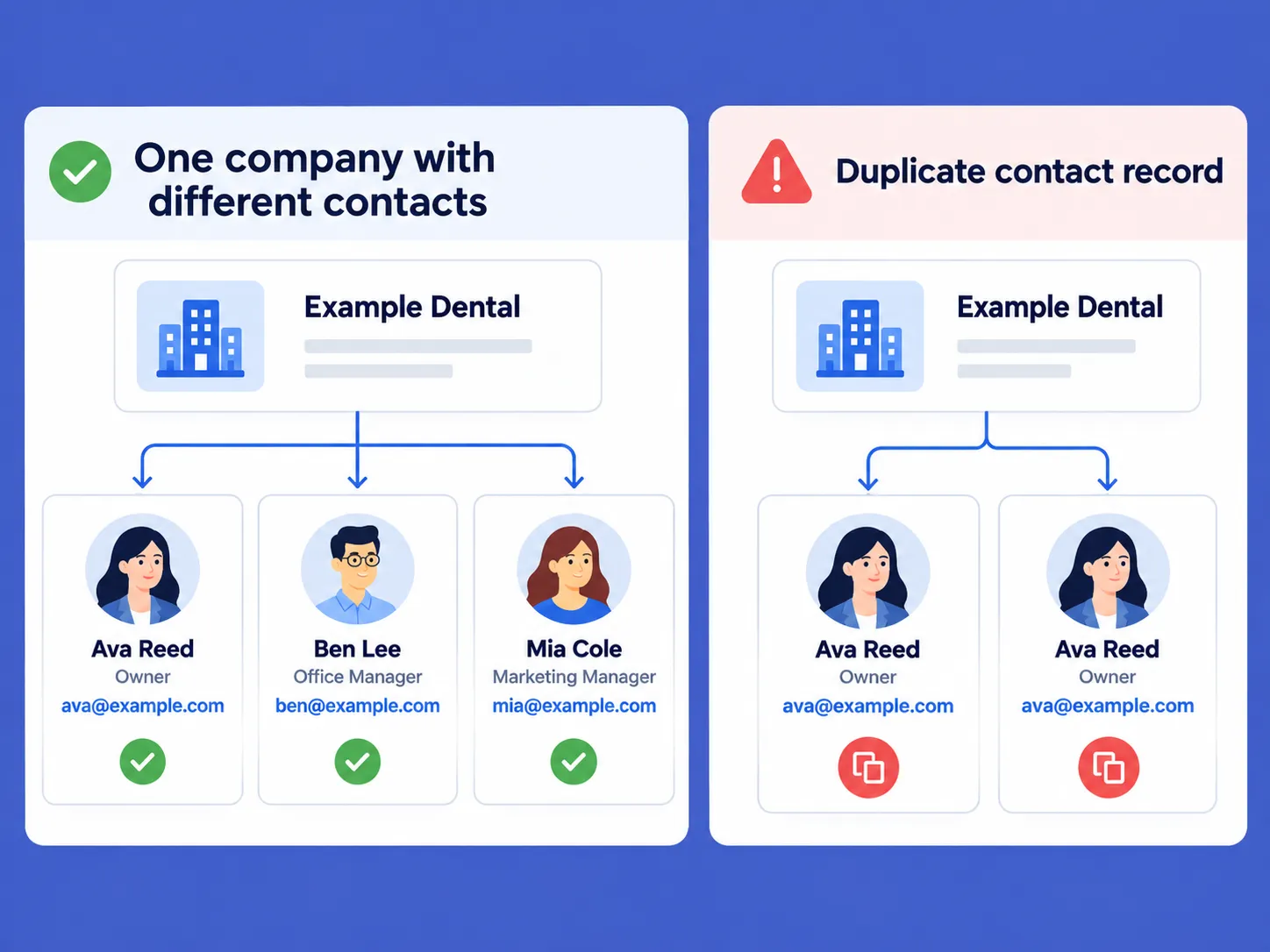
Three rows with the same company name can represent three different people. To decide whether anything should be removed, compare the contact details within those rows.
One Company With Different Contacts
Outscraper의 Leads & Contacts Enrichment can return several contacts associated with a company. The documented contact data includes fields such as names, job titles, email addresses, and social profiles, though not every contact has every field.
| 회사 | Contact name | Job title | Email address |
|---|---|---|---|
| Example Dental | Ava Reed | 소유자 | ava@example.com |
| Example Dental | Ben Lee | Office Manager | ben@example.com |
| Example Dental | Mia Cole | Marketing Manager | mia@example.com |
The company name repeats because each row lists a different person. Deleting rows by company name alone would remove two of these contacts.
The Same Contact Appearing More Than Once
If another row repeats Ava Reed’s name, company, email address, and all other details, it is a duplicate contact record. Check the full row before removing it.
Different email addresses can still belong to the same person. Compare names and any available profile details before treating them as separate contacts.
How Contacts per Company and Emails per Contact Work
Choose how many contacts you need from each business, then how many email addresses you need for each contact.
Contacts per Company: How Many Contacts You Request
Contacts per Company controls the number of contacts requested for each company. Outscraper’s API documentation lists a default of 3. Treat this as the requested limit, not a guarantee that every company will return three contacts.
Use this setting when you need fewer or more people from each business. It is separate from the email-address limit described below.
Emails per Contact: How Many Addresses You Request for Each Person
Emails per Contact controls the number of email addresses requested for each contact. The documented API default is 1. This limit applies to each person, not to the company as a whole.
For example, setting Contacts per Company to 3 그리고 Emails per Contact to 2 requests up to three contacts, with up to two email addresses each, where available. Increasing the email limit does not increase the number of people requested.
사용하다 Leads & Contacts Enrichment to add contact names, job titles, email addresses, and other available contact details to your business records.
How to Request One Contact per Company in Outscraper
When you only need one contact from each business, choose your contact preferences and set the limit before running your task. Check the email limit too, so you request only as many addresses as you need for that contact.
Open the Leads & Contacts Settings
If you are using the Google 지도 스크레이퍼, find Leads & Contacts under the enrichment services.
다음 버튼을 클릭하세요. gear icon on the Leads & Contacts card to open the settings inside the current Google Maps Scraper task.
You can also click the open-in-new-tab icon if you want to use the standalone Leads & Contacts page instead.
The two workflows use the same main contact controls, but the final action is different:
- Inside Google Maps Scraper, click Save after changing the Leads & Contacts settings.
- On the standalone Leads & Contacts page, review your inputs and click Find Leads & Contacts.
For a broader walkthrough of adding contact enrichment to Google Maps results, see How Outscraper’s Leads & Contacts Enrichment works.
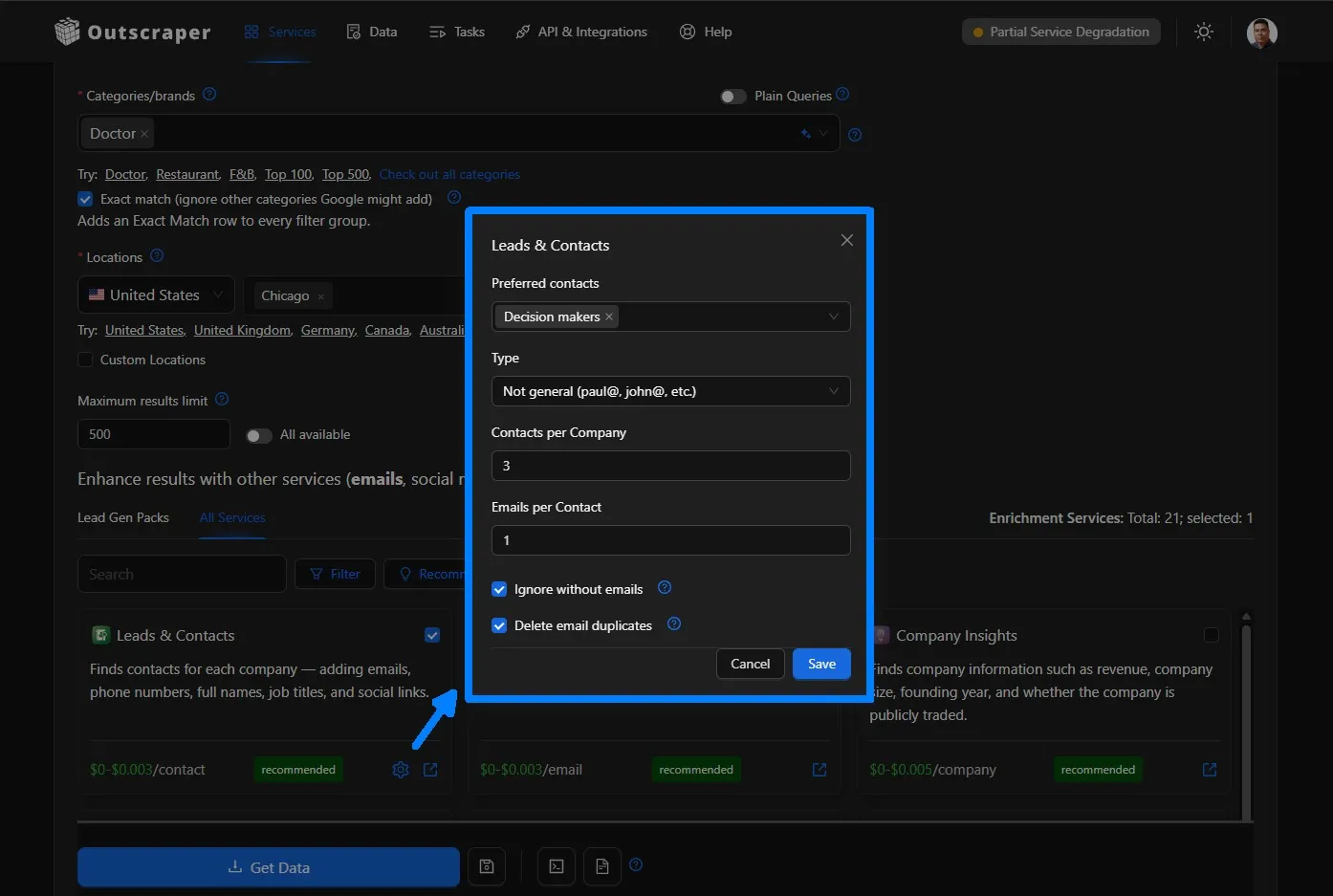
Choose Your Preferred Contacts and Email Type
Under Preferred Contacts, choose the role category that fits your task: Any, Decision Makers, Influencers, Procurement/Purchasing, Technical, Finance, Operations, Marketing, Sales, Maintenance, Human Resources, Legal and Compliance, Supply Chain/Logistics, or Education/Training.
Leave it at Any when you do not want to limit the contact role.
Under 유형, choose Any, 일반적인 for shared addresses such as info@ 또는 support@또는 Not generic for person-specific addresses such as paul@ 또는 john@.
These options help narrow the kind of contact or email address requested. They are separate from Contacts per Company 그리고 Emails per Contact, which control quantity.
Change Contacts per Company to 1
Find Contacts per Company and change the value to 1.
This requests one contact for each company instead of several. Outscraper’s API documentation lists a default value of 3, so changing it to 1 is useful when your final list only needs one contact per business.
The setting controls the requested contact limit. It does not mean that every company will return a contact if matching information is not available.
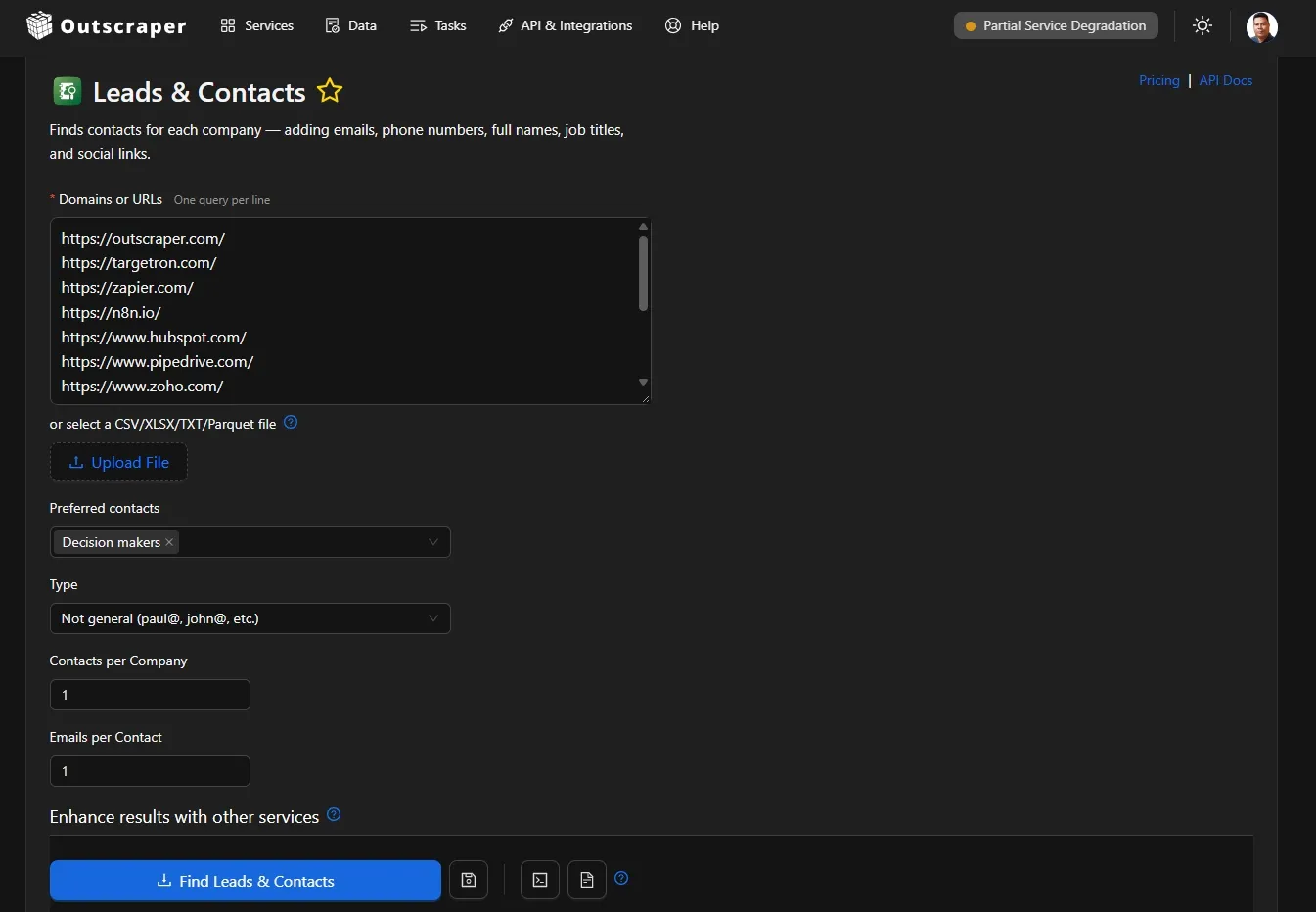
Choose the Email Limit for That Contact
Set Emails per Contact to the number of email addresses you want for each contact.
사용하다 1 when you only need one email address. Choose a higher number if you want more than one email address for the same contact.
For example, if Contacts per Company = 1 그리고 Emails per Contact = 1, Outscraper will request one contact and one email address for that contact, where available.
After reviewing the settings, click Save if you are using Leads & Contacts inside Google Maps Scraper. If you are using the standalone Leads & Contacts page, click Find Leads & Contacts.
Check Repeated Business Records Separately
Setting Contacts per Company to 1 limits the number of contacts requested for each company. It does not automatically remove repeated business or place records.
If the same company still appears more than once in the results, compare the business and contact details before removing anything.
Repeated business records, missing email records, and businesses sharing the same email are handled by separate settings. Those controls are covered in the next section.

사용하다 Leads & Contacts Enrichment to choose how many contacts and email addresses you want for each company before starting the enrichment.
How Outscraper Handles Duplicate and Missing Email Records
The duplicate and email filters solve different problems. Use them based on what you want to remove from the final results, rather than treating them as interchangeable settings.
중복 항목 제거
중복 항목 제거 is used to remove repeated business or place records from the results.
This is different from limiting how many contacts are requested for one company. A company can have several valid contacts without being a duplicate business.
Use this setting when the same business is returned more than once and you want Outscraper to remove repeated place records.
Ignore Without Emails
이메일 없이 무시하기 removes places where no email address was found.
According to the helper text in the web app, this option applies when 이메일 및 연락처 스크레이퍼 is selected as an enrichment service.
Use it when you only want records that contain at least one email address.
The helper text also includes a billing note for ignored records. Because the percentage shown in the interface should be confirmed before publishing, I recommend leaving that billing detail out of the article for now.
Delete Email Duplicates
Delete email duplicates removes places that have the same email address.
The helper text gives the example of one company having several locations that share the same email. In that case, the setting can remove place records with the repeated email address.
See the Google Maps Scraper getting-started guide for more details on these settings.
This is separate from Contacts per Company. One setting limits how many contacts are requested for each company, while the other removes place records based on a repeated email.
Which Setting Should You Use?
Use the setting that matches the problem in your results:
| If you want to... | 사용하다 |
|---|---|
| Request one contact per company | Contacts per Company = 1 |
| Limit email addresses for each contact | Emails per Contact |
| Remove repeated business or place records | 중복 항목 제거 |
| Remove places where no email was found | 이메일 없이 무시하기 |
| Remove places that share the same email address | Delete email duplicates |
These settings control different parts of the output. Check what is repeating before removing records so you do not delete contacts or businesses you still need.
Final Checklist for Multiple Contacts for the Same Company
Before removing repeated rows or changing your enrichment settings, check these five points:
- Compare the contact details to see whether the rows contain different people from the same company.
- Set Contacts per Company based on how many contacts you actually need from each business.
- Set Emails per Contact based on how many email addresses you need for each returned contact.
- Use duplicate and email filters carefully because Drop Duplicates, Ignore without emails, and Delete email duplicates solve different problems.
- Review the final results before deleting records so you do not remove useful contacts or separate business locations by mistake.
사용하다 Leads & Contacts to set how many contacts and email addresses you want from each company before running your task.
자주하는 질문
가장 자주 묻는 질문과 답변
Contacts per Company sets the maximum number of contacts requested for each company. It does not guarantee that every company will return that number.
If fewer matching contacts are available, the result can contain fewer contacts than the limit you selected.
예. Emails per Contact controls how many email addresses are requested for each contact. This setting is separate from Contacts per Company, which controls how many contacts are requested for each business.
Start with the settings under Leads & Contacts. Review Preferred Contacts, 유형, Contacts per Company및 Emails per Contact to make sure they match the contact data you are trying to find.
Keep in mind that these settings control what Outscraper requests. They do not guarantee that matching contact information will be available for every company.
Set Contacts per Company ~에 1 before running the task.
If you also want only one email address for that contact, set Emails per Contact ~에 1.
These settings control how many contacts and email addresses are requested. They do not automatically remove duplicate business records.
No. Outscraper documents 중복 항목 제거 as removing the same organizations returned by different queries within one task or request. If related searches are run as separate tasks, the same business can still appear in more than one result file.