Das Inhaltsverzeichnis
Most CRM databases are incomplete. In fact, up to 91% of contact records are missing key information, and about 22% of B2B contact data decays each year. These gaps mean your team often spends hours checking in outdated emails, phone numbers, or company details that could result in leads being missed.
Incomplete records also reduce sales. Companies with outdated data can lose 12-15% of potential revenue each year.
Contacts and leads enrichment solves this problem. It adds missing information and updates old records so your team can contact the right people and verwenden. every lead effectively.
What Contacts and Leads Enrichment Means
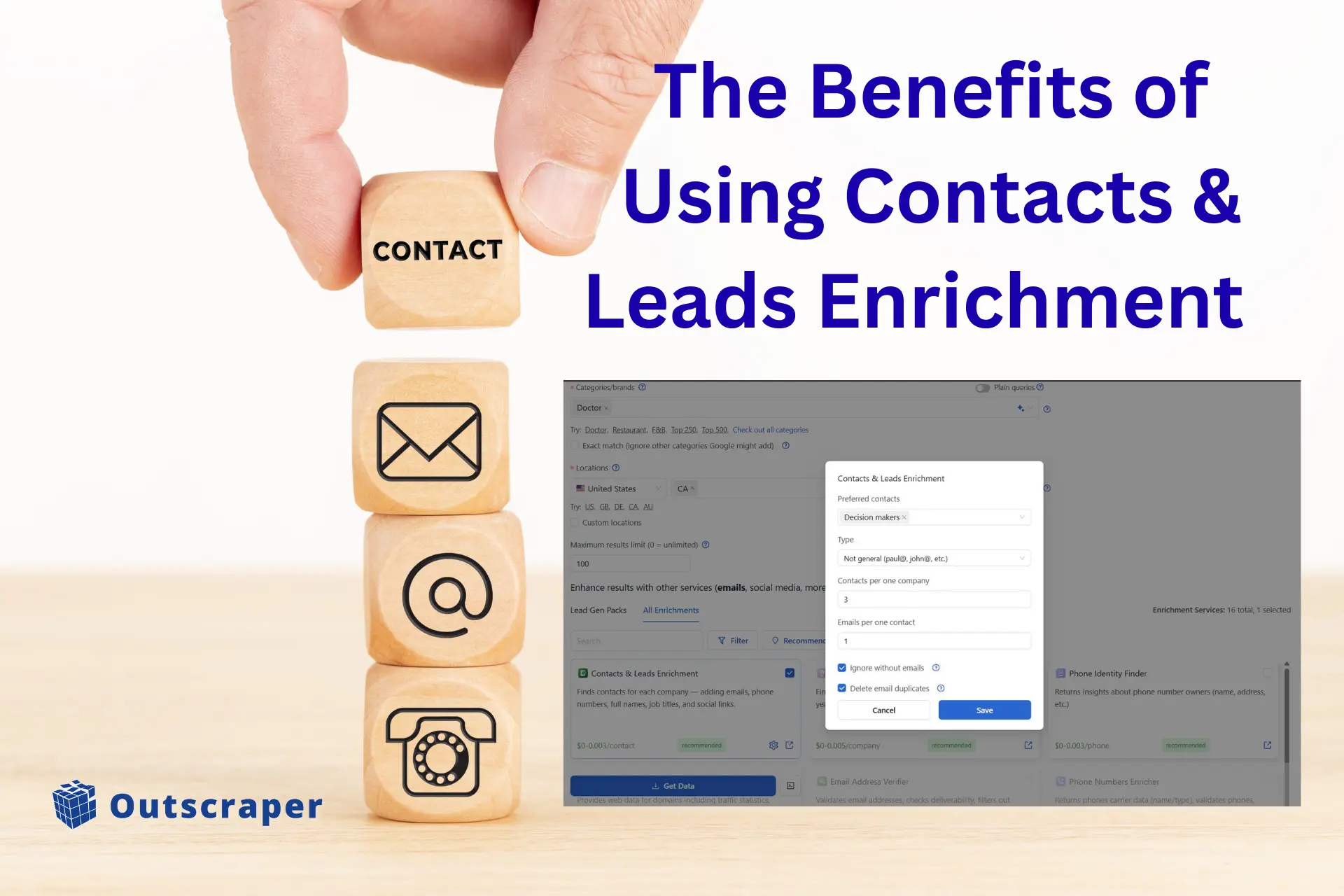
Contact enrichment improves individual records by adding missing details such as email addresses, phone numbers, and social profiles. This helps your team contact people without spending time searching for information.
Lead enrichment improves company records. It adds details like:
- Firmographics: industry, company size, and location
- Technographics: tools or software a company uses
- Intent data: signs that a company is interested in a product or service
These updates give your team a clearer picture of each lead and make outreach more effective.
Quick Takeaways:
Lead enrichment makes company records complete and ready for sales or marketing actions.
Contact enrichment ensures individual records have all the information needed to connect successfully.
This guide explains what enrichment is, why it matters, and how Outscraper helps teams strengthen their data quality at scale. You can also visit our comprehensive guide for the full list of Outscraper’s enrichment tools.
Testen Sie Outscraper kostenlos mit einem monatlich erneuerbaren Free Tier.
Why Contacts & Leads Enrichment Matters
Accurate and complete data is the foundation of successful sales and marketing. Without it, teams spend time following up with outdated contacts and missing opportunities. Contact and lead enrichment updates records, fills missing details, and makes outreach and campaigns more effective.
Better Data means More Accurate Outreach
Enrichment fills missing details and updates old records, allowing your team to reach the right people at the right time. Accurate data reduces wasted effort and improves reply rates.
Improved Segmentation and Scoring
With enriched contact and lead information, teams can segment leads by industry, location, or role, and rank them based on fit and intent. This ensures outreach focuses on leads most likely to respond.
More Targeted, Personalized Campaigns
Enriched data allows personalized messages using up-to-date contact and company information. This improves campaign performance and helps sales teams engage more effectively.
Practical Use Cases: Contacts & Leads Enrichment for B2B Teams
B2B teams work with data from many sources. Over time, these lists become incomplete or outdated. Enrichment services for Google Maps scraper helps turn scattered and partial records into a usable profile that supports sales and marketing work.
Filling Missing Details from Old CRM Records
Old CRM data often has empty or outdated fields. Enrichment fixes these gaps by updating emails, phone numbers, roles, and company details. This improves overall data quality and gives teams a clearer view of their contacts.
Enriching Leads Collected from Forms
Many sign-up forms collect only basic information. Enrichment turns these thin entries into full profiles by adding company details, job roles, and business context. This makes it easier to qualify leads before passing them to sales.
Enhancing Lists from Google Maps and Web Scraping
Scraped lists often include only names, business names, or addresses. Enrichment adds emails, phone numbers, and company insights so the data becomes usable for direct outreach and follow-up.
Building Custom Audiences for Marketing
Cleaner data makes it easier to group leads by role, industry, or location. This supports better segmentation for ads and email campaigns and helps teams reach the right audience with relevant messages.
Testen Sie Outscraper kostenlos mit einem monatlich erneuerbaren Free Tier.
How Outscraper Contacts and Leads Enrichment Works
Outscraper’s business data and enrichment platform enriches contact and lead records in a few simple steps. The process is automated, so teams can update and expand their databases without spending time on manual research. Businesses will experience real-time intelligence from Google Maps and 50+ sources by enriching their leads with contacts, reviews, and company insights.
Using Outscraper’s enrichment tool is simple. Here’s the quick process:
Step 1: Login and Choose Your Target
When using the Google Maps-Scraper, select the business category and location you want to enrich. If you want maximum results, leave the limits field blank.
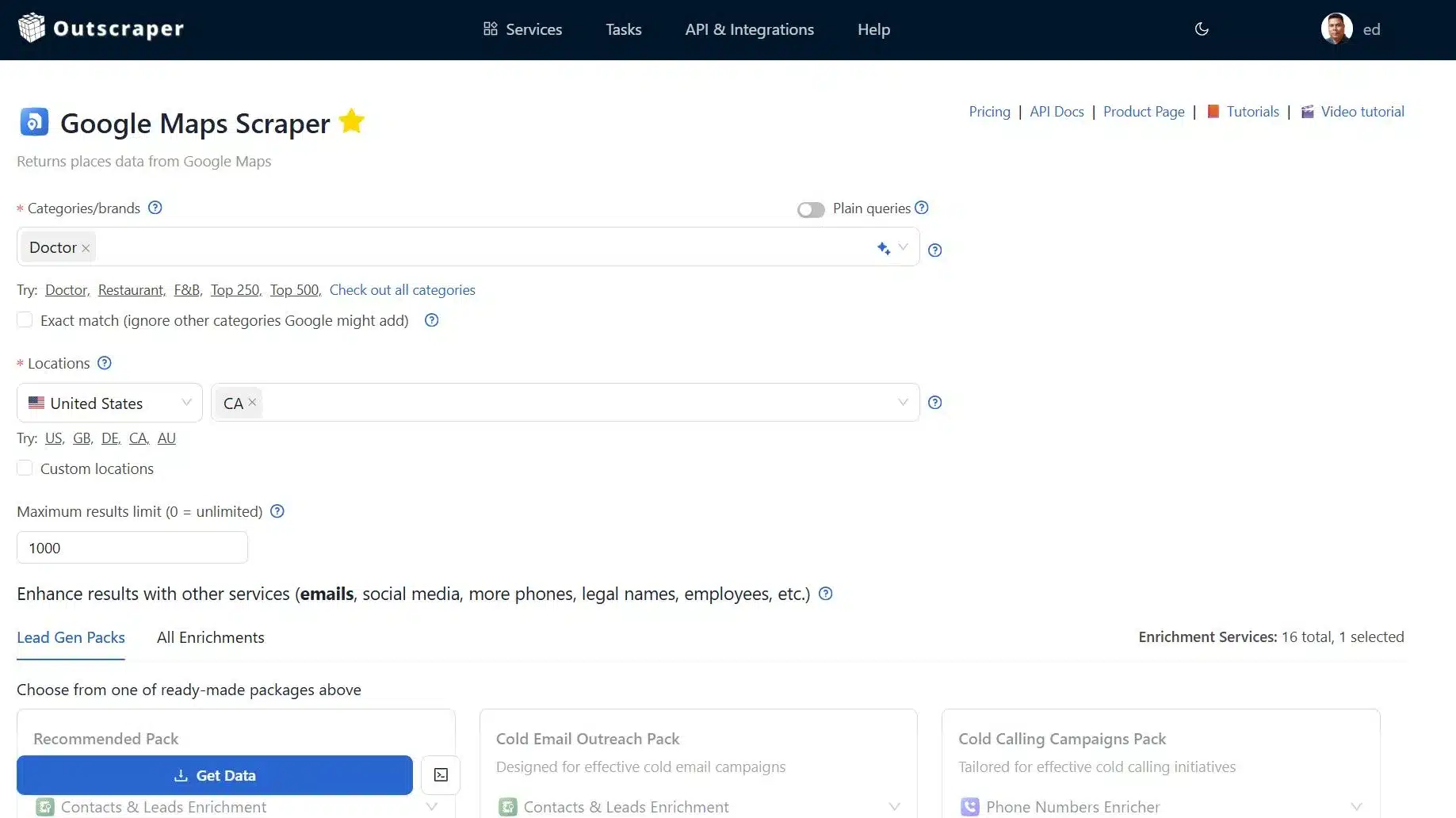
Inside Google Maps Scraper by Outscraper
Step 2: Set your Contacts & Leads Enrichment Filters
This is where you define the type of people and emails you want, such as preferred contact roles and the email filters. You can also check he “Ignore without emails” and “Delete duplicate emails” options.
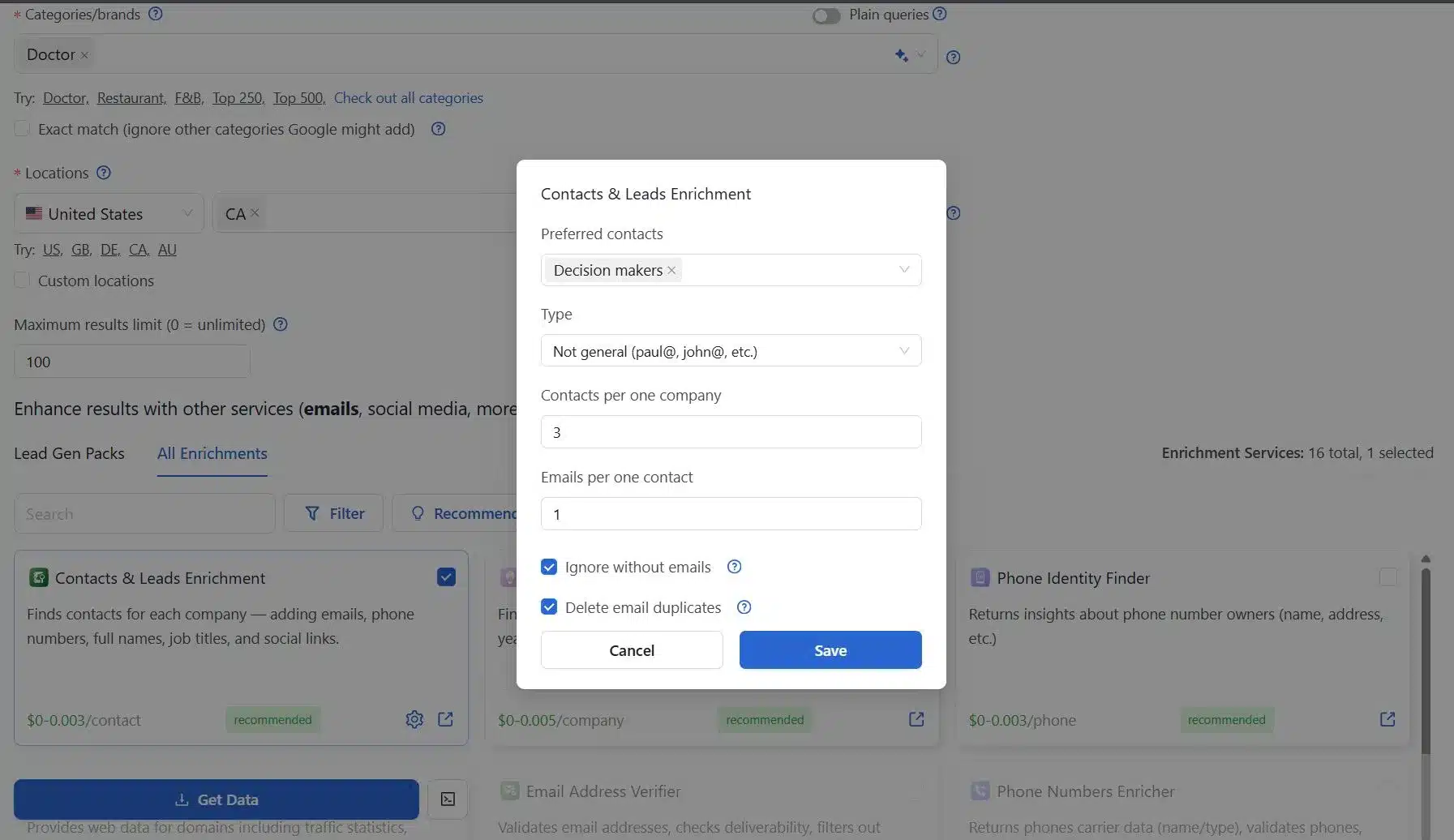
Contacts & Leads Enrichment Options
Step 3: Choose Additional Enrichment Options
You can apply this if you need it, but for now, we will be focusing on Contacts & Leads enrichment.
Step 4: Save Your Settings
After selecting all the parameters for the specific enrichment, click Save.
Step 5: Advanced Filters Options
You can also include additional filters from the advanced parameters if you wish, but this quick guide focuses on the main Contacts & leads Enrichment settings.
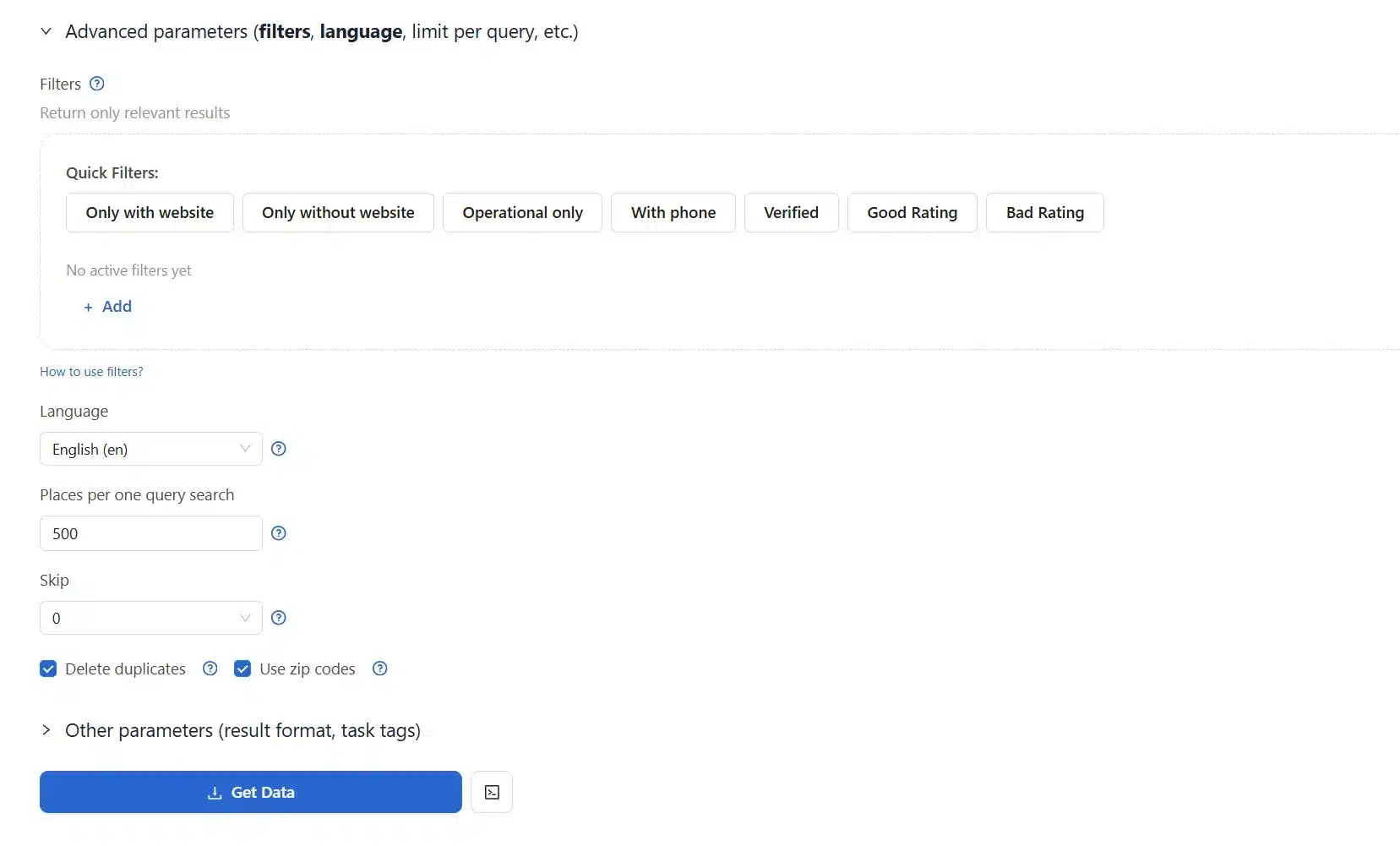
Advanced Filters to Choose From Outscraper
Step 6: Download your enriched data
You can now start the enrichment process and download the results once ready.
Key Benefits of Using Contacts & Leads Enrichment
Contact & Leads enrichment works best when it directly improves how your team finds, sorts, and speaks to leads. Outscraper adds missing details to your records so you can focus on the strongest prospects, personalize your messages, and shorten the time it takes to move someone from first touch to reply.
The points below highlight the main gains teams see once their data becomes more complete:
Better Lead Generation
More complete records make it easier to spot high-value leads. Outscraper adds job titles, company information, and other missing details so your team can rank leads based on fit and interest.
More Accurate Personalization
Personalized outreach depends on knowing who you are writing to, or who your target customer based on your ICP. With enriched roles, company details, and background information, your team can send messages that feel direct and relevant.
Less Time Wasted on Weak Leads
Clean data helps staff avoid leads that are not a good match. When records are enriched, your team can identify weak accounts early and focus on the ones that show the most promise.
Higher Conversion Rates
When messages reflect a lead’s situation and company profile, the conversion moves faster. Enriched records help reduce friction and support stronger conversion rates.
Testen Sie Outscraper kostenlos mit einem monatlich erneuerbaren Free Tier.
Who Benefits from Contacts & Leads Enrichment
Outscraper enrichment fits teams and professionals who work with lead and contact data every day. It supports anyone who needs clean, complete, and usable records to drive outreach and campaigns.
The following groups see the most value:
Sales Development Representavies (SDRs)
SDRs spend a lot of time reaching out to prospects. Enriched data helps them contact the right people with up-to-date emails, phone numbers, and roles, reducing wasted effort.
Lead Researchers
Teams responsible for building lead lists can enrich incomplete records, verifying emails, titles, and company details. This ensures that every lead in the database is usable.
Growth Teams
Growth teams rely on clean, high-quality data for segmentation, personalization, and multi-channel campaigns and measure results. Enriched records help them target the right audience at the right time and reduce wasted spend.
Agencies That Build Prospect Lists
Agencies that deliver prospect lists to clients need accurate and complete information. Enrichment improves list quality and helps agencies deliver better results to their clients.
Marketers Who Need Better Segmentation
Marketers depend on clean data to group leads by role, industry, and location. Enriched records make segmentation more precise and improve campaign performance.
Teams Looking to Improve CRM Hygiene
Any organization with outdated or partial contact data can benefit. Enrichment updates old records, fills missing details, and ensures teams have reliable information for outreach. By using Outscraper, you can enhance your CRM with automated company data enrichment.
Why Data Quality Decides Outcomes
Most teams deal with the same hidden issue in their CRM. Records often look complete but still contain missing or outdated details once outreach begins. This slows follow-ups, weakens targeting, and reduces the return on time spent by sales and marketing teams.
Contact and lead enrichment improves the quality of your data. It turns partial records into usable profiles, adds direct contact details, and provides clearer signals about who to target. With stronger company and contact data, teams plan outreach with more confidence.
Outscraper’s Business Data & Enrichment Platform makes this process practical at scale. Instead of manually checking every record, teams can refresh and expand their data in a structured way. This leads to cleaner lists, better segmentation, and more consistent outreach.
When data quality improves, the entire funnel works better. Sales teams focus on qualified accounts, marketing campaigns reach more relevant audiences, and revenue operations spend less time fixing records and more time supporting growth.
FAQ
Häufigste Fragen und Antworten
Contacts and leads enrichment adds missing outdated details to your existing data. This includes direct emails, phone numbers, job titles, company size, industry, locations, social profiles, and technology signals. Instead of working with partial records, your teams gets complete profiles they can use for targeting, personalization, and faster follow-ups.
Contact enrichment focuses on people. It adds personal details such as professional emails, phone numbers, job titles, and social profiles. Lead enrichment focuses on companies. It adds company-level data such as industry, employee size, technologies uses, business locations, and intent signals. With Outscraper, we combined them. Together, they give you both sides of the buying picture: who to contact and what business looks like.
No. Outscraper works for solo founders, small agencies, startups, and large sales teams. You can enrich small lists or process large files depending on your needs. This makes it useful if you are just starting to build lists, or already managing thousands of records.
Yes. You can enrich data collected from Google Maps scraping, website scrapers, or other lead sources. Outscraper accepts partial inputs like business names, domains, or emails and then fills missing fields such as contact details, company profiles, and online presence. It will enrich and turn your incomplete CRM into your most valuable resource.
You should run data enrichment regularly to keep your CRM accurate. A practical approach is:
- Every 30 to 60 days for active sales lists
- Every 90 days for marketing databases
- Immediately before major campaigns or outbound sprints
This keeps your data fresh and reduces wasted outreach.