İçindekiler
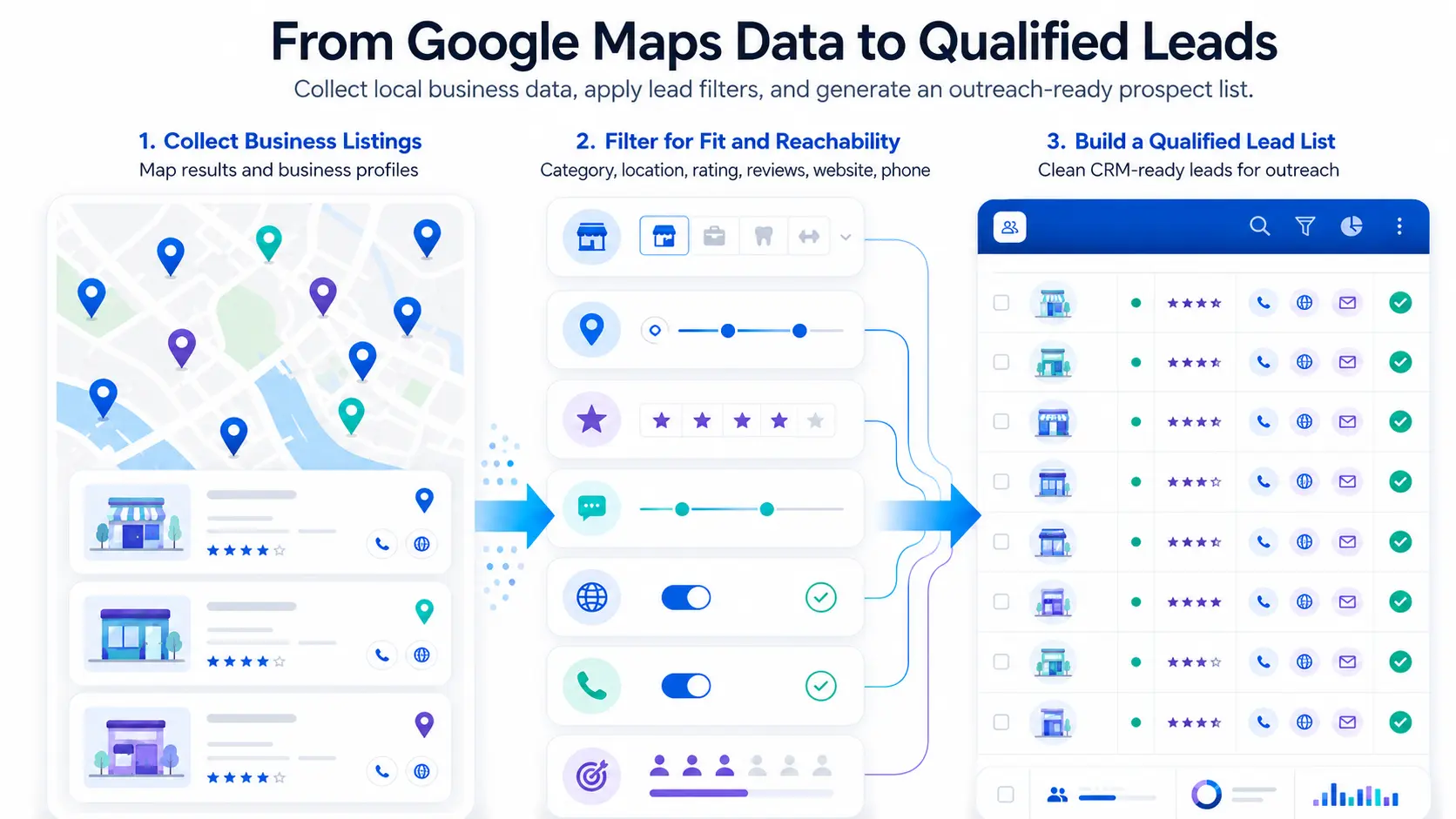
You can use Google Maps data to find high-intent local business leads by searching for a specific category and location, then filtering businesses by website status, rating, review count, profile completeness, phone availability, and market fit.
This helps solve a common outreach problem: large contact lists often look useful, but many include weak-fit businesses, missing details, or prospects with no clear reason to respond.
For sales teams, marketing agencies, local SEO teams, SaaS companies, and consultants, better targeting can save time before the first email or call.
Google Maps includes information on over 250 million businesses and points of interest, but the real value comes from using the right signals to find businesses that match your offer.
With the right filters, Google Maps data turns a broad contact list into a more focused outreach list based on fit, demand, and visible business gaps. For the full Google Maps lead generation workflow, see Outscraper’s guide to turning Google Maps data into quality leads.
Quick answer: To qualify high-intent local business leads with Google Maps data:
- Search by business category and location.
- Collect public details such as website, phone, rating, reviews, address, and business status.
- Filter businesses by website status, review count, rating, profile completeness, and market fit.
- Prioritize leads with active demand, visible gaps, and enough context for personalized outreach.
Why Google Maps Data Is Useful for Lead Qualification
Lead qualification should start before outreach. If your team waits until after sending emails or making calls to check whether a business is a good fit, you may waste time on prospects that were never likely to respond.
Google Maps data helps by showing public business signals before you contact anyone. You can check whether a business matches your target category, serves the right location, has an active local presence, and shows signs that your offer may be relevant.
It Shows Real Businesses by Category, Location, and Service Area
Google Maps organizes businesses by category and location, which makes local lead research more focused. A marketing agency can search for dental clinics in Austin, roofing companies in Phoenix, or restaurants in Chicago. A SaaS company selling booking software can look for salons, clinics, or home service businesses in specific cities.
This helps teams avoid one common outreach mistake: contacting businesses that do not match the target market.
It Includes Public Business Signals
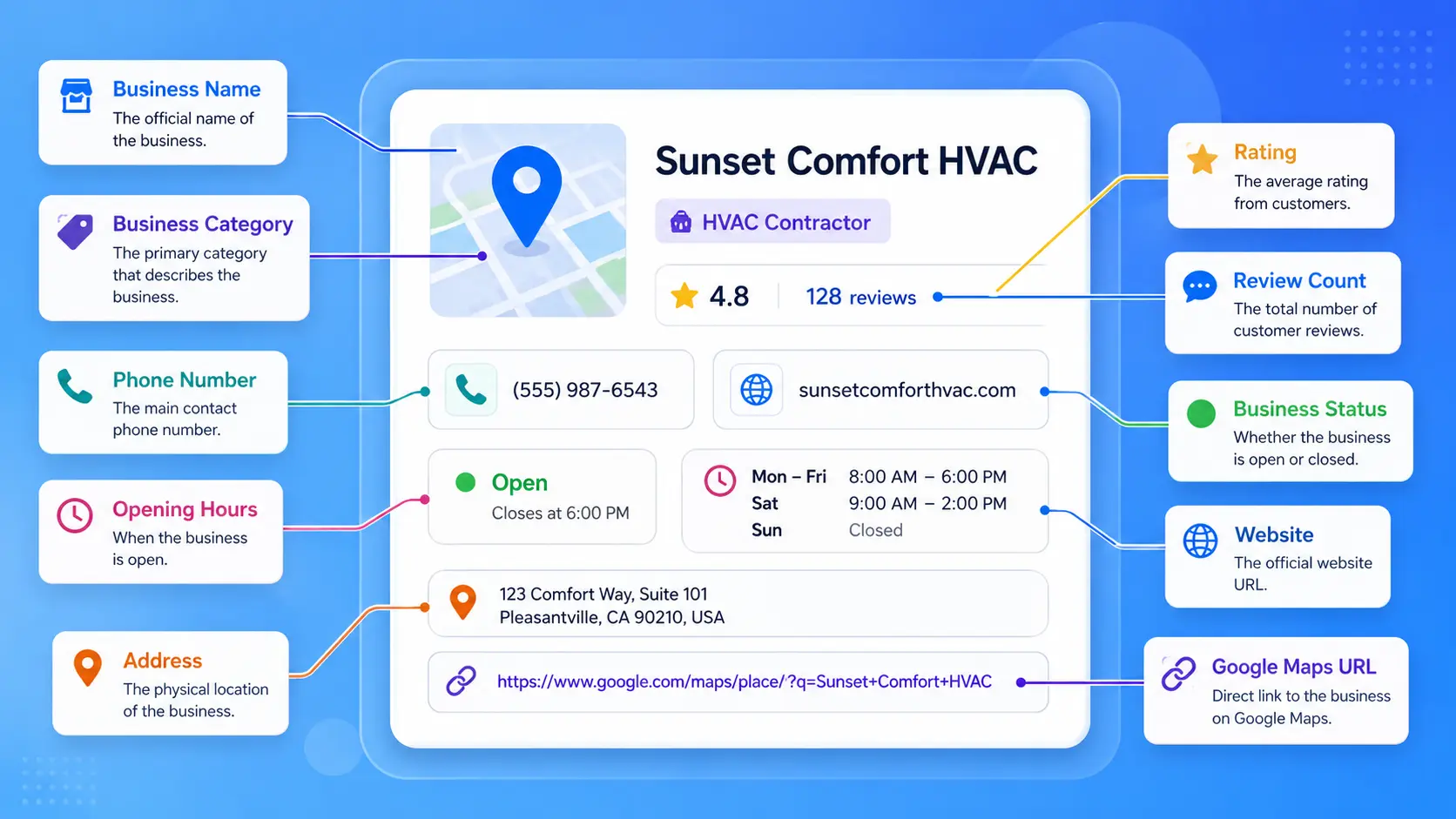
A Google Maps listing can include useful details such as business name, category, address, phone number, website, rating, review count, opening hours, photos, Google Maps URL, and business status.
Tools like Google Haritalar Veri Kazıyıcı can help collect these fields by category and location instead of copying them one by one.
These fields help you see whether a business is active, reachable, and relevant. They can also reveal gaps, such as no website, a weak profile, low rating, or missing contact details.
Google Maps includes over 250 million businesses and points of interest, but a large source does not automatically create a good outreach list. The useful part is the filterable data: category, location, rating, review count, website status, phone number, opening hours, and business status. These fields help teams remove weak-fit businesses before they spend time on outreach.
It Helps Teams Filter Prospects Before Outreach
Google Maps data helps teams narrow their list before sending a message. A sales team can remove businesses outside the target location. A marketing agency can focus on companies with weak online presence. A reputation management consultant can prioritize businesses with many reviews and low ratings.
This makes the outreach list smaller but stronger.
Qualification narrows the market, but the file still needs a final check. Use this guide to prepare your prospect list for cold outreach by standardizing fields, handling duplicates, checking contact data, and assigning a final status.
The goal is not to contact every business in a city. The goal is to find businesses that match your target market, show enough public context, and have a clear reason for outreach.
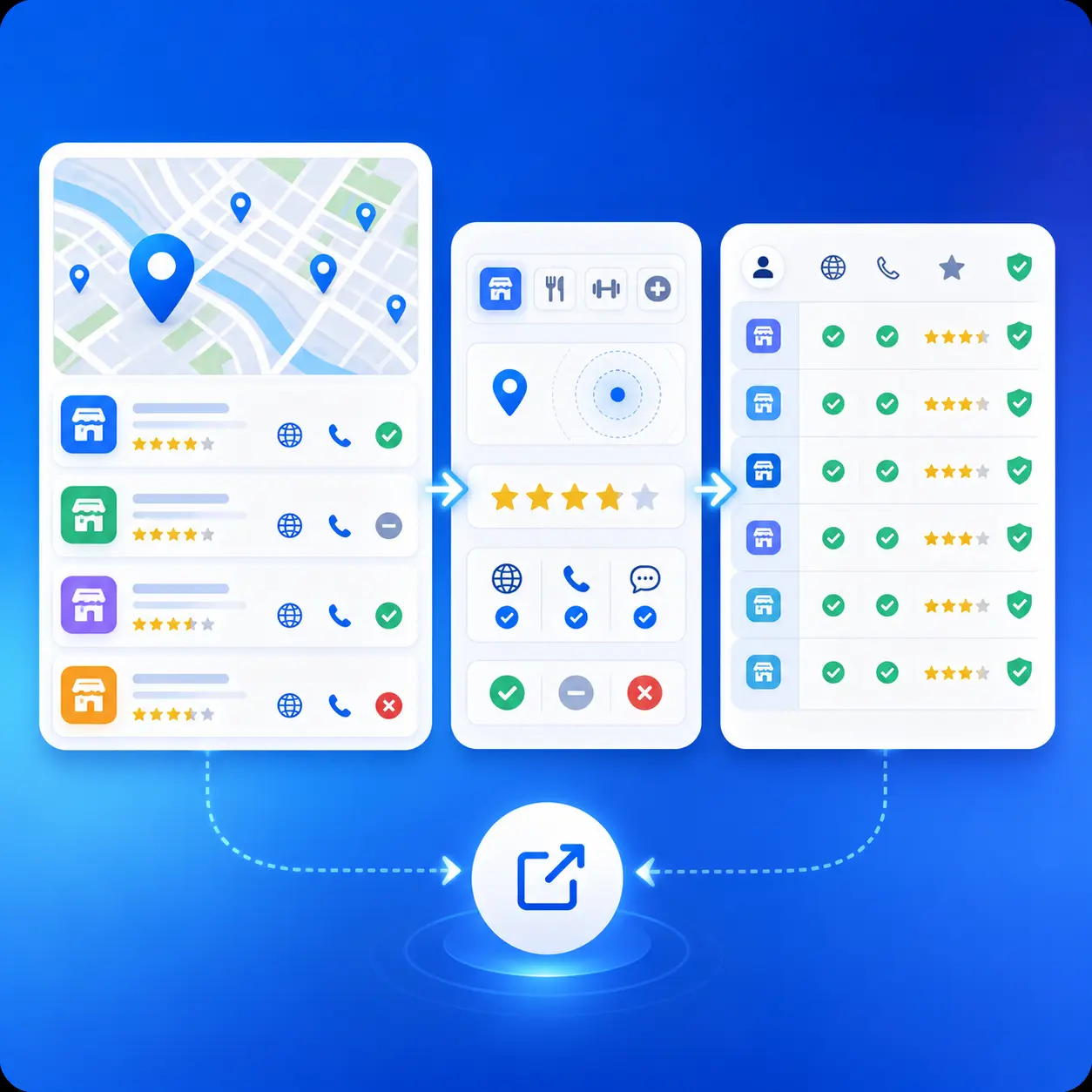
Export local business data by category, location, ratings, reviews, and other details to qualify leads before outreach.
What Makes High-Intent Local Business Leads Different?
A high-intent local business lead is a business that matches your target market and shows public signs that your offer may be relevant.
This does not always mean the business is ready to buy today. It means the business is easier to qualify because there is enough public data to understand its category, location, activity, and possible needs before outreach.
The Business Matches Your Target Category
Category fit is the first sign of a qualified lead. A business may be active and easy to contact, but it is still a poor lead if it does not match the type of customer you serve.
For example, a dental marketing agency should focus on dental clinics, orthodontists, or cosmetic dentists. A home services software company may focus on roofing companies, plumbers, HVAC contractors, or cleaning services.
The Business Is Located in Your Target Market
Location fit matters because many local products and services are tied to a specific city, region, or service area.
A lead may look useful on paper, but if it is outside your target territory, it may not be worth contacting. Google Maps data helps you filter businesses by city, neighborhood, state, country, radius, or service area.
The Business Shows Signs of Active Customer Demand
A business with regular reviews, visible opening hours, photos, and an active profile is easier to assess than a listing with very little public data.
Review count, rating, and recent customer activity can help show whether the business has ongoing demand. This is useful for sales teams, agencies, and consultants that want to prioritize businesses with active local customers.
The Business Has Visible Gaps in Its Online Presence
Some businesses show clear signs that they may need help.
A business may have no website, a low rating, weak profile details, few photos, limited service information, or outdated contact data. These gaps can help shape the outreach angle.
For example, a business with no website may be a fit for web design, booking software, SEO, or lead generation services. A business with many reviews but a low rating may be a fit for reputation management or customer experience support.
The Business Has Enough Public Data for Personalized Outreach
High-intent leads are easier to contact when you have enough context to write a specific message.
Google Maps data can help you mention the business category, location, review pattern, website status, or profile gap. This helps your outreach feel more relevant than a generic message sent to every business in the list.
Google Maps Signals That Can Help You Find Better Leads
Google Maps data becomes more useful when you know which signals to check. These signals help you find businesses with active demand, visible gaps, or a clear reason for outreach.
The goal is not to judge a business from one field alone. A stronger lead usually comes from a mix of signals, such as category fit, location fit, review activity, website status, and profile quality.
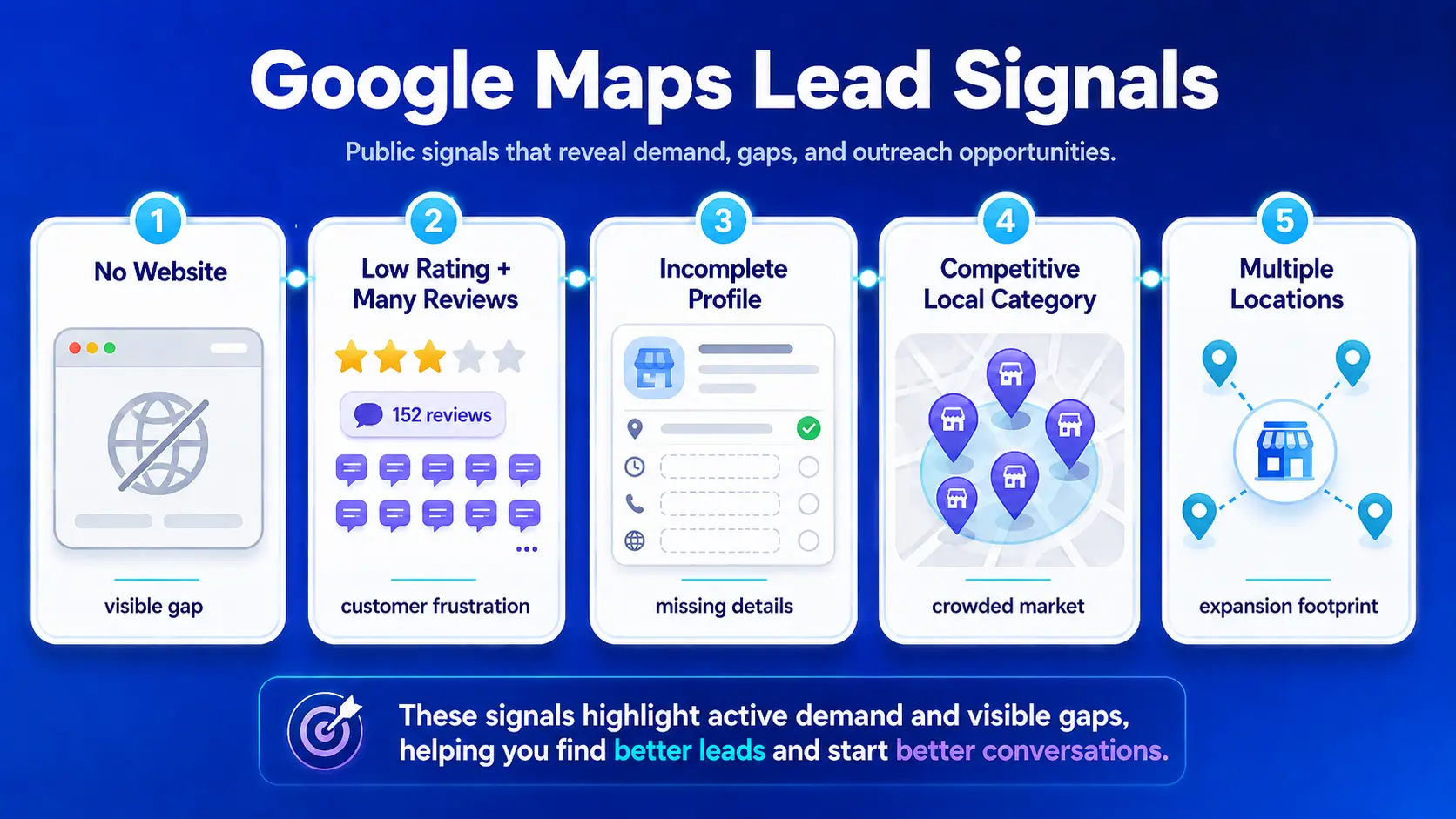
Businesses Without Websites
Businesses without websites can be strong prospects for web design, local SEO, booking software, lead generation, or digital marketing services.
This signal matters because a missing website can limit how customers find, compare, and contact the business outside Google Maps. For some local businesses, the Google Business Profile becomes their main online presence. That creates a clear outreach angle if your service helps them build a stronger website, capture more leads, or improve their local visibility.
Example outreach angle:
A local roofing company has many reviews and a public phone number, but no website. That business already shows customer demand, but its online presence is limited. A web design or local SEO provider can use that signal to write a more specific message.
Businesses With Low Ratings but High Review Volume
A low rating with many reviews can point to a business with active demand but possible customer experience issues.
This is different from a business with one bad review. A company with hundreds of reviews and a weak rating has enough customer feedback to show a pattern. That pattern can help reputation management teams, consultants, customer experience platforms, and local SEO agencies find a more relevant outreach angle.
For deeper review analysis, teams can export Google Maps reviews and compare rating patterns, complaint themes, and review volume across locations.
For example, a dental clinic with 250 reviews and a 3.6 rating has demand, but the review pattern can show problems with service, wait times, communication, or customer follow-up. That creates a clearer reason to contact the business than a generic pitch.
Businesses With Many Reviews
A high review count can show that a business receives steady customer activity. This is useful because active businesses are often easier to qualify than listings with little public data.
Many reviews can also help you understand the business faster. You can check what customers mention often, what they like, what they complain about, and whether the business responds to feedback.
For sales and marketing teams, high review volume can help prioritize leads that already have local demand. These businesses often have more data to support a specific outreach message.
Businesses With Incomplete Google Business Profiles
An incomplete Google Business Profile can show missed local visibility opportunities.
Common gaps include:
- Missing website
- Missing phone number
- Weak business description
- Few photos
- Limited service details
- Missing opening hours
- Outdated business information
These gaps matter because many customers use Google Maps to decide which local business to contact. If a profile has missing or weak details, the business can lose trust before a customer visits the website or makes a call.
This signal is useful for local SEO agencies, marketing teams, consultants, and software companies that help businesses improve their online presence.
Businesses in Competitive Local Categories
Some local categories are more competitive because customers compare several businesses before choosing one.
Examples include:
- Dentists
- Lawyers
- Restaurants
- Home service companies
- Auto repair shops
- Real estate agencies
- Medical clinics
In these categories, small gaps can matter. A missing website, low rating, weak profile, or poor review response can affect how a business appears beside local competitors.
For outreach, this gives you a stronger angle. You are not only saying, “We can help your business.” You are pointing to a visible issue that affects how the business competes in its local area.
Businesses Expanding Across Multiple Locations
A business with more than one location can show growth. Multi-location businesses often need better systems for local SEO, review tracking, data management, reporting, marketing, or customer communication.
For example, a restaurant group with five locations needs consistent profiles, accurate opening hours, updated phone numbers, review monitoring, and clear location data. A clinic group, franchise, or service company with several branches has similar needs.
This signal is useful because multi-location businesses often have more data to manage and more reasons to care about consistency across locations.
Outscraper can help you enrich business websites with emails, phone numbers, and social profiles.
How to Build and Score a More Qualified Outreach List
After you identify useful Google Maps signals, the next step is to turn them into a repeatable lead qualification process. This helps your team avoid random outreach and focus on businesses that match your target market.
If your team needs this data for wider market coverage, you can also build a local business database from Google Maps before scoring and segmenting the list.
Step 1: Choose a Specific Category and Location
Start with one business category and one target area.
A broad search like “businesses in California” will create a messy list. A focused search like “roofing companies in San Diego” or “dental clinics in Austin” is easier to filter, segment, and use for outreach.
This step matters because category and location are the foundation of lead fit. If a business does not match your offer or target area, the rest of the data will not matter much.
Step 2: Collect the Right Business Data
Once you choose a category and location, collect the fields that help you qualify each business.
Useful fields include:
- Business name
- Category
- Adres
- Phone number
- İnternet sitesi
- Değerlendirme (Rating)
- Review count
- Opening hours
- Google Maps URL
- Email, when available
These details help you check whether the business is active, reachable, and relevant to your offer.
Step 3: Apply Lead Filters
After collecting the data, filter the list based on your offer and target customer.
For example, you may prioritize businesses that:
- Have no website
- Have a low rating
- Have many reviews
- Have missing profile details
- Have multiple locations
- Match your target category and location
The right filters depend on what you sell. A web design agency may focus on businesses without websites. A reputation management company may focus on businesses with many reviews and low ratings. A SaaS company may focus on businesses in categories that need booking, forms, or customer communication.
Step 4: Segment the List
Segmentation helps you avoid sending the same message to every business.
You can segment the list by:
- Industry
- City
- Değerlendirme (Rating)
- Review count
- Website status
- Business size or number of locations
For example, businesses without websites should receive a different message from businesses with low ratings. Multi-location businesses may need a different angle than single-location businesses.
Step 5: Add Context for Outreach
Before sending outreach, add a short note explaining why each business is a fit.
This can include:
- The business category
- The city or service area
- A missing website
- A low rating
- A high review count
- An incomplete profile
- A multi-location signal
This context helps your message sound specific instead of generic. It also helps your sales or marketing team understand why the business is on the list.
Simple Google Maps Lead Scoring Matrix
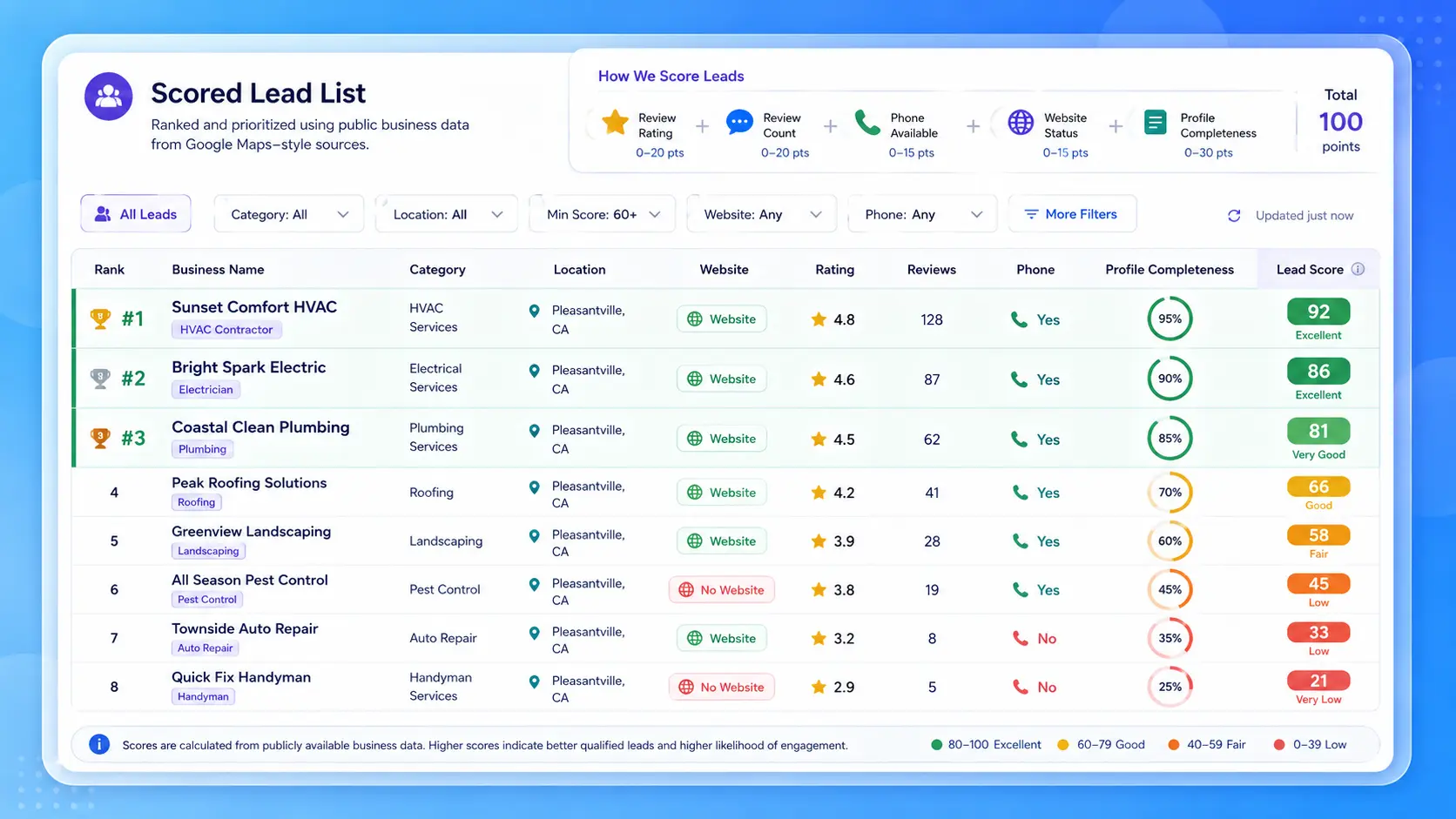
A scoring matrix makes qualification easier because your team can use the same rules for every list.
| Lead Signal | Example | Suggested Score |
|---|---|---|
| Matches target category | Dental clinic, law firm, roofing company | +3 |
| Located in target market | City, region, or service area | +3 |
| Has many reviews | 50+ reviews | +2 |
| Has low rating but high review volume | 3.5 rating with 200 reviews | +3 |
| Has no website | Missing website field | +3 |
| Has incomplete profile | Missing photos, weak details, limited service info | +2 |
| Has phone number | Public phone number listed | +2 |
| Has email after enrichment | Contact email found from website | +3 |
| Has multiple locations | 2 or more branches | +2 |
This does not need to be complicated. The goal is to create a simple way to rank leads before outreach. Businesses with stronger fit, clearer demand, and more visible gaps should move to the top of the list.
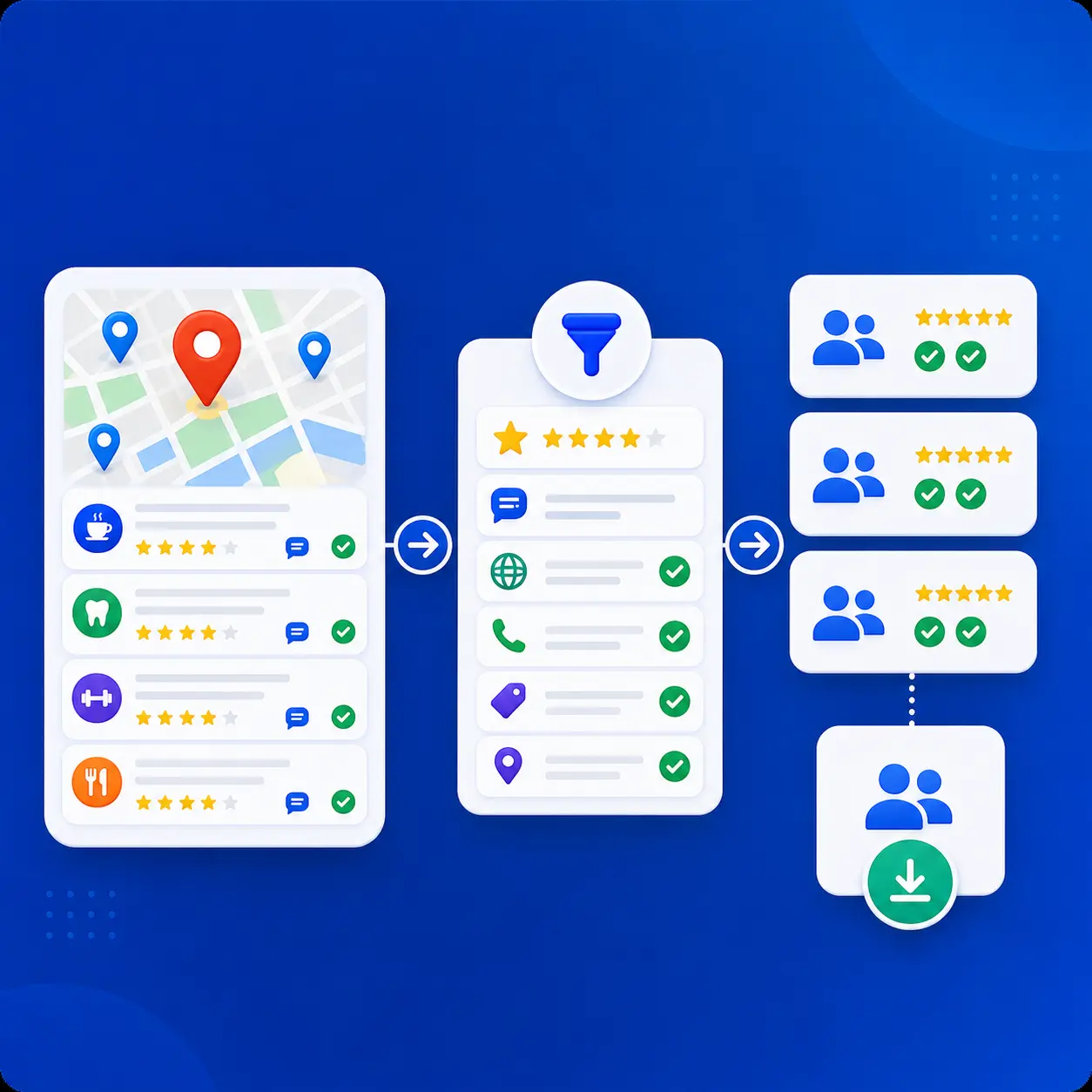
Use Outscraper’s Google Maps API to return local business data from search queries and send qualified leads into your app, CRM, or workflow.
How to Turn Google Maps Data Into Better Outreach
Google Maps data becomes more useful when it shapes the message you send. After you filter and score the list, use the business signals to decide what to say and who to contact first.
A business with no website, a low rating, strong review volume, or multiple locations should not receive the same message as every other lead. Each signal points to a different outreach angle.
Personalize Based on Business Signals
Personalized outreach does not need to be long. It only needs to show that you understand why the business may be a fit.
Useful signals include:
- No website
- Low rating
- Strong review volume
- Incomplete profile
- Local competition
- Category-specific needs
- Multiple locations
For example, a roofing company with many reviews but no website may be a fit for website, SEO, or lead generation services. A restaurant with many reviews but a low rating may be a fit for reputation management or review tracking.
Create Different Outreach Angles
Different signals should lead to different messages.
Common outreach angles include:
- Website improvement
- Local SEO
- İtibar yönetimi
- Lead generation
- Data enrichment
- Competitor research
- Review monitoring
- Multi-location profile management
This helps your team avoid sending the same pitch to every business in the list.
Prioritize Leads Before Sending Emails
After scoring and segmenting your list, contact the strongest leads first.
A simple priority order can look like this:
- Best-fit businesses with clear outreach opportunities
- Good-fit businesses with useful but weaker signals
- Low-fit or incomplete records that need more checking
This helps your team spend more time on prospects that are easier to qualify.
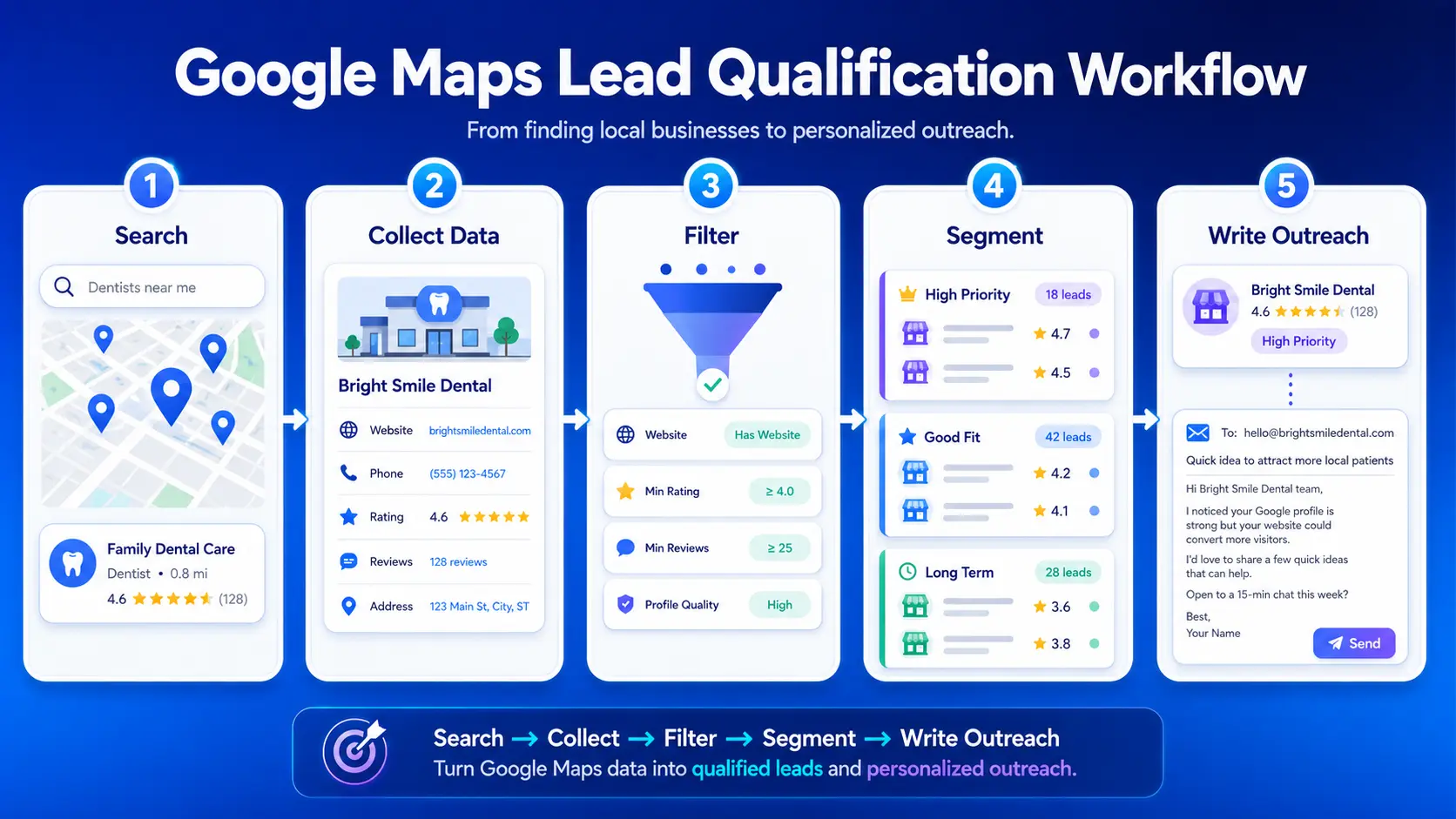
Example Lead Qualification Workflow
Here is a simple step-by-step workflow using dental clinics as an example:
- Search for dental clinics in your target city.
- Collect business name, website, phone number, rating, review count, address, opening hours, and Google Maps URL.
- Filter clinics with many reviews, low ratings, missing websites, or weak profile details.
- Segment the list by outreach angle, such as website improvement, local SEO, reputation management, or growth support.
- Write outreach based on the visible opportunity instead of sending a generic message.
Common Mistakes When Building Outreach Lists from Google Maps
The biggest mistake is treating every business as equal.
Common mistakes include:
- Scraping too broad of a category
- Sending the same email to every business
- Ignoring ratings and review count
- Not checking website availability
- Focusing only on volume instead of lead quality
- Forgetting to clean duplicate or closed listings
A smaller list with better fit is usually more useful than a large list with no clear outreach reason.
How Outscraper Helps Build Better Lead Lists
Outscraper helps teams collect Google Maps business data by category and location, then use that data to build cleaner outreach lists.
Instead of manually copying business names, websites, phone numbers, addresses, ratings, reviews, and Google Maps URLs, teams can export public business data at scale and filter it based on their own lead rules.
For example, a sales team can search by niche and city, export the results, filter by rating and review count, check website availability, and enrich contact details when available. A marketing agency can use the same workflow to find businesses with weak online presence, missing websites, or review-related issues.
This makes Google Maps data easier to turn into a focused outreach list for sales, marketing, local SEO, market research, and lead generation.
Use Outscraper to export Google Maps business data by category and location, then focus your outreach on businesses that are easier to qualify and personalize.
SSS
SIKÇA SORULAN SORULAR
A high-intent local business lead is a business that matches your target category, location, and offer. It also shows public signs that make outreach more relevant, such as active reviews, missing website, low rating, incomplete profile, or strong local demand.
Useful Google Maps data includes business name, category, address, phone number, website, rating, review count, opening hours, business status, photos, and Google Maps URL. These fields help you check whether a business is active, reachable, and relevant before outreach.
Yes. Google Maps listings often show whether a business has a website. Businesses without websites may be useful prospects for web design, local SEO, booking tools, marketing services, or lead generation offers.
Ratings and reviews help show customer demand and possible service gaps. For example, a business with many reviews and a low rating may have steady customer activity but problems with customer experience, reputation, or follow-up. That can make the lead more relevant for certain services.
No. Contacting every business usually leads to weak outreach. It is better to filter and score the list first. Focus on businesses that match your target market, show active demand, and have a clear reason for a specific message.
Outscraper helps extract Google Maps business data by category and location, including business names, websites, phone numbers, ratings, reviews, addresses, and other public fields. This helps teams build cleaner lists that can be filtered, segmented, and used for more focused outreach.