İçindekiler
Public company data for sales prospecting helps sales, marketing, and research teams understand a company before outreach. Instead of relying only on old lead lists or surface-level firmographics, teams can review SEC filings, annual reports, earnings calls, investor presentations, press releases, and public business profiles to find account priorities, risks, expansion plans, leadership changes, and market signals.
The amount of public company data available is large. The SEC says EDGAR contains millions of company and individual filings, processes about 4,700 filings per day, serves 3,000 terabytes of data to the public each year, and adds about 40,000 new filers per year on average.
The value is not just having more data. The value is knowing which signals matter and turning them into better outreach, account research, or market analysis. This guide explains how to use public company data for sales prospecting and how to combine filings with public business data, reviews, contact data, and location signals for a cleaner research workflow.
Quick Answer: How to use public company data for sales prospecting
- Choose a target company or account list.
- Check the latest 10-K, 10-Q, and 8-K filings.
- Review the business, risk factors, and management discussion sections.
- Look for signals such as expansion plans, business risks, cost pressure, technology needs, leadership changes, and competitor threats.
- Cross-check those signals with earnings calls, investor presentations, press releases, reviews, locations, and public business data.
- Turn the signal into a specific outreach angle, discovery question, or market research note.
What Is Public Company Data for Sales Prospecting?
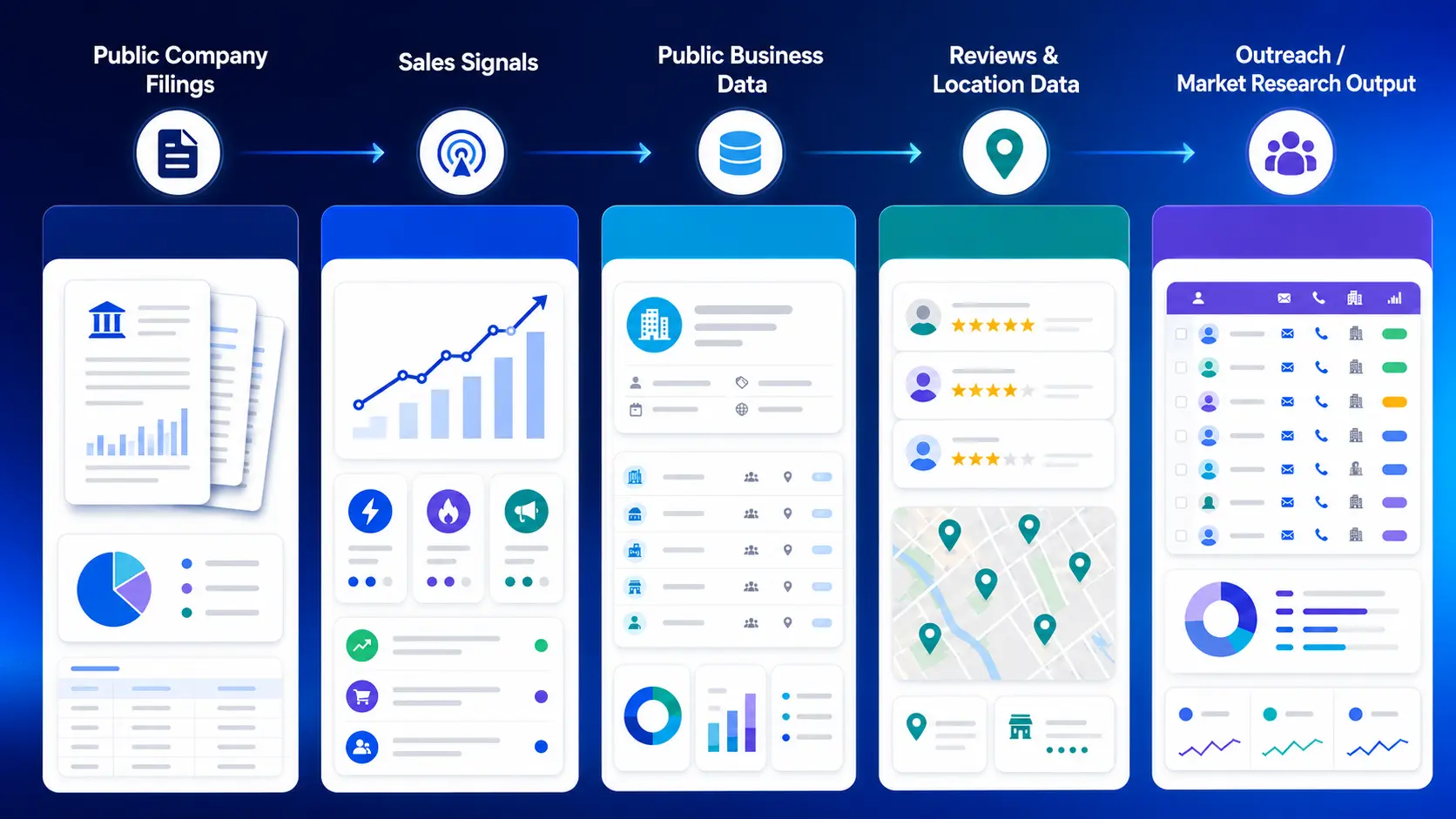
Public company data for sales prospecting is information that publicly traded companies make available through required filings, investor updates, public announcements, and business profiles. Sales teams can use this information to understand a company’s priorities, risks, financial direction, market activity, and possible buying needs before outreach.
Common sources include Form 10-K annual reports, Form 10-Q quarterly reports, Form 8-K event reports, proxy statements, earnings calls, investor presentations, press releases, company websites, review data, and public business listings.
For sales and market research teams, the goal is not to read every document. The goal is to find useful signals. These signals can include expansion plans, cost pressure, technology investments, leadership changes, customer complaints, competitor threats, hiring activity, location growth, and changes in business focus.
This type of research helps teams move from broad prospecting to account-specific outreach. Instead of contacting a company with a generic pitch, a sales team can reference a real business signal and connect it to the prospect’s current priorities.
Public Company Data vs. Public Business Data
Public company data usually explains what a company reports to investors and regulators. This includes filings, financial results, risk factors, leadership updates, and investor presentations.
Public business data shows how companies and local businesses appear in the market. This can include business names, categories, locations, websites, phone numbers, emails, ratings, reviews, opening hours, and competitor presence.
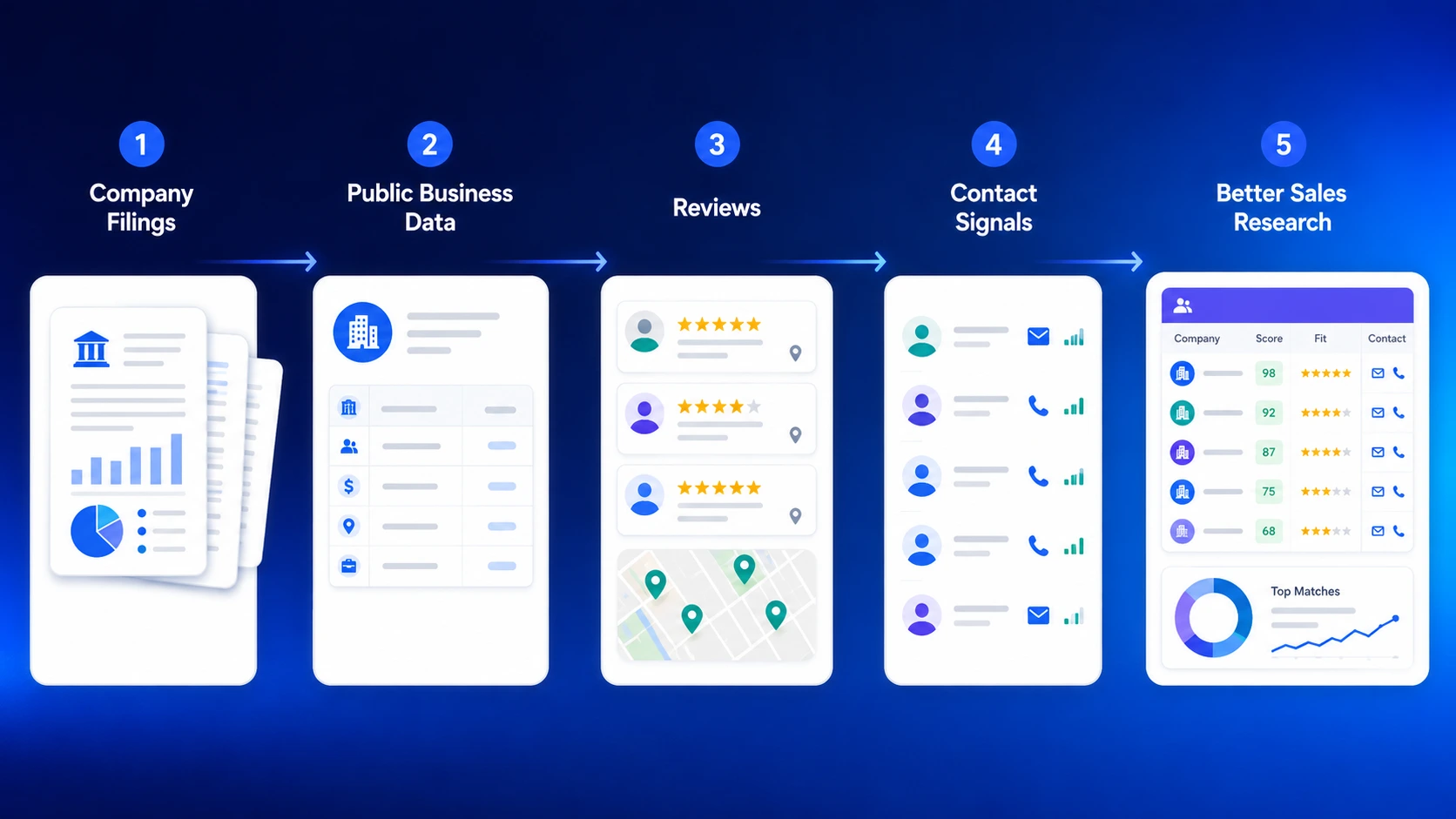
For sales prospecting, both are useful. Public company data gives account-level context. Public business data helps teams build lists, check market coverage, compare competitors, and find contacts. Together, they give sales and research teams a clearer view of who to contact, why now, and what message may be relevant.
Why Public Company Data Matters for B2B Sales
Public company data helps sales teams understand an account before outreach. A 10-K, 10-Q, 8-K, earnings call, or investor presentation can show what a company is trying to improve, where it plans to grow, what risks it is watching, and which business areas may need support.
This makes outreach more specific. Instead of sending a broad message about growth or efficiency, a sales team can reference a real signal such as rising costs, expansion into a new region, technology investment, customer retention pressure, or a competitive threat.
For market research teams, the same data helps compare companies in one industry. When filings are combined with reviews, locations, and public business data, teams can better understand market activity, customer sentiment, and competitor gaps.
The Best Public Company Data Sources to Check
You do not need to read every public document. Start with the source that answers your research question.
SEC filings have different names based on their purpose. A 10-K is the annual report, a 10-Q is the quarterly update, and an 8-K is used for major company events.
A 10-K is best for understanding the company’s business, risks, financial condition, and long-term priorities. A 10-Q is useful for recent updates and changes in performance. An 8-K helps you spot events such as leadership changes, acquisitions, or other important company updates.
Earnings calls and investor presentations help explain how leadership talks about strategy, growth, cost pressure, and market priorities. Press releases and investor relations pages help track newer announcements such as partnerships, product launches, acquisitions, and location updates.
Public business profiles, reviews, and location data add another layer. Filings show company-level context, while Google Maps business data can show market presence, customer sentiment, competitor activity, and contact opportunities.
Public Company Data Sources for Prospecting and What They Reveal
| Data Source | What It Can Reveal | How Sales and Research Teams Can Use It |
|---|---|---|
| Form 10-K | Business overview, risks, financial condition, market priorities, and long-term plans. | Build account context and identify stronger sales angles. |
| Form 10-Q | Quarterly updates, recent performance changes, and current risks. | Check whether a business priority or risk is still active. |
| Form 8-K | Major company events, leadership changes, acquisitions, and material updates. | Find timely trigger events for outreach. |
| Proxy Statement | Executive leadership, governance details, compensation, and board changes. | Understand leadership priorities and decision-maker context. |
| Earnings Calls | Executive commentary, growth plans, cost pressure, and market concerns. | Prepare outreach, discovery questions, and account notes. |
| Investor Presentations | Company positioning, strategic priorities, market focus, and growth plans. | Understand how the company explains its direction to investors. |
| Press Releases | Product launches, partnerships, acquisitions, location updates, and executive changes. | Track recent changes that may create better outreach timing. |
| Public Business Profiles | Locations, categories, websites, phone numbers, business status, and operating details. | Build prospect lists and check market coverage. |
| Reviews and Ratings | Customer complaints, service gaps, competitor weaknesses, and customer sentiment. | Support competitor research, account planning, and market analysis. |
| Contact and Company Data | Emails, phone numbers, domains, company details, and enrichment fields. | Turn research into a usable outreach list. |
Use this table to choose the right public company data source based on the sales signal or market research question you want to answer.
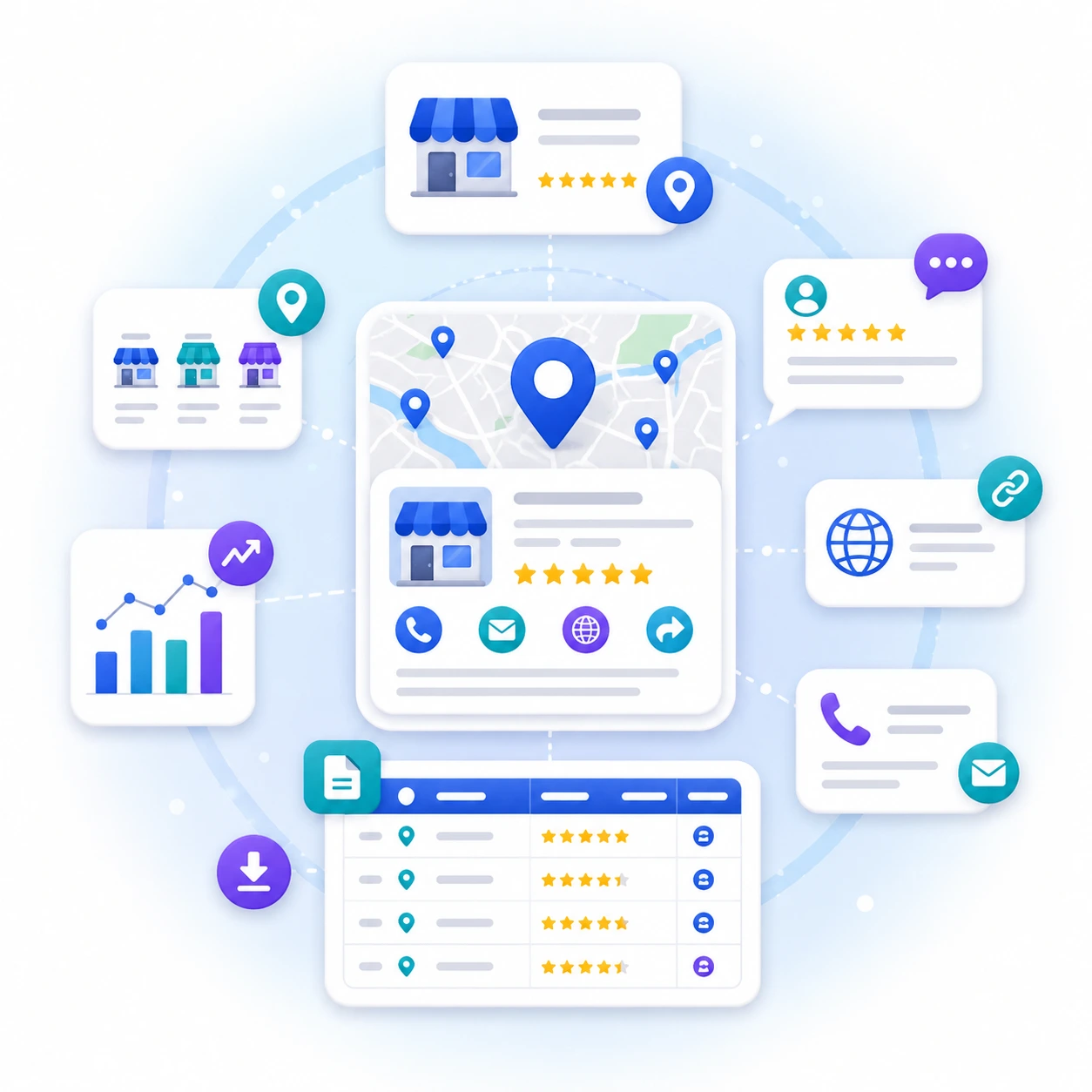
After you find account signals from public company data for sales prospecting, use Outscraper to collect business profiles, reviews, ratings, websites, contacts, locations, and competitor data in one workflow.
What Sales Signals Can You Find in Public Company Data?
Public company data can help sales and research teams spot signals that are easy to miss in basic lead lists. The goal is to find what changed, what the company cares about, and where a relevant offer may fit.
Growth Plans and Market Expansion
Growth plans are useful sales signals because they show where a company is putting attention and resources. Look for mentions of new markets, new business units, new products, regional expansion, store openings, acquisitions, or increased investment in a specific category.
For prospecting, these signals can help you understand timing. A company expanding into new regions may need local market data, location research, competitor tracking, customer review analysis, or better contact data for outreach and partnerships.
Business Risks and Operational Challenges
Risk sections, quarterly updates, and earnings calls can show the problems a company is watching closely. These may include supply chain pressure, rising costs, customer churn, regulatory changes, labor shortages, data quality issues, or increased competition.
For sales teams, these risks can shape better discovery questions. Instead of opening with a broad pitch, you can ask about a specific business pressure the company has already mentioned publicly.
Technology Investments and Digital Transformation Needs
Public companies often discuss technology investments when they are improving operations, customer experience, data systems, automation, cybersecurity, or digital channels.
These signals matter for B2B sales because they can point to active projects. If a company mentions data modernization, automation, CRM changes, AI adoption, or digital customer experience, it may also need cleaner data, better data enrichment, API access, or faster research workflows.
Cost Pressure, Efficiency Goals, and Budget Signals
Cost pressure can appear in filings, earnings calls, and investor presentations. Look for mentions of margin pressure, operating expenses, restructuring, automation, productivity, cost reduction, or process improvement.
These signals can help sales teams position their offer around time savings, cleaner workflows, fewer manual tasks, or better use of existing resources. This is especially relevant when teams are still collecting business data manually, checking public profiles one by one, or cleaning messy spreadsheets before outreach.
Competitor Threats, Customer Sentiment, and Market Changes
Public company data can also show how a company sees its competitors and market risks. Look for mentions of pricing pressure, new entrants, changing customer behavior, weaker demand, brand reputation, or regional competition.
This is where public filings become stronger when combined with public business data. Reviews, ratings, locations, categories, websites, and business status can show what customers are saying and where competitors may be stronger or weaker.
Google Maps review data can also help teams compare service gaps, recurring complaints, pricing concerns, and customer sentiment across markets.
A Simple 5-Step Prospecting Research Workflow
Once you know which signals to look for, the next step is to turn research into a repeatable process. The goal is not to read every filing or collect every possible detail. The goal is to find enough account context to decide whether the company is worth contacting, why the timing may matter, and what message would make sense.
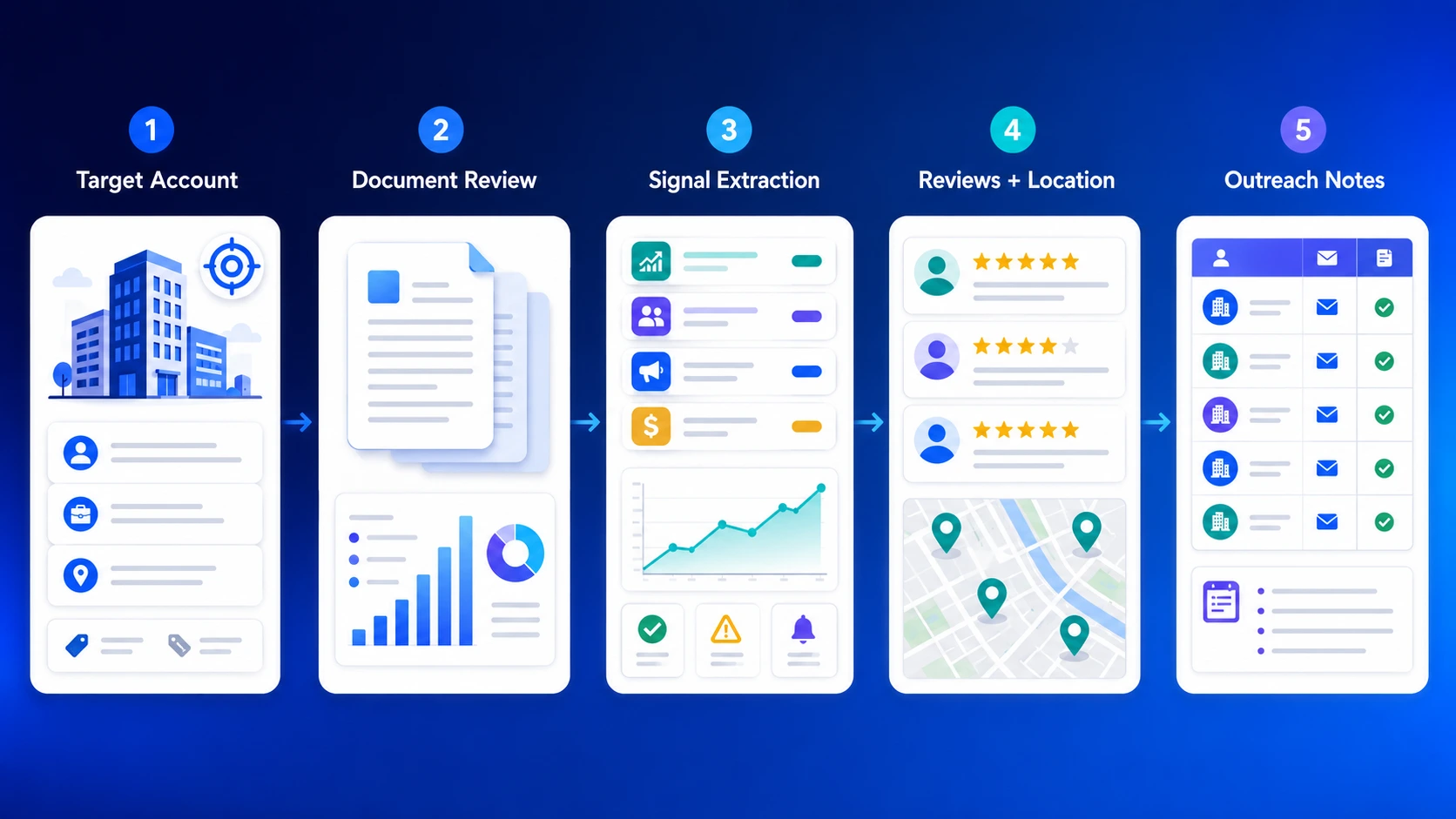
Step 1: Choose the Target Company or Account List
Start with a specific account, market, or list segment. For example, you might focus on public retail companies expanding into new cities, healthcare companies dealing with staffing pressure, or software companies discussing data quality and automation.
A clear target keeps the research focused. Without it, you can spend too much time reading documents without knowing what you need to find.
Step 2: Check the Latest Filings and Investor Updates
Start with the most recent 10-K for the full business overview, then check the latest 10-Q or 8-K for newer changes. After that, review the company’s investor presentation, earnings call notes, and recent press releases.
Look for repeated themes. If the same issue appears in the annual report, quarterly update, and executive commentary, it is more likely to be a real business priority.
Step 3: Extract the Most Relevant Sales Signals
Focus on signals that connect to a possible business need. These may include expansion plans, rising costs, customer retention pressure, new technology projects, leadership changes, acquisitions, regulatory pressure, or competitor threats.
Do not copy long financial language into your notes. Translate each signal into a simple sales research note.
Example:
Filing note: “The company is investing in automation to improve operational efficiency.”
Sales note: “This account may care about tools that reduce manual work, improve data quality, or speed up research workflows.”
Step 4: Cross-Check Signals With Reviews, Locations, and Public Business Data
Company filings show what leadership reports. Market data can show what is happening outside the investor materials.
Check business profiles, locations, reviews, ratings, websites, contact availability, opening hours, and competitor presence. This helps confirm whether the account’s stated priorities match what customers and local markets show.
For example, if a company discusses expansion, location data can show where it is growing. If it mentions customer experience, reviews can show recurring complaints, service gaps, or competitor weaknesses.
Step 5: Turn the Signal Into Outreach, Account Notes, or Market Research
The final step is to turn your research into action. For sales teams, that may mean a more specific cold email, call opener, LinkedIn message, or discovery question. For market research teams, it may mean a competitor note, segment comparison, or market entry finding.
A simple format works best:
- What changed?
- Why does it matter?
- What signal supports it?
- What message or research action should follow?
This keeps the process practical and prevents research from becoming another unused document.
Collect Google Maps business profiles, reviews, contacts, and location data for your next outreach workflow.
How to Turn Account Research Into Outreach and Market Analysis
Finding a useful signal is only the first step. The next step is turning that signal into a clear message, sales note, or research finding. This is where many teams lose the value of their research. They collect details, but they do not connect those details to a specific action.
Generic Outreach vs. Account-Specific Outreach
Generic outreach usually starts with broad claims. It may say the seller helps companies save time, grow faster, improve efficiency, or find better leads. These points may be true, but they are easy to ignore when they are not connected to the buyer’s situation.
Account-specific outreach starts with a real signal. That signal can come from a filing, earnings call, investor presentation, press release, review pattern, location change, or competitor activity.
For example:
Generic message:
“We help sales teams find better leads.”
Account-specific message:
“I noticed your team is expanding into new regional markets. Teams in that situation often need cleaner business lists, local competitor data, and contact details before launching outreach.”
The second version works better because it connects the offer to a visible business change.
Cold Email Example From a Company Signal
Here is a simple structure you can use:
Hi [Name],
I saw that [Company] has been expanding into [market/region/category]. When teams enter a new market, one challenge is getting a clean view of local businesses, competitors, customer sentiment, and contact opportunities.
Are you currently building those market lists manually, or does your team already have a data workflow for this?
Best,
[Your Name]
This format works because it is specific without sounding too complicated. It mentions the signal, connects it to a likely business need, and asks a practical question.
Discovery Questions Based on Filing Research
Research can also improve discovery calls. Instead of asking only general questions, use the signal to guide a better conversation.
Examples:
- “Your latest investor update mentioned expansion into new markets. How is your team researching local competitors before entering a new area?”
- “You mentioned cost control as a priority. Are there any research or data collection tasks your team still handles manually?”
- “Your company has been investing in digital channels. How are you keeping business and location data clean across your systems?”
- “Customer experience came up several times in your recent updates. Are reviews or local customer feedback part of your market research process?”
- “You mentioned competition in several regions. How does your team compare competitor presence, ratings, and location coverage?”
These questions show that the seller did basic research. They also create a smoother path from public signals to the buyer’s actual workflow.
Comparing Competitors, Locations, Reviews, and Business Signals
For market research teams, the same process can support market research with public business data. Instead of looking at one company alone, compare several companies across the same market.
Useful comparison points include:
- number of locations
- business categories
- ratings and review volume
- recurring customer complaints
- website and contact availability
- market coverage by city, state, or region
- competitor presence in target areas
- changes in location, activity, or business status
This helps teams answer practical questions: Who is growing? Which areas are crowded? Where are customers unhappy? Which competitors have weak reviews? Which markets may need more research before sales or expansion?
Where Outscraper Fits in the Research Workflow
Company filings and investor updates help explain strategy. Public business data helps show what is happening in the market.
This is where Outscraper can support the workflow. Teams can use Outscraper to collect Google Maps data, reviews, ratings, websites, phone numbers, emails, categories, locations, and business status at scale. That makes it easier to move from account research to a usable prospect list, competitor report, or market research file.
The goal is not to replace strategic research. The goal is to reduce manual work after the signal is found. Once a team knows what market, category, or competitor group to study, structured exports and APIs can help turn that research into data they can use in outreach, CRM tools, dashboards, or internal reports.
Checklist: How to Use Public Company Data for Sales Prospecting
- Start with the company’s latest filings, earnings updates, and investor materials.
- Find one clear signal, such as expansion, cost pressure, technology investment, customer sentiment, or competitor risk.
- Cross-check that signal with Google Maps business data, reviews, locations, and contact details.
- Turn the signal into an outreach angle, account note, discovery question, or market research finding.
- Use Outscraper to collect the business data behind the signal and move from research to action.
Use Outscraper to collect business profiles, reviews, locations, contacts, and competitor signals for cleaner prospect lists and market research.
SSS
SIKÇA SORULAN SORULAR
Public company data for sales prospecting is information that publicly traded companies make available through filings, investor updates, earnings calls, press releases, and business profiles. Sales teams use it to understand account priorities, risks, expansion plans, leadership changes, and market signals before outreach.
Sales teams can start with SEC EDGAR, company investor relations pages, annual reports, quarterly reports, 8-K filings, earnings calls, investor presentations, and press releases. They can also check public business profiles, reviews, ratings, websites, locations, and contact data to understand how the company appears in the market.
The most useful filings are the 10-K, 10-Q, and 8-K. A 10-K gives a full annual view of the company’s business, risks, and financial condition. A 10-Q gives quarterly updates. An 8-K reports major events such as leadership changes, acquisitions, or other important company updates.
Company filings can help sales teams find real account signals before contacting a prospect. Instead of sending a generic message, a seller can reference a specific priority, risk, market expansion, cost pressure, technology project, or competitor concern that the company has already discussed publicly.
This research helps market teams compare companies, regions, competitors, customer sentiment, and business activity. Filings and investor updates show company-level strategy, while reviews, ratings, locations, categories, and public business profiles show what is happening in the market.
Outscraper can help after a team identifies the market, category, competitor group, or account list it wants to study. Teams can use Outscraper to collect public business data, reviews, ratings, websites, phone numbers, emails, categories, locations, and business status at scale, then export the data for outreach, CRM updates, dashboards, or research reports.