Оглавление
What a Local Business Database Is
Consumers and companies today make decisions based on data. Nearly half of all Google searches have local intent, meaning people are actively looking for services and businesses in their area rather than general information, and about 72% of these searchers visit a store within five miles of their location.
The pattern highlights why a local business database matters as it turns scattered business listings and contact points into a database that marketers, sales teams, and data analysts can use to find, segment, and act on prospects.
A local business database is a structured set of business records that supports searching, filtering, and operational tasks. It is a commercial subset of POI databases. POI databases may also include non-commercial locations like landmarks or public facilities.
Each entry in a local business database typically includes the business name, category, physical address, phone number, website, and review information. The defining trait is organization. The data is arranged so that teams can query, export, update, and connect with other tools.
When someone searches for “local business database,” they usually want usable information, not a list to scroll through. Most marketers use these datasets to build targeted lists by location and service category.
Sales teams pull contacts and decision-maker info. Data teams clean and link records to enrich them with reviews or engagement metrics. The database exists to support work that leads to outreach, analysis, and insight.
How Local Business Database Differs From a Simple Directory
A simple directory is built for discovery while a local business database supports action. When using a directory, you type in a category or name, and the interface shows results you can click into. It helps a consumer find a nearby plumber or cafe.
Meanwhile, a local business database supports action. You can filter businesses by location, category, or review count. You can export records and use them in outreach campaigns, dashboards, or analytics. The difference is practical. One is for browsing. The other is for work.
How People Use a Local Business Database
Real-world use cases tend to fall into clear patterns:
- Lead generation: finding businesses that match specific categories and areas.
- Market analysis: review counts, star ratings, or category distribution across regions.
- Territory planning: understanding where services are concentrated or missing.
- Data enrichment: adding missing emails, domains, or contact fields to existing records.
When this data is structured by location and category, it enables location intelligence, allowing teams to analyze geographic patterns, compare markets, and make decisions based on where businesses operate rather than isolated listings. This turns local business data into a strategic asset for marketing, sales, and research rather than a static collection of records.
Many teams build these databases from sources like Карты Гугл because the listings are current, widely accessible, and tied to real user activity through reviews. When that information is collected and stored in a structured format, it becomes a local business database that supports real work, not just discovery.
Попробуйте Outscraper бесплатно, воспользовавшись ежемесячно возобновляемым Бесплатным уровнем.
Common Examples of Local Business Databases
Understanding where local business databases come from helps clarify how they are built and used. While a database itself is a structured dataset, it often begins with publicly available or specialized sources. Platforms like Google Maps function as POI data sources, not just business directories. At the same time you can also enrich POI data with Google Maps.
Public Business Directories
Public directories like Google Maps, Yellow Pages, and Bing Places provide widely accessible business listings. These platforms are sources of raw data, not databases in themselves. Teams collect, clean, and organize this information to create a structured local business database that can be searched, filtered, and exported for marketing, sales, or research purposes.
Industry-Specific Directories
Some industries maintain specialized directories, such as Better Business Bureau (BBB) listings or trade-specific databases. These directories cover fewer businesses but often offer more accurate category or certification information. Teams use these listings as input to enrich their databases, ensuring better segmentation, verification, and targeting for outreach.
B2B and Marketing Databases
B2B and marketing databases are built to be actionable from the start. They combine public and industry-specific data with additional enrichment into structured, searchable datasets. These databases allow teams to filter by industry, location, size, or contact information and export records for campaigns or analysis. Unlike raw directories, they are designed to support workflows rather than simply provide visibility.
What Data Does a Local Business Database Usually Contain
A local business database brings together multiple layers of information about businesses, making it actionable for marketing, sales, and research. The structure and type of data it contains reflect real-world workflows, rather than theoretical categories.
Core Business Information
At the foundation are the basic details that identify a business:
- Business name, address, and phone numbers
- Primary and secondary categories that define the services of products offered.
These fields разрешить teams to search, filter, and segment businesses quickly. They are the minimum required for building lead lists or performing market insights.
Operational Details
Operational data provides context for how a business functions and serves customers:
- Hours of operation
- Service areas or delivery zones
- Location signals, such as GPS coordinates or multiple branch addresses
These fields help teams prioritize outreach and plan coverage efficiently, ensuring contact attempts happen at the right times and in the right regions.
Reputation and Activity Signals
Customer feedback and engagement give insight into business performance:
- Reviews and ratings.
- Volume of reviews or recent activity
These signals разрешить marketers and sales teams to prioritize businesses that are active and visible to customers, helping allocate resources effectively.
Ownership and Contact Details
Basic business listings provide limited owner or decision-maker information. For example, Google Maps may show emails or websites, but direct contacts often require additional sourcing or enrichment.
Setting realistic expectations early helps teams plan for the effort needed to supplement missing data and ensures campaigns are built on accurate, actionable information.
How Google Maps Fits Into Local Business Databases
Why Google Maps Is Often the Starting Point
Google Maps is often the primary starting point for building a local business database. Its widespread coverage, frequent updates, and structured listings provide the raw data that teams can collect, clean, and organize into actionable datasets.
Google Maps offers several advantages that make it a preferred input source:
- Coverage across cities and categories – from restaurants to service providers, Maps includes millions of listings in diverse industries and locations.
- Regular updates from business owners and users – hours, addresses, and review data are continuously refreshed, keeping the information current.
These features make Карты Гугл a practical starting point for business data extraction which is useful for marketers, sales teams, and data analysts looking to compile comprehensive local business datasets.
Limits of Google Maps as a Standalone Database
While Maps is a rich source, it has clear limitations when treated as a complete database:
- No direct owner emails or internal business identifiers – most listings lack the contact details needed for outreach.
- Listings are not designed for bulk storage or advanced search – the platform is built for browsing, not exporting or large-scale analysis.
Because of these пределы, Google Maps database is typically collected and structured into a separate local business database, allowing teams to filter, enrich, and integrate it into workflows.
Legal and Ethical Considerations Before You Start
Before collecting or building a local business database, it’s important to understand compliance and responsible practices. Addressing legal and ethical considerations first ensures that technical steps are implemented safely and appropriately.
Google Terms of Service
Google Maps is a common source for local business data, but direct scraping for commercial use can violate Google’s terms of service. Teams should be aware of this risk and plan data collection methods carefully. The goal is to highlight compliance, not create unnecessary concern. A recommended way is to use APIs or licensed data, which is a common approach to remain within the rules.
Data Protection and Privacy Laws
Responsible Use of Collected Data
Even when collecting only business information, it’s important to store and use data for clear, legitimate purposes. Avoid harvesting private contact details or employee profiles. Using the database for outreach, analysis, or operational planning rather than intrusive tracking will ensure ethical and compliant workflows.
Methods for Building a Local Business Database
There are several ways to build a local business database, depending on your technical skills, compliance needs, and scale. Some methods rely on official data access, while others involve collecting and organizing public listings.
The sections below outline the most common approaches in building a Local Business Database.
Method 1: Building a Database Using Google Maps Platform APIs
This method uses Google’s official APIs to collect business data in a structured and compliant way. It is best suited for teams building internal tools, analytics systems, or small business database software where data quality and predictable behavior matter.
Step 1: Create a Google Cloud Project
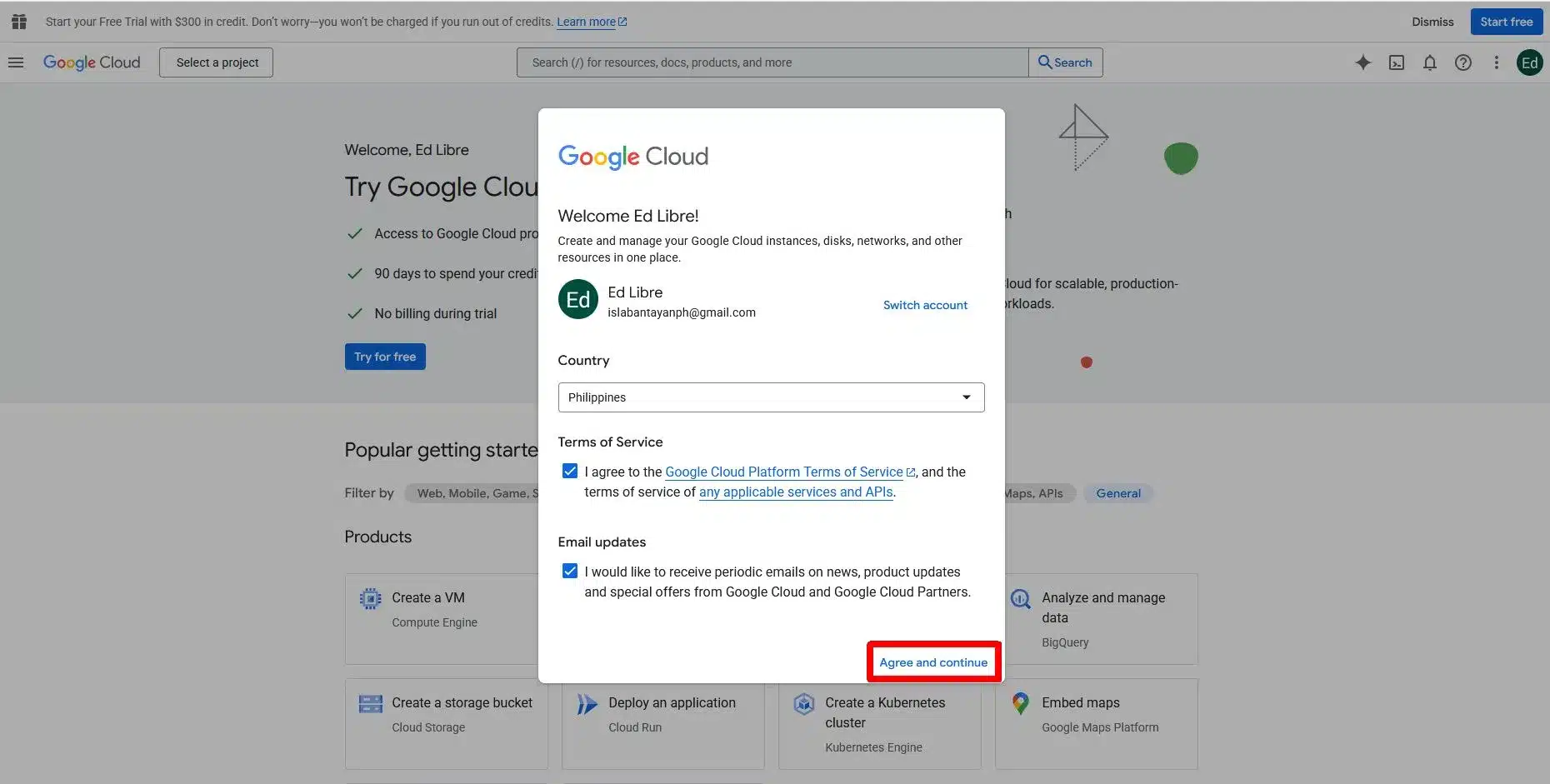
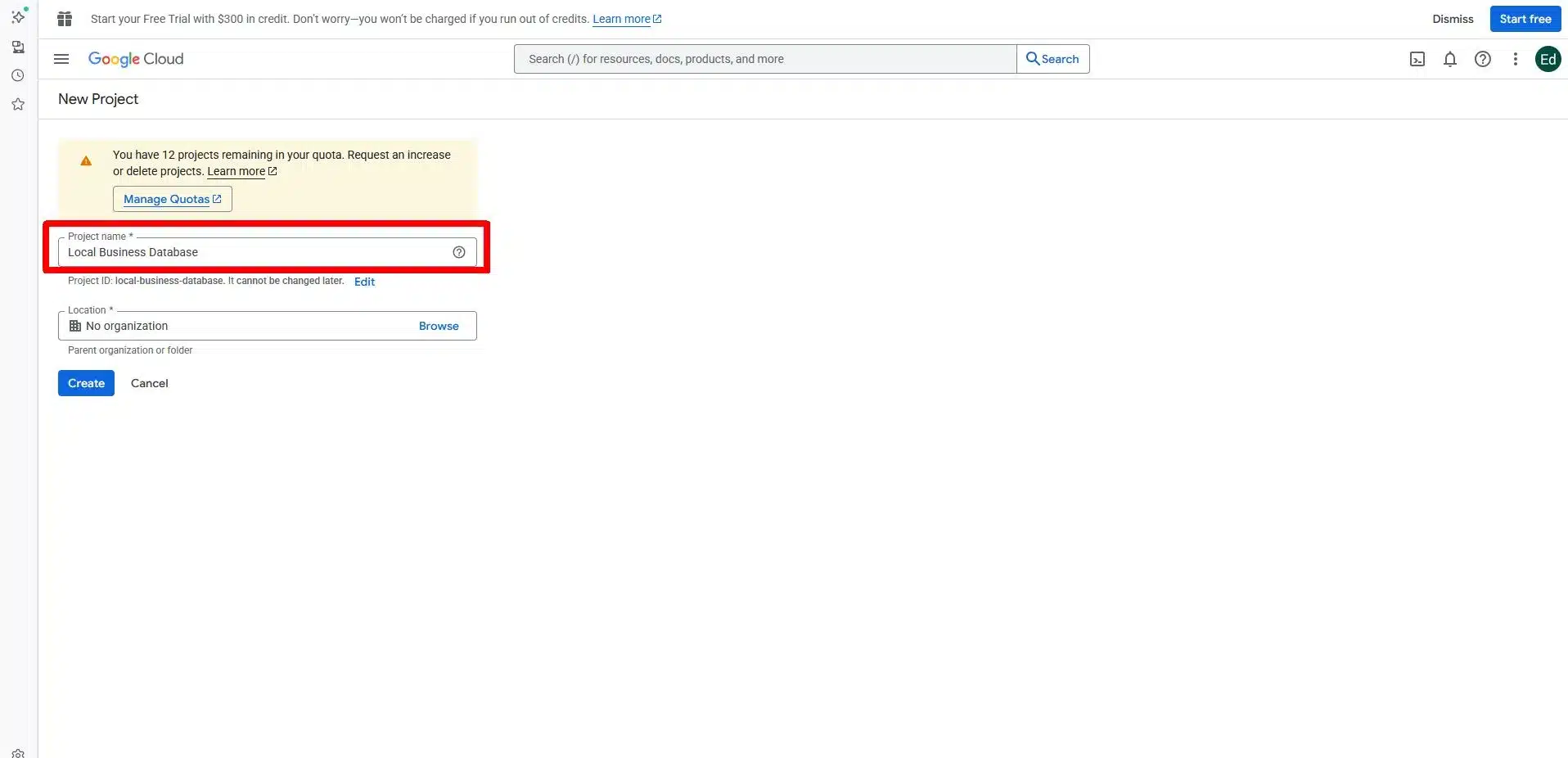
Start by creating a project in Google Cloud. This project controls billing, permissions, and access to Google Maps services. Enable the Places API and any related location services needed for your use case.
Step 2: Generate and Secure an API Key
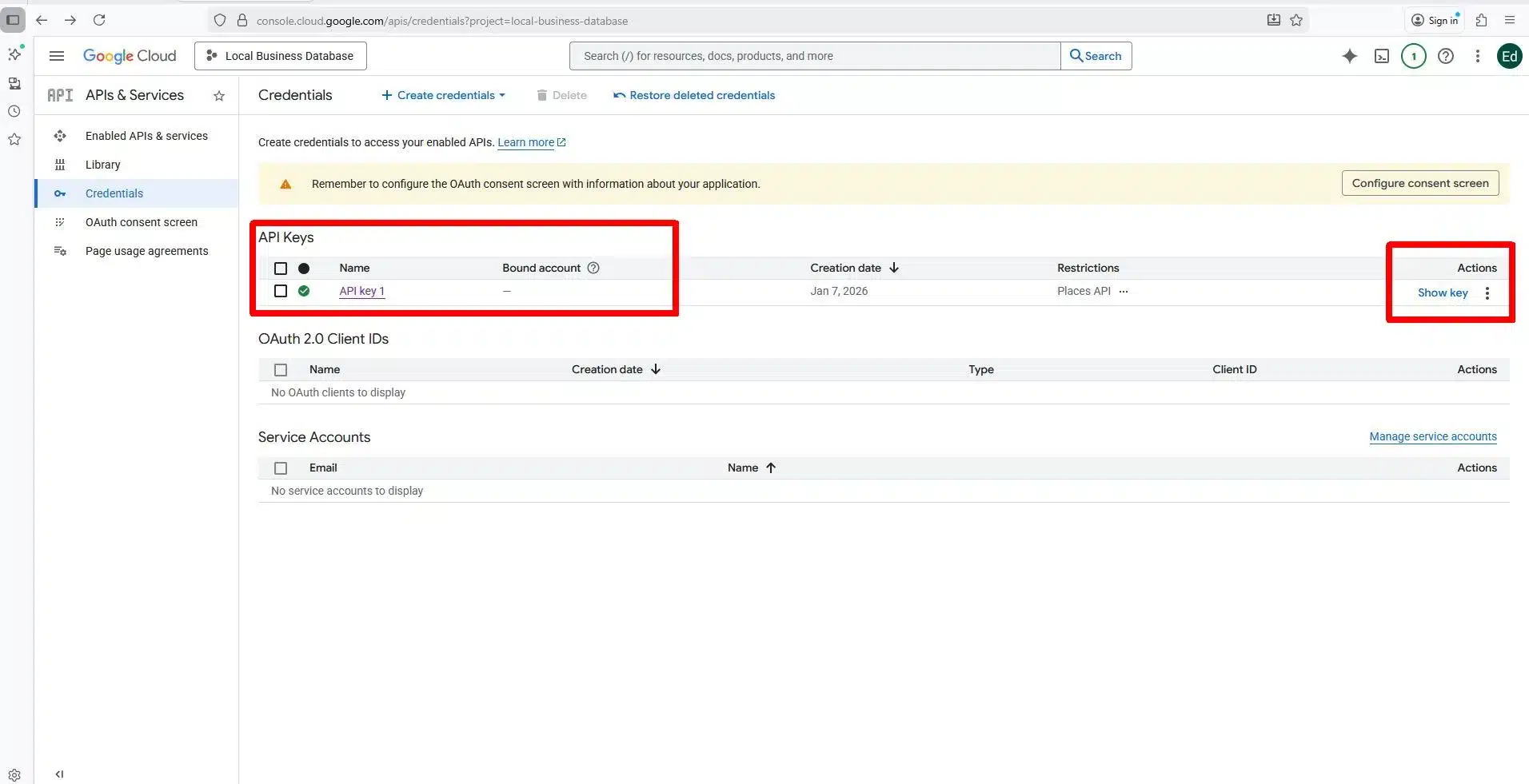
Create an API key to authenticate requests. Restrict the key by IP address, domain, or application type to control usage and limit risk. Quotas and limits help manage costs.
Step 3: Search for Businesses
Use Nearby Search requests to find businesses within a defined area and radius. Filter by category or keyword to narrow results. Each result includes a unique Place ID.

Step 4: Retrieve Business Details
Use Place Details requests with Place IDs to pull fields such as address, phone number, website, hours, ratings, and reviews. This step completes individual records.

After getting all the Places IDs, you can fetch all the Places details using your browser if it is only one or two businesses, but it is advisable to use automation if you want to download the data of all the nearby businesses.
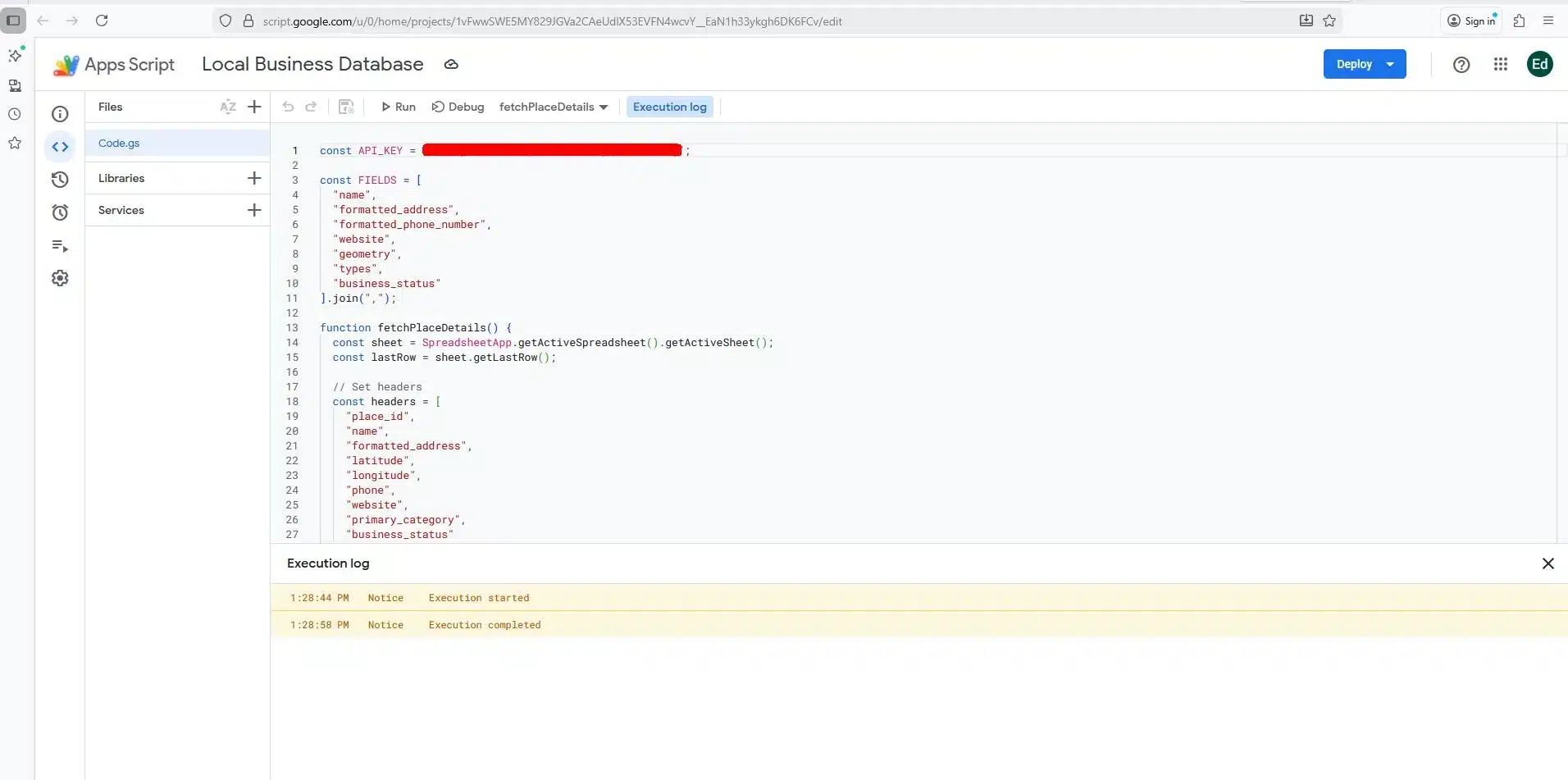
In this example, I will be using Google Sheet to download the raw JSON files and use the Apps Script extension to populate the data of our Local Business database.
If you have some backgrounds in Python programming you can also used some Python script to convert the raw JSON files into CSV.
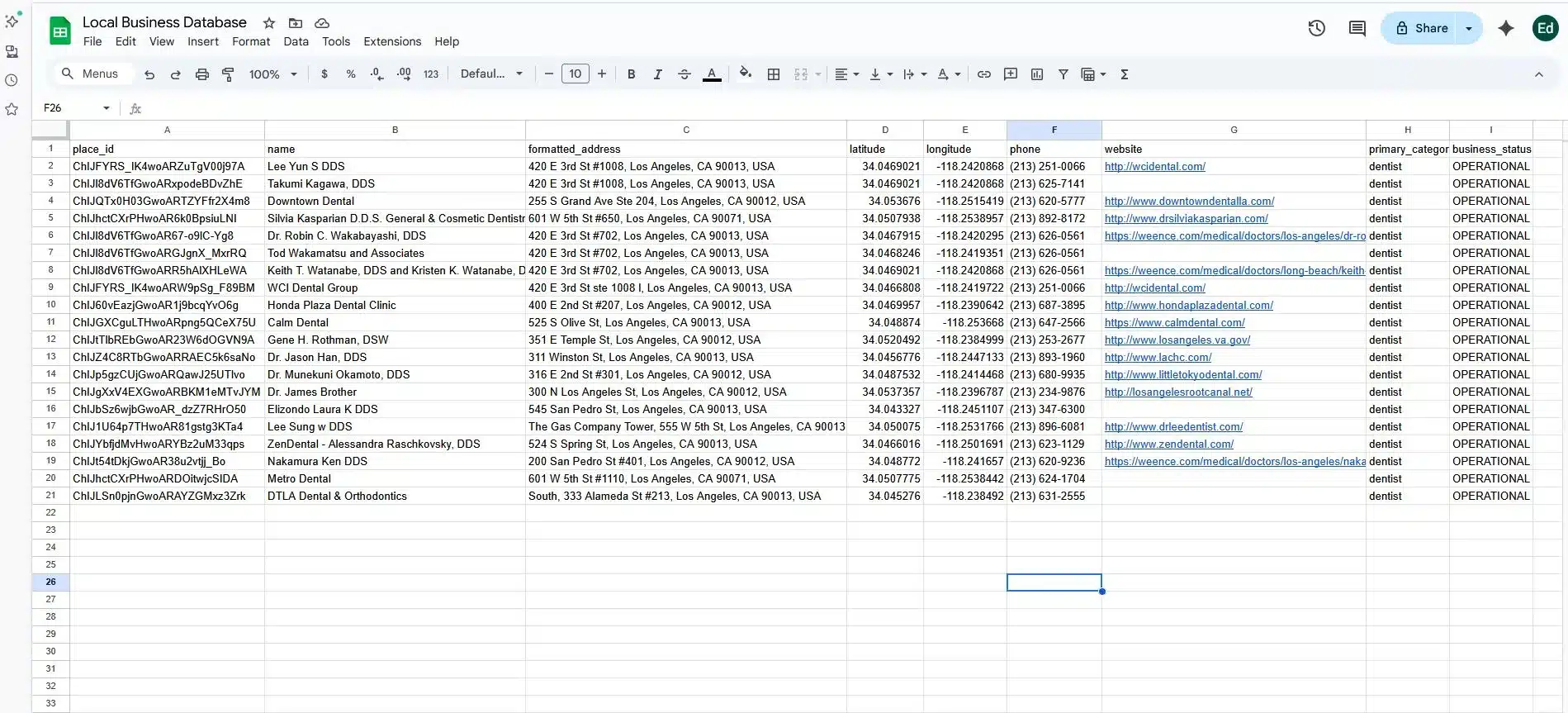
Step 5: Analyzing the Data of Your Local Business Database
This is the only time that you can start building your Local Business database. You can add more details in your database based on your needs.
Попробуйте Outscraper бесплатно, воспользовавшись ежемесячно возобновляемым Бесплатным уровнем.
Method 2: Building a Database Using Third-Party Tools
This method relies on third-party tools to collect public business listings and organize them into usable datasets. It reduces technical setup compared to APIs, but still requires careful input selection, cleanup, and validation.
Step 1: Choose a Data Collection Tool
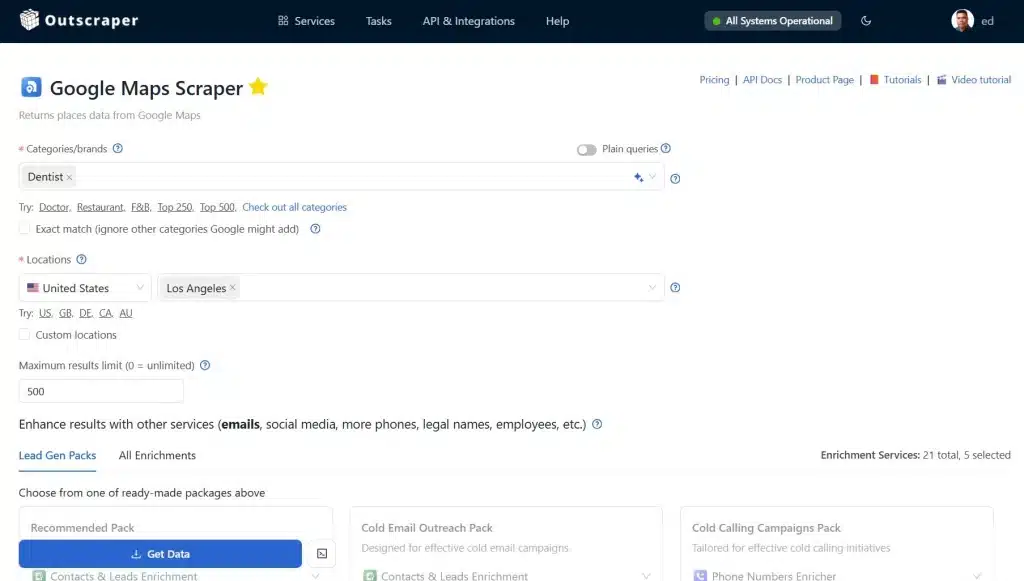
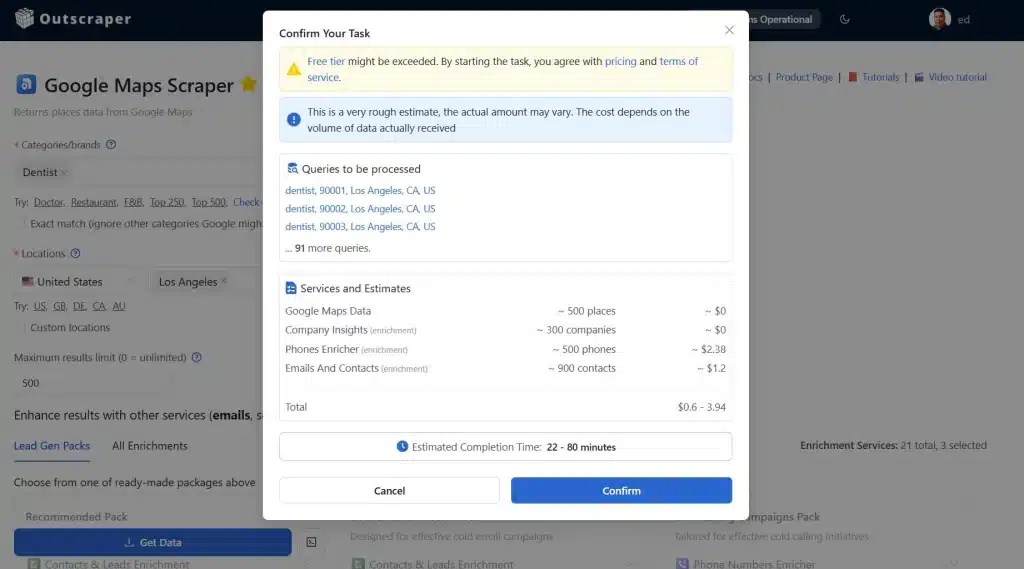
Select a tool that supports local business data collection and exports. Options like Outscraper, Apify, and Scrap.io differ in sources, filters, and output formats, so focus on how well they fit your workflow rather than brand claims. in this example we will be using Парсер Google Maps to build a local business database.
Step 2: Define Categories and Locations
Set clear inputs such as business type, city, or service area. Consistent categories and location boundaries help avoid gaps, overlaps, and uneven coverage in the results.
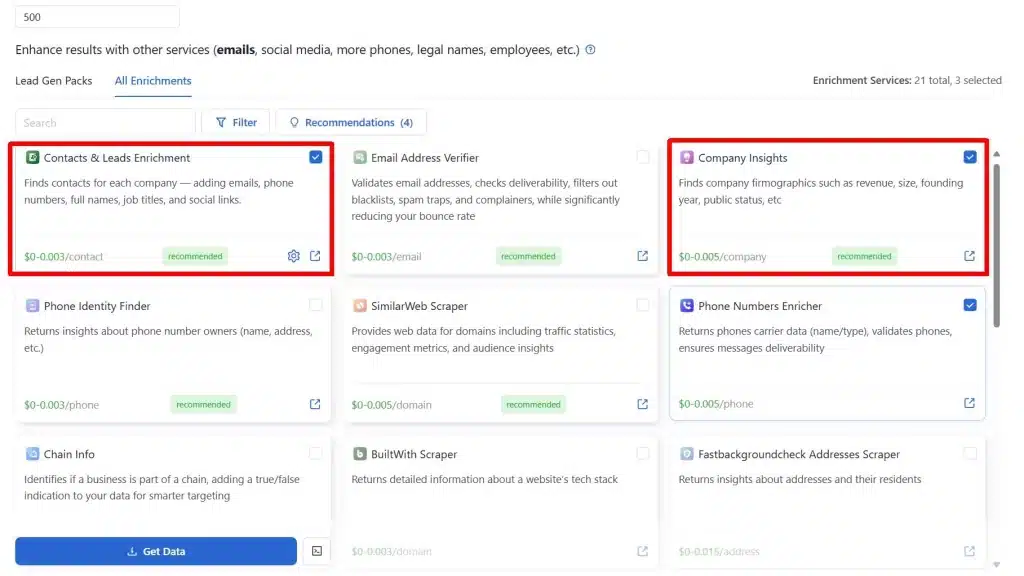
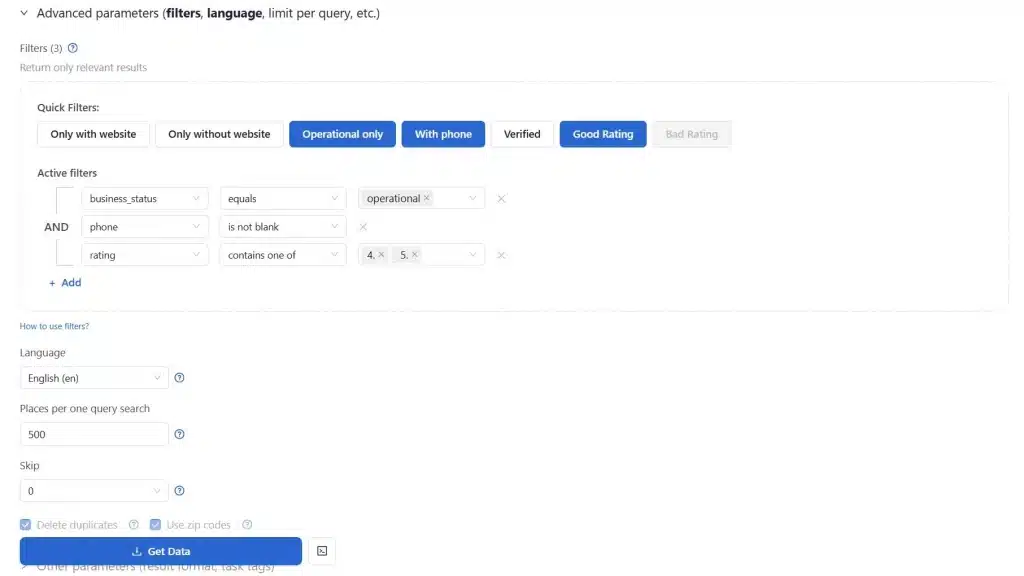
Step 3: Add Enrichments & Advanced Filters
Adding enrichment to your existing data will make your local business database stand out from the rest. Don’t just rely on typical fields such as business name, address, phone number, website, ratings, and reviews. You can add email addresses, tech stacks and other relevant business details. Mastering how to use the Google Maps Data scraper filter will also help improve your local business database.
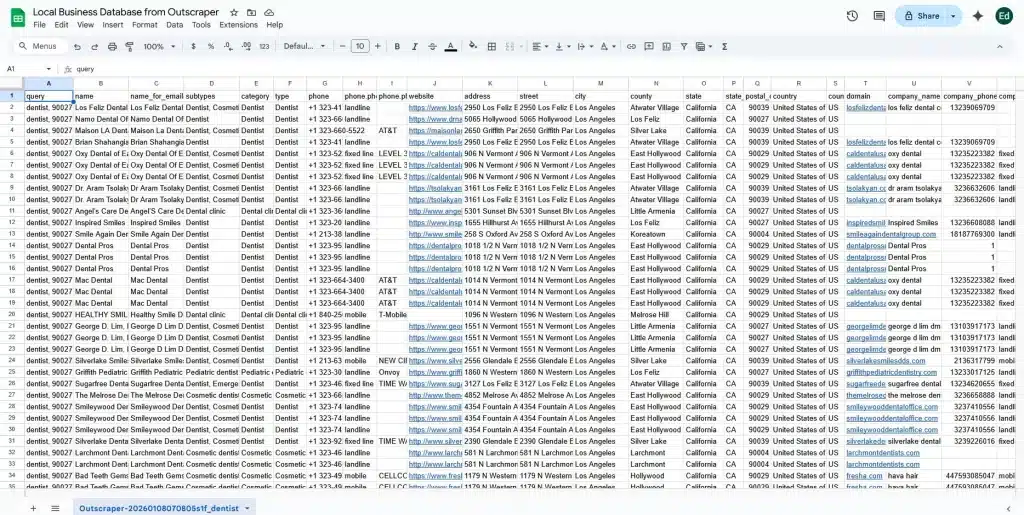
Step 4: Extract & Export the Results
Download the data in CSV or Excel format. These formats make it easier to review records, apply filters, and prepare the dataset for storage or import into other systems.
Step 5: Clean and Validate the Data
Remove duplicate entries and review missing or outdated fields. Basic cleanup at this stage improves accuracy and reduces issues during outreach or analysis.
This approach works well for teams that need flexibility and faster setup, with the understanding that data quality depends on careful input selection and review.
Method 3: Building a Database from Public Records and Government Sources
This method uses official datasets published by government or regulatory bodies to create a verified business database.
Step 1: Identify Relevant Public Data Sources
Locate business registries, licensing databases, or open data portals at the city, state, or national level that cover your target region or industry.
Step 2: Download Available Business Records
Access bulk files or searchable exports containing registered business names, addresses, license types, and registration statuses.
Step 3: Normalize and Standardize Fields
Clean inconsistent formats for names, addresses, and categories so records can be filtered and matched across locations.
Step 4: Store Data in a Searchable Structure
Import the cleaned data into tables or database software that supports filtering by location, industry, or registration type.
Step 5: Validate Against Other Sources
Cross-check records with listing platforms or internal data to identify closed, inactive, or duplicate businesses.
This method works best for verification, compliance checks, and industries where official registration matters more than online presence.
Попробуйте Outscraper бесплатно, воспользовавшись ежемесячно возобновляемым Бесплатным уровнем.
Method 4: Building a Database from First-Party and Internal Data
This method builds a local business database using data already collected through your own systems and interactions.
Step 1: Gather Existing Business Records
Export data from CRMs, email platforms, lead lists, sales tools, or customer databases that contain business-level information.
Step 2: Consolidate Data into a Single Dataset
Merge records from multiple sources into one structured file or database to remove silos and inconsistencies.
Step 3: Deduplicate and Clean Entries
Remove repeated businesses, standardize naming conventions, and correct missing or outdated fields.
Step 4: Enrich Records Where Needed
Add missing categories, locations, or website data using public sources to improve usability.
Step 5: Organize for Search and Analysis
Structure the database so it can be filtered by region, industry, or engagement history.
This approach is most effective for expansion, prioritization, and analysis based on known business relationships.
Free vs Paid Local Business Databases
When building a local business database, teams often weigh free sources against paid options. The choice depends less on features and more on scale, reliability, and intended use. Understanding the strengths and limits of each helps guide planning and resource allocation.
What Free Data Is Useful For
Free sources such as public directories, Google Maps, or open government datasets are best for:
- Research and market analysis – getting a rough sense of business distribution or category counts.
- Planning – identifying potential service areas or gaps.
- Early testing – prototyping a database structure or workflow before scaling
Free data is ideal for experimentation and light operational work where accuracy or volume is not critical.
Where Free Data Breaks Down
Free datasets often come with limitations:
- Incomplete coverage – not all businesses are listed, or categories may be inconsistent.
- Manual cleanup required – duplicates, missing fields, and outdated information often need to be fixed before use.
These gaps make free data challenging for systematic outreach or internal systems that depend on consistent and reliable records.
When Paid Data Makes Sense
Paid databases are appropriate when teams need reliable, large-scale coverage for:
- Lead generation and outreach – reaching prospects efficiently without manual collection.
- Internal systems and reporting – feeding CRMs, dashboards, or analytics tools with up-to-date data.
The choice to invest in paid data should be based on time saved, volume handled, and operational scale, rather than just the raw features offered by the vendor.
That is why we encourage our free users to upgrade your accounts and utilize the full potential of Outscraper’s newly-improved business data and enrichment platform.
Updating and Choosing the Right Approach in 2026
A local business database is only valuable if the information remains current. Fresh data ensures accurate analysis, reliable outreach, and effective planning. Regular updates prevent stale records from reducing the database’s usefulness.
Why Updates Matter
Business information changes constantly. Stores relocate, hours change, phone numbers update, and companies open or close. Without periodic updates, a database quickly becomes outdated, leading to wasted time, inaccurate insights, or failed outreach.
Update Options
There are two common ways to maintain freshness:
- Scheduled API pulls – For databases built via Google Maps APIs or other official endpoints, schedule automated queries to retrieve the latest details. This ensures the system always reflects current business data.
- Periodic tool-based re-runs – For datasets collected with third-party tools, rerun data collection at defined intervals. Compare new results with existing records to update fields, add new businesses, and remove closed ones.
Both methods require planning around frequency and scale, balancing cost and maintenance effort against data accuracy.
Попробуйте Outscraper бесплатно, воспользовавшись ежемесячно возобновляемым Бесплатным уровнем.
Choosing the Right Approach in 2026
Building a local business database involves balancing accuracy, scale, compliance, and maintenance. Each method has unique advantages and limitations. Understanding these helps teams select the approach best suited for their use case.
Comparisons of Methods for Building a Local Business Database
| Method | Pros | Cons | Best Use Case | Suggested Choice |
|---|---|---|---|---|
| Method 1: Google Maps API | Structured, reliable, compliant; automated updates; predictable results | Requires technical setup; usage costs; limited enrichment | Internal systems, analytics dashboards, SEO-targeted outreach | Best for teams needing compliance and structured, current data |
| Method 2: Third-Party Tools | Easy to set up; handles IP rotation and CAPTCHAs; no-code or low-code | Quality varies; input definition and cleanup required; risk if misused | Fast collection, research, large-scale data gathering without API coding | Good for teams needing speed and flexibility, with validation processes |
| Method 3: Public Records / Government Sources | Verified business registrations; high legal accuracy; useful for regulated industries | Limited category coverage; no reviews or ratings; often less current | Compliance checks, verification, regulated industries | Best for verification and legal validation alongside another method |
| Method 4: First-Party / Internal Data | High relevance; known accuracy; includes engagement and interaction history | Limited coverage; may need enrichment for completeness | Sales, territory planning, outreach prioritization | Ideal for teams leveraging internal knowledge and expanding existing datasets |
Recommendations for 2026
- Single-method approach: Use API-based builds if compliance, automated updates, and structured data are top priorities.
- Hybrid approach: Combine API + internal data or API + third-party tools for a database that is scalable, current, and enriched.
- Verification-focused approach: Layer public records on top of API or tool-based data for regulated industries or when legal accuracy is required.
- Operational workflows: Use first-party/internal data to prioritize leads, plan territories, and enrich datasets with known engagement history.
Cost and efficiency tip: Использование Outscraper’s Парсер Карт Google Maps с Интеграция API can save both time and money compared with building directly on Google Places API. Outscraper handles infrastructure, request limits, and batching, reducing setup effort and allowing smaller teams to collect large datasets without managing quotas or paying high API overages.
For most modern teams in 2026, a hybrid strategy, starting with API data (via Outscraper for efficiency), adding enrichment through third-party tools (also available with Outscraper), and validating with public records, offers the best balance of scale, accuracy, compliance, and usability.
Conclusion: Build a Local Business Database That Works
Creating a local business database in 2026 is no longer just about collecting listings, but it’s about turning raw business data into actionable insights for marketing, sales, and research. Whether you use Google Maps APIs, third-party tools, public records, or your internal data, the key is organization, accuracy, and usability.
Regular updates, ethical collection practices, and structured storage ensure your database remains reliable and ready to drive decisions.
By combining multiple methods, especially using Outscraper’s Business Data & Enrichment Platform for efficiency and cost savings, teams can build a dataset that supports outreach, analytics, and operational planning at scale.
Часто Задаваемые Вопросы
Наиболее частые вопросы и ответы
A local business database is a structured set of business records designed for action, not just browsing. Unlike simple directory, it allows filtering, exporting, and integrating business data into workflows for marketing, sales, and analysis.
Typical data includes core business information (name, addpress, phone), operation details (hours, service areas, GPS coordinates), reputation signals (reviews, ratings, recent activity), and ownership/contact details. This structure makes the database actionable for lead generation, market research, and territory planning.
Google Maps offers broad coverage, up-to-date listings, and structured information. Its data is widely accessible, making it ideal for marketers, sales teams, and analysts to compile comprehensive datasets. However, it has limitations, such as missing owner emails and no bulk export functionality.
There are four common approaches:
- Using Google Maps APIs for structured, compliant data.
- Utilizing third-party tools to collect and organize public listings.
- Using public records and government sources for verified data.
- Building from first-party/internal data collected via CRMs or sales systems.
Free sources (Google Maps, public directories, government data) are good for research, planning, or prototyping, but they often require cleanup and may have incomplete coverage. Paid databases provide reliable, large-scale, and ready-to-use datasets for outreach, internal systems, and operational workflows.
Regular updates are crucial. Use scheduled API pulls or periodic tool-based data collection to refresh records, add new businesses, and remove closed ones. Maintaining current data ensures effective outreach, accurate analysis, and reliable operational planning.