Оглавление
API Google Places для привлечения потенциальных клиентов can help agencies, sales teams, and lead-generation teams find local businesses without searching Google Maps one listing at a time. This becomes useful when a prospecting campaign covers multiple cities, business categories, or service areas and manual research starts taking too much time.
The API can return business details such as names, categories, addresses, websites, phone numbers, ratings, and operating status. For teams building prospect lists, the main question is whether the official API gives them enough useful business data without creating more technical work than the campaign requires.
The practical choice depends on how you search, which fields you need, how many locations or categories you want to cover, and what you plan to do with the results. For the technical basics, including setup, authentication, field masks, and request examples, see our Google Places API guide.
Quick Answer: How to Use Google Places API for Lead Generation
- Define the business type and location you want to target.
- Use Text Search or Nearby Search to find matching businesses.
- Request the business fields needed for prospect research.
- Review the results against your campaign criteria.
- Check whether the API still fits when the search expands across more locations or larger datasets.

How Google Places API Fits Into Lead Generation
Google Places API can support the business-discovery stage of a lead generation workflow. Instead of checking Google Maps listing by listing, a team can search for businesses by keyword, category, or location and request details about the matching places.
What the API Can Do in a Prospecting Workflow
Google’s API «Места» (новое) supports Text Search for written queries, Nearby Search for businesses around a defined location, and Place Details for retrieving more information about a known business, such as its address, website, phone number, rating, or opening hours.
The final review still matters. A business appearing in the results only means that it matched the search request. It does not automatically make that company a suitable lead.
What Makes a Places API Search Different From Building a Lead Database
Google Places API is built around place searches and place information. A targeted API request is different from trying to collect and store a large reusable dataset of businesses across many cities or categories.
Larger prospecting projects bring different data and technical requirements.
When the Official API Makes Sense for Prospect Research
The official API is a good fit when an application or internal tool needs place information for a specific search, location, or known business.
It becomes less straightforward when the goal is to collect large numbers of business records across many markets. At that point, result coverage, request volume, data fields, and usage rules become more important.
How to Use Google Places API for Lead Generation
A lead search should start with a clear target rather than a broad API request. Define the type of business you need, where those businesses should be located, and which details will help you decide whether a record deserves further research.
Step 1: Define the Businesses You Want to Find
Start with a simple target such as:
- стоматологи в Чикаго
- roofing companies in Dallas
- accounting firms near a specific business district
Keep the first search focused on business type and geography. Other signals can be reviewed after the initial businesses have been found.
Step 2: Turn the Target Market Into a Search Query
Translate the target into something the Places API can search.
For example, a team looking for dental practices in Chicago can start with the query “dentists in Chicago.” If the campaign needs a supported business category, Google also provides place types that can be used to narrow search requests.
At this stage, focus on finding businesses that match the target market. Qualification and outreach decisions come later.
Step 3: Use Text Search for Category and Location Searches
Text Search (New) accepts written queries such as a business type combined with a city or area. Google can also apply location and place-type controls to refine the results.
This makes Text Search a practical starting point when the target can be expressed naturally, such as:
business type + city
For example, a search for dentists in Chicago can use a Text Search (New) request like this:
curl -X POST -H "Content-Type: application/json" -H "X-Goog-Api-Key: API_KEY" -H "X-Goog-FieldMask: places.displayName,places.formattedAddress,places.websiteUri,places.nationalPhoneNumber" -d '{"textQuery":"dentists in Chicago"}' "https://places.googleapis.com/v1/places:searchText"
The query identifies the type of business and location, while the field mask limits the response to business details useful for initial prospect research.
Once results are returned, the team can review which businesses match the original target.
Step 4: Use Nearby Search When Geography Defines the Market
Nearby Search (New) is better suited to searches centered on a specific geographic area. The request defines a location and search radius, then uses one or more place types to find matching businesses inside that area.
This can be useful when the campaign targets businesses around a particular neighborhood, commercial area, branch location, or service territory rather than an entire city.
Step 5: Review Individual Businesses With Place Details
Once a business has been identified, its Place ID can be used with Place Details (New) to request more information about that specific location. Available data can include its address, phone number, website, rating, opening hours, and other place details depending on the fields requested.
Request only the fields needed for the research task. Google requires field masks for Text Search, Nearby Search, and Place Details, and the fields selected can affect response size, performance, and billing.
At this point, the API has helped identify the business and retrieve useful context. The next step is deciding which of those fields actually matter when reviewing a potential lead.
Which Google Places API Fields Matter for Lead Research
Google’s Place Data Fields documentation lists the fields available for Text Search, Nearby Search, and Place Details. For lead research, only a small set is usually needed. The useful fields are the ones that help a team identify the business, understand where it operates, and decide whether the record deserves further research.
Google groups Places API fields across different billing tiers, so requesting fields from a higher-priced tier can increase the cost of the request.
Business Name, Category, and Location
Start with the fields that confirm what the business is and where it operates.
Useful fields can include:
displayNameprimaryTypetypesформатированный адресместоположение
These fields help separate relevant businesses from records that do not match the target market.
Website and Phone Number
A website and phone number can make a business record more useful for further research.
Places API (New) supports fields such as:
websiteUriнациональный телефонный номерinternationalPhoneNumber
These fields can help a researcher move from a basic place record to the business’s own website or another contact channel.
Rating and Review Count
рейтинг а также userRatingCount can add context about a business’s Google Maps presence.
For example, an agency may use these fields to decide which businesses need closer review. They should be treated as research signals rather than proof that a company is ready to buy a service.
If you want to use these fields to narrow a prospect list further, our guide to qualifying local business leads with Google Maps data covers the next stage.
Business Status and Opening Information
В статус бизнеса field can help identify whether a business is operational, temporarily closed, or permanently closed. Opening-hours fields can provide more context about the location.
This can help avoid spending research time on records that are no longer useful for the campaign.
Choose Fields Based on the Prospecting Question
Requesting every available field is rarely necessary.
The next limitation becomes clear once the required fields are defined: some contact information that sales teams often want is not part of the standard Places API response.
What Google Places API Does Not Give You for Lead Generation
Google Places API can identify businesses and return useful place details, but some information needed for prospecting sits outside the standard Places response. These limits matter more as the research moves from a few businesses to a larger lead project.
Business Email Addresses Are Not Standard Places API Fields
Google’s current Places data fields include information such as websites, phone numbers, addresses, ratings, and business details. A business email address is not listed as a standard Places API field.
This means finding the business through Places API may be only the first stage when a campaign also requires email contacts.
When a prospecting workflow also needs emails or other contact details, Дополнение данных о местах в Google Maps can fill the gap after the businesses have been identified.
Search Results Are Not Outreach-Ready Leads
A business returned by Text Search or Nearby Search has matched the API request. The result still needs to be checked against the campaign criteria.
For example, a search for dentists in Chicago may identify relevant practices, but the team may still need to review location, website, business status, rating, or other criteria before deciding which records deserve further research.
If you need the full process for turning business records into prospect lists, our Lead Scraping Guide covers the next steps.
Search Coverage Can Become a Problem for Larger Projects
Text Search (New) currently returns a maximum of 60 results across all pages. Google also notes that identical Text Search requests are not guaranteed to return the same list of places every time.
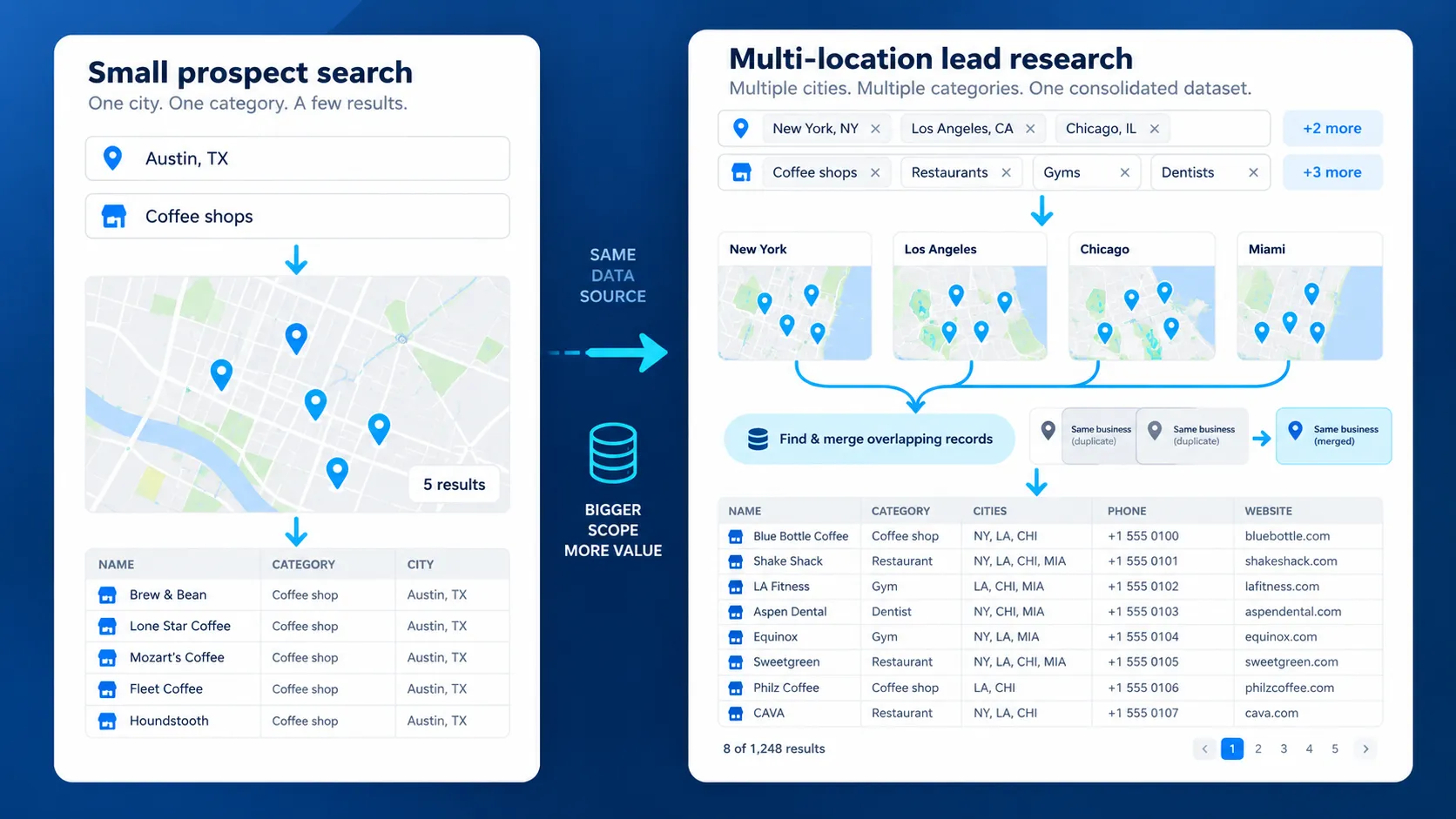
For a small prospect search, that may be enough. Research covering many businesses, categories, or locations requires more planning because a single query may not represent the full market.
Storage and Reuse Rules Matter
Places API data also comes with usage rules. Google’s Places API policies restrict how Places content can be prefetched, cached, or stored. Place IDs are exempt from those caching restrictions and can be stored for later use.
Teams planning to create reusable lead datasets should review these requirements before designing the workflow.
These limits become more noticeable when the same prospecting process has to run across many cities, categories, or search areas.
Outscraper’s Google Maps Places API supports programmatic business-data collection for lead research and automated workflows.
What Happens When Your Lead Search Expands Across Many Locations
A single search may work for one city or business category. The workflow changes when the same research has to cover dozens of locations, categories, or service areas.
Repeating Searches Across Cities and Categories
Text Search (New) returns up to 20 results per page and a maximum of 60 results across all pages for a single query. Nearby Search (New) returns between 1 and 20 results per request.
A lead project covering several markets therefore needs multiple requests. For example, researching dentists across ten cities means running separate searches for each location rather than relying on one broad query.
Request Volume and Cost Increase With Larger Searches
More searches mean more API requests. Google Places API uses pay-as-you-go pricing, and the fields requested can affect which SKU applies to the call. Google also recommends using field masks so requests return only the data needed.
This makes search design more important as the project grows. A small test covering one market has very different usage from repeated searches across hundreds of locations.
Handling Duplicate Businesses Across Searches
Overlapping searches can return the same business more than once. This may happen when nearby areas overlap or when similar queries point to the same place.
A larger prospecting workflow therefore needs a way to identify repeated records before the data moves to the next research stage. Place IDs can help distinguish individual places returned by Google.
Bulk Prospecting Has Different Requirements From App-Based Place Search
Places API works well when an application needs place information in response to a specific search. Google describes Text Search and Nearby Search as methods for finding places from text or geographic criteria, while Place Details retrieves information about a known place.
Bulk prospecting asks a different question: how do you collect business records across many searches, reduce repeated records, add the fields needed for research, and prepare the resulting data for further use?
If your project involves collecting business records across many searches, our Google Maps Data Extraction Guide explains the extraction workflow in more detail.
That difference becomes important when deciding whether to keep building around the official Places API or use a workflow designed around bulk business-data collection.
When to Use Google Places API or a Bulk Business Data Workflow
The better option depends on what the project needs to produce. A place search inside an application has different requirements from collecting business records for research or prospecting.
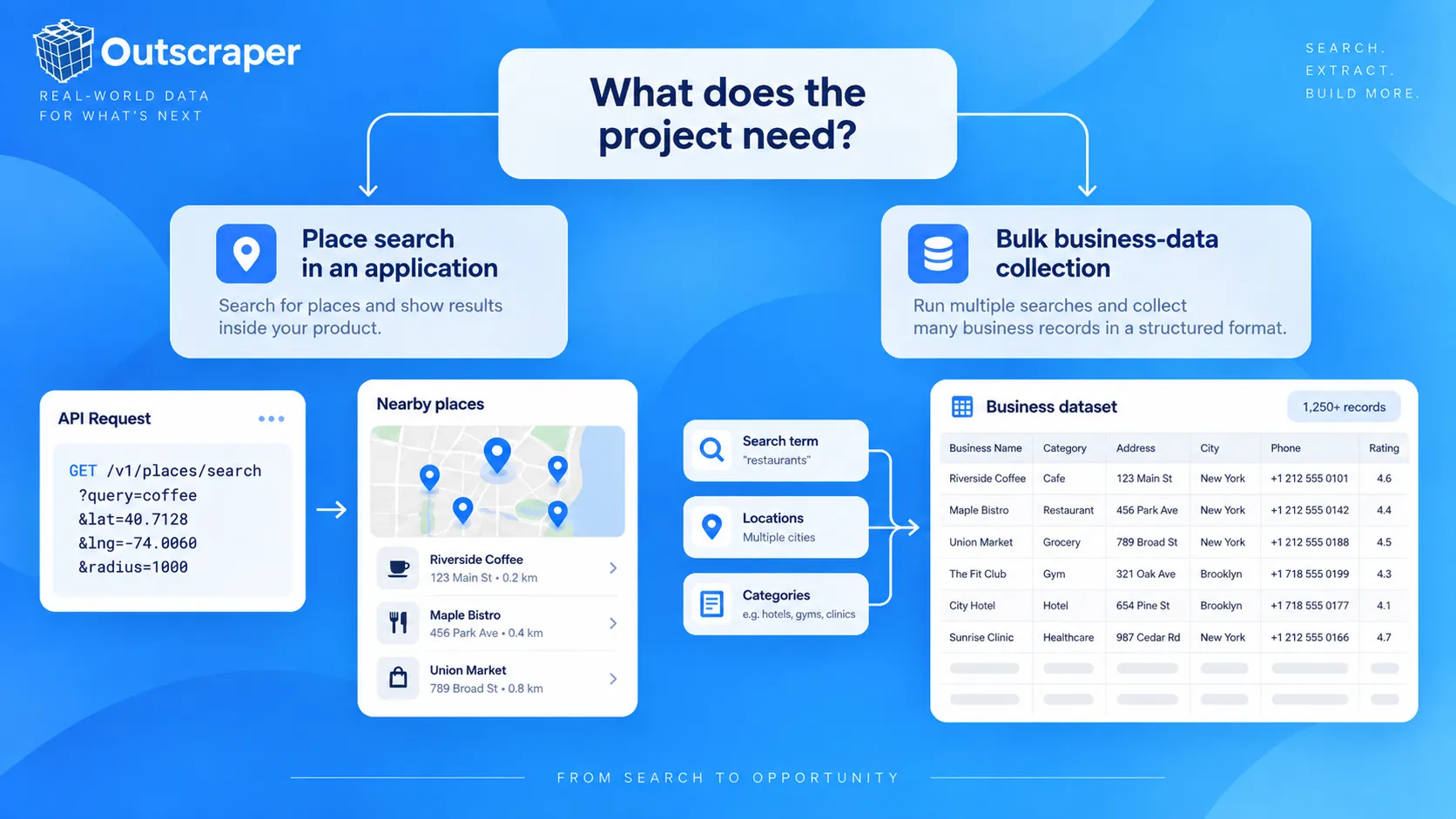
Use Google Places API When Places Power an Application
Google Places API is a strong fit when an application needs to find places in response to a user, location, or specific search.
Text Search and Nearby Search can find places from text or geographic criteria, while Place Details can retrieve information about a known place.
This fits use cases such as:
- showing nearby businesses inside an application;
- searching for businesses around a selected location;
- retrieving details about a known place;
- adding place information to an internal tool.
For the technical side of these workflows, the API Google Maps Places provides programmatic access to business data for applications and automated processes.
Use a Bulk Data Workflow When the Dataset Is the Main Output
The requirements change when the main output is a list of businesses rather than an in-app place search.
A prospecting team may need to search several cities or categories, remove repeated records, select specific columns, and export the results for further research.
This is where a bulk collection workflow becomes more practical than repeating individual place searches.
Using Outscraper Without Building the Collection Layer Yourself
Outscraper's Парсер Google Maps provides a no-code route for collecting Google Maps business data. Its dashboard supports category and location searches, duplicate removal, field selection, and exports including CSV, Excel, Parquet, and JSON.
This can reduce the amount of collection logic a team has to build when the main task is gathering business records for research.
No-Code Collection vs. Programmatic Collection With Outscraper
The same type of business-data workflow can also be handled programmatically.
Outscraper’s Google Maps Places API supports bulk queries and returns structured business data through an API, including fields such as business name, address, phone number, website, rating, reviews, and business status.
Match the tool to the job:
Google Places API: use when place search is part of the application.
Outscraper dashboard: use when the team needs business data without building an API workflow.
Outscraper API: use when bulk business-data collection needs to run inside an automated or custom process.
The deciding factor is the job the data needs to perform, not the number of features available in each option.
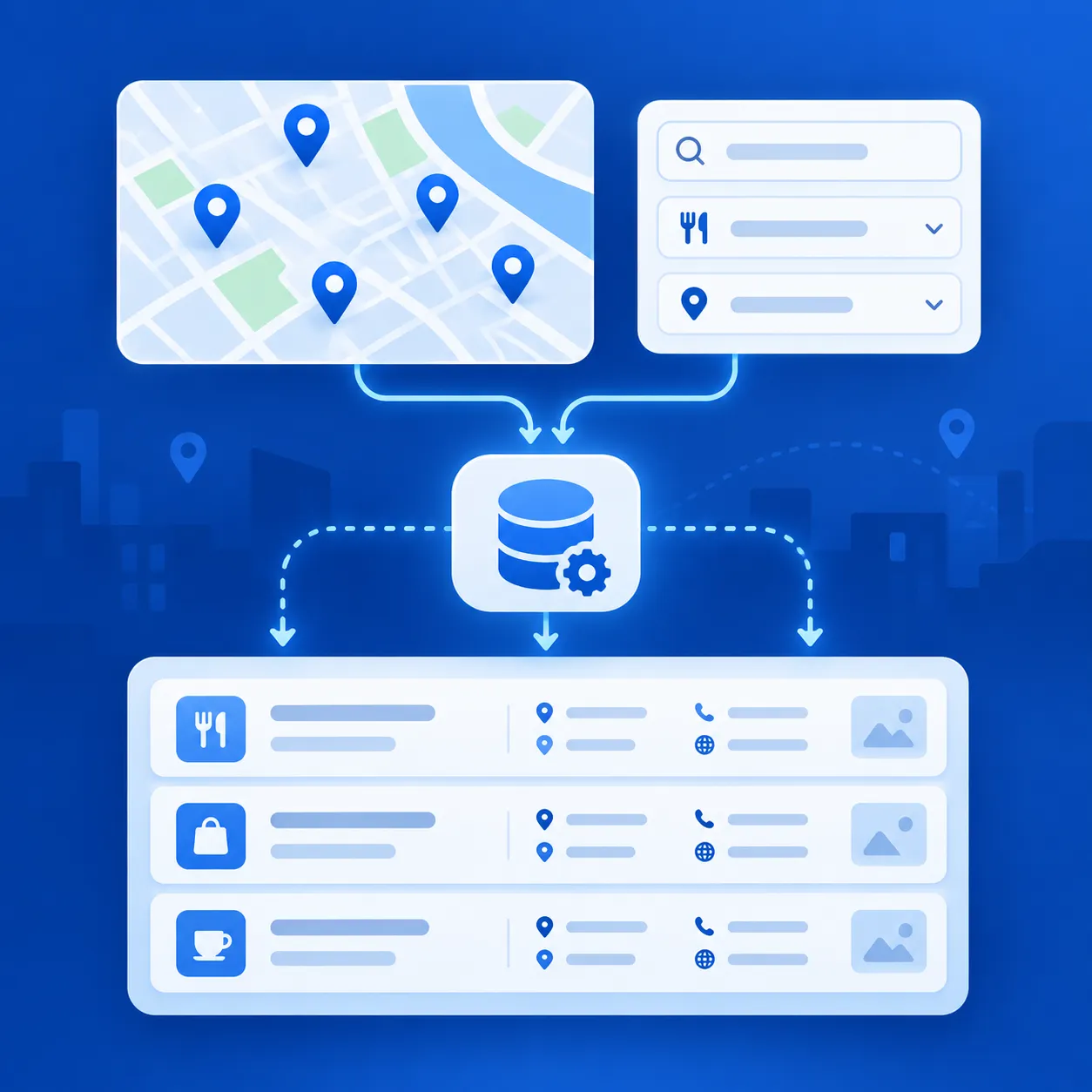
Use Outscraper Google Maps Scraper to collect business records by category and location without setting up your own Places API workflow.
A Simple Google Places API Lead Generation Example
A small example shows how the earlier steps fit together. Assume a sales team wants to research dental practices in Chicago.
Example Target: Dentists in Chicago
The first step is to define a narrow search:
Business type: Стоматологи
Location: Чикаго
Purpose: Find practices that may be worth further prospect research
This keeps the request focused before adding more filters or business details.
Define the Business and Location Criteria
A Text Search query such as “dentists in Chicago” gives Google both the business type and geographic context.
Text Search (New) requires a textQuery and a FieldMask that specifies which fields should be returned.
For an initial search, useful fields may include:
- название компании;
- formatted address;
- веб-сайт;
- номер телефона;
- рейтинг;
- business status.
Search for Matching Businesses
The request returns a list of matching places. Each result is represented as a Place object, and the fields included depend on the FieldMask used in the request.
At this point, the team can review whether the returned businesses match the original target rather than treating every result as a finished lead.
Request More Details When Needed
If one business needs closer review, its Place ID can be passed to Place Details (New). Google supports retrieving information such as the address, phone number, rating, reviews, and other place details for a known Place ID.
This avoids requesting more information than needed for every business in the first search.
Review Whether the Results Fit the Lead Research Task
The search gives the team a list of businesses that match the query. From there, the team can check which records fit the campaign criteria and which ones need more research.
A matching result is a starting point, not a finished lead.
Final Checklist: Google Places API for Lead Generation
- Define the business type, location, and basic prospect criteria.
- Choose Text Search or Nearby Search based on how the market is defined.
- Request only the business fields needed for the research task.
- Review the returned businesses before treating them as leads.
- Check API limits, usage rules, and cost before expanding across more locations.
- Decide whether the official Places API or a bulk business-data workflow better fits the project.
For lead research across many locations or categories, Outscraper provides a no-code Google Maps Scraper and API-based options for collecting business data.
Часто Задаваемые Вопросы
Наиболее частые вопросы и ответы
Google Places API can be used for business discovery and prospect research. Text Search and Nearby Search can find businesses by query or location, while Place Details can return more information about a known business. How the returned data is stored and reused must follow Google Maps Platform policies.
No standard business email field appears in Google’s current Places API field list. Available fields include items such as phone numbers, websites, addresses, ratings, and other place information.
Yes. Text Search can use queries such as a business type combined with a city, while Nearby Search can find places within a defined geographic area. Google also supports place types and location controls for refining searches.
The API can support repeated business searches, but larger prospecting projects require more requests, careful field selection, and attention to Google’s usage and storage rules. If the main output is a bulk business dataset, the workflow has different requirements from an application that looks up places when needed.
Google restricts how Places content can be cached and stored. Place IDs are specifically allowed to be stored and reused, and Google recommends refreshing stored Place IDs that are more than 12 months old. Teams planning a reusable dataset should review the current Places API policies before storing other returned content.
Google Places API is designed for applications that search for places and retrieve place information through Google’s supported API. A Google Maps scraper is built around collecting business records from Google Maps for data workflows. The better fit depends on whether the project needs place information inside an application or business records as the main output.