목차
Google Places API vs Google Maps API is a common comparison for developers and businesses building applications that need interactive maps, business information, or location-based search. Both services belong to Google Maps Platform, but they handle different tasks and can work together.
For example, a developer building a store locator may need to display locations on a map, allow customers to search for nearby stores, and retrieve business details such as addresses, opening hours, and ratings. Choosing the right API depends on the features the application needs.
The difference also matters for lead generation, market research, and business directories. These tasks often require collecting and working with business records rather than simply displaying locations or retrieving individual place details.
Key points when comparing Google Places API vs Google Maps API:
- Main purpose: Google Maps displays interactive maps, while Google Places provides place search and business information.
- 주요 기능: Both support location-based applications but serve different needs.
- Use cases: Choose based on whether you need maps, business details, or both.
- 가격: Costs depend on API usage, request types, and selected data fields.
- Using both APIs: Combine map display and place search in applications such as store locators.
- Bulk data collection: 아웃 스크레이퍼 is an option for collecting 구글 지도 비즈니스 정보 across multiple locations or categories.
Retrieve structured business records for your applications with Outscraper Google Places API.
What Is the Difference Between Google Places API and Google Maps API?
The main difference between Google Places API and Google Maps API is how they handle location information. Google Maps JavaScript API focuses on displaying and interacting with maps, while Google Places API (New) focuses on searching for places and retrieving information about them.
Both services are part of Google Maps Platform. They can be used separately or together, depending on what an application needs.

Google Maps JavaScript API: Interactive Maps and Visualization
Google Maps JavaScript API allows developers to add interactive maps to websites and web applications. Users can zoom, move around the map, and interact with markers representing specific locations.
For example, a retail company can display its store locations on a map, allowing customers to see where each branch is located.
Developers can also customize map appearance, add markers, and connect map interactions to other application features.
Google Maps JavaScript API includes a Places library, so developers can add place search and related functionality without treating map display and place search as entirely separate systems.
Google Places API: Business Search and Place Information
Google Places API (New) provides access to information about places, including businesses, landmarks, and other points of interest.
Developers can use it to search for places by name, category, or location and request available details such as:
- Business names and addresses
- Geographic coordinates
- 전화번호 및 웹사이트
- 운영 시간
- Ratings and reviews
- Place photos
The information returned depends on the endpoint, requested fields, and available data.
For example, a restaurant discovery application can use Places API to find nearby restaurants and retrieve details that help users compare their options.
Unlike an API focused on rendering maps, the Places API (New) web service can return structured place information without requiring an interactive map to be displayed.
For detailed setup instructions, request examples, and field selection, see the Google Places API 가이드.
Google Places API vs Google Maps API: Features Compared
Choosing between Google Places API and Google Maps API depends on how your application searches, displays, and processes location information. While some features overlap, others require a specific Google Maps Platform service.
| 특징 | Google Maps JavaScript API | Google Places API (New) |
|---|---|---|
| Primary purpose | Interactive map display | Place search and data retrieval |
| Interactive maps | Supported | No map rendering |
| Custom map markers | Supported | Not supported |
| Business search | Through Places library | Supported |
| Nearby search | Through Places library | Supported |
| Search autocomplete | Through Places library | Supported |
| Place details | Through Places library | Supported |
| 업체 목록 | Through Places library | Supported |
| Place photos | Through Places library | Supported |
| Ratings and reviews | Through Places library | Supported |
| 지오코딩 | Through geocoding service | Returns place coordinates; general geocoding is a separate service |
| Lead generation | Limited as a data collection method | Supports business discovery, subject to usage restrictions |
| Development requirements | Browser-side JavaScript | REST API requests, typically from a backend |
| Pricing considerations | Map loads and additional service usage | Request types and requested data fields |
| Best use cases | Interactive maps and location-based interfaces | Business search, place lookup, and location information retrieval |
Maps JavaScript API supports place search and business details through its Places library, while Places API (New) provides access to these features through a web service.
What Business Data Can You Retrieve With Google Places API?
Google Places API returns structured information based on the requested location, search query, or Place ID. Available data fields include:
- Business identification: Place ID, business name, and business category.
- Location information: Address, latitude, and longitude.
- Contact information: Phone number and website URL.
- Business operations: Opening hours and business status.
- Customer feedback: Ratings, review count, and up to five reviews through Place Details.
- Visual information: Place photo references.
Developers can specify which fields they need using a field mask. For example, an application displaying nearby dental clinics may only need business names, addresses, coordinates, and opening hours rather than reviews and photos.
Not every business listing contains all requested fields. Google also applies restrictions on how Places data can be stored, displayed, and reused. These requirements should be reviewed before using the API for business directories, CRM enrichment, or large-scale data collection.
Check API endpoints, request parameters, and response examples for collecting Google Maps business data.
When Should You Use Google Places API or Google Maps API?
Start with the expected output of your project. Do users need to interact with a map, search for nearby businesses, or retrieve information about specific locations? Each task has different requirements.
Interactive Maps and Store Locators
Google Maps JavaScript API is suitable for applications where users need to view and interact with geographic locations.
Common examples include:
- Retail websites displaying branch locations.
- Real estate platforms showing properties on a map.
- Hotel booking websites displaying accommodation locations.
- Franchise websites showing their physical locations.
A retailer with an existing database of store addresses and coordinates can display those locations using Maps JavaScript API without requesting business details through Places API.
Business Search and Place Details
Google Places API is suitable for applications that need to find places or retrieve information about businesses.
For example, a travel application can use Nearby Search to find restaurants around a hotel. It can then request business details such as opening hours, ratings, and addresses to help travelers decide where to eat.
Other practical uses include address autocomplete, local business discovery, and displaying business information within an application.
Developers can also follow practical API request examples to find local businesses with Google Places API.
Lead Generation, Market Research, and Business Directories
These use cases often require business records rather than interactive maps.
A marketing agency researching dental clinics across several cities may need business names, phone numbers, websites, and locations. A market research team may need business categories and geographic coordinates to study competition across different areas.
Google Places API can support business discovery, but search result limits, request costs, and Google’s data storage and usage restrictions need to be considered before collecting records at scale.
Teams researching potential customers can also review how to use 잠재 고객 유치를 위한 Google Places API.
Business directories have similar requirements. Places API can support place discovery and details, while Maps JavaScript API can display business locations. However, building and maintaining a directory requires careful consideration of how the underlying data is collected, stored, and updated.
For a practical example, see how to build a business directory using Google Places API

Start retrieving structured Google Maps business data for your applications, research, and lead generation workflows.
How Do Google Places API and Google Maps API Pricing Differ?
Google Places API and Google Maps JavaScript API follow a usage-based pricing model. The cost depends on the services used, monthly usage, and the billing category, also known as a SKU (Stock Keeping Unit).
Map Loads vs Place Search and Details Requests
Google Maps JavaScript API charges for interactive map loads under the Dynamic Maps SKU. Other services, such as Street View, geocoding, and Places functionality, may generate separate charges.
Google Places API pricing depends on the type of request, such as Nearby Search, Text Search, Place Details, or Autocomplete. Each request type has its own billing conditions.
For example, a store locator displaying locations from an existing database may only generate map-related charges. Adding business search and place details introduces further billing considerations.
How Usage and Requested Fields Affect Costs
Several factors affect the total cost of using these APIs:
- Map loads: How often an interactive map is loaded.
- 요청 건수: The number of API requests made each month.
- Request type: The specific search or data retrieval method used.
- 필수 입력 항목: The information requested through Places API.
- Free usage caps: The monthly allowance for each billing SKU.
For Place Details, Nearby Search, and Text Search requests, Google applies the highest billing category associated with the requested fields. Selecting only the information your application needs can help control costs.
Review the official Google Maps Platform pricing list before estimating expenses, especially for applications that combine map display and place search.
When Should You Use Google Places API and Google Maps API Together?
Applications that require both interactive maps and place search can benefit from using these services together. Maps JavaScript API provides the visual interface, while Places functionality supplies the information users need to find and select locations.
Common examples include travel planning applications, local business directories, and location-based search platforms.
Example: Building a Searchable Store Locator
Consider a retailer that wants customers to find the nearest branch by entering their address or neighborhood. The application needs to accept a location search, identify nearby branches, and display them on an interactive map.
A typical workflow involves four steps:
- Display the map: Use Maps JavaScript API to load an interactive map.
- Accept a location search: Use Places Autocomplete to suggest locations as the customer types.
- Find nearby branches: Compare the selected location’s coordinates with the retailer’s existing store database.
- Display the results: Add markers for nearby branches and show relevant store information.

If the application also needs business information from Google, it can request supported fields through the Places library or Places API (New) web service.
The retailer does not need to request every business detail from Google if that information already exists in its own database. Keeping these tasks separate can reduce unnecessary API requests and associated costs.
When Does Outscraper Make Sense for Business Data Collection?
A developer building an interactive map has different requirements from a marketing agency collecting thousands of business records. One needs application features, while the other needs a dataset that can be used outside the map interface.
Application Features vs Bulk Business Data Collection
Google Places API works well for applications that need to search for places and retrieve business information. However, collecting business records across multiple cities or categories requires planning around search limits, API requests, costs, and data usage restrictions.
아웃 스크레이퍼 Google 지도 스크레이퍼 offers a no-code approach to collecting business data in bulk without building a custom extraction system.
For example, a market research team studying dental clinics across several cities can collect business names, addresses, phone numbers, websites, ratings, and other available listing information for further analysis.
Choosing an API or a Business Data Collection Workflow
The choice depends on what you intend to do with the information:
- Google Maps JavaScript API: Display interactive maps and location-based interfaces.
- Google Places API: Search for places and retrieve information within an application.
- Outscraper Google Maps Scraper: Collect structured business records for research, lead generation, and other data workflows.
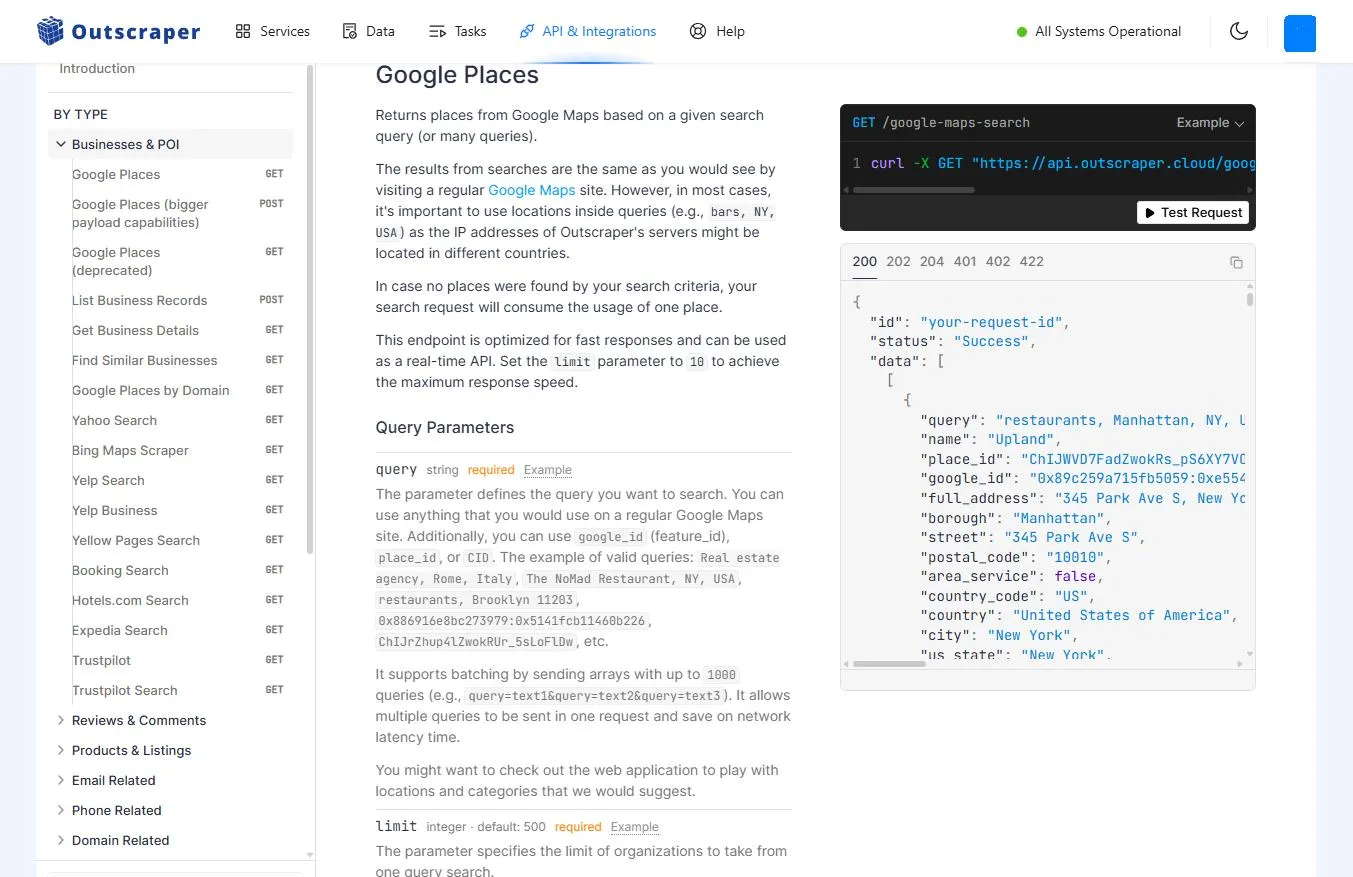
Developers who need structured business records for their applications can use the Outscraper Google Places API to collect business data programmatically.
For a closer comparison of official Google APIs and data extraction methods, read Google Maps API vs. Web Scraping: Which Is Better?.
Final Checklist: Choosing Between Google Places API and Google Maps API
- Use Google Maps JavaScript API for interactive map display.
- Use Google Places API for place search and business details.
- Combine both services when your application needs maps and place search.
- Review API pricing, search limits, and data usage restrictions.
- Consider Outscraper when you need to collect business data in bulk.
Collect Google Maps business data across multiple locations and categories with 아웃 스크레이퍼, without building a custom extraction system.
자주하는 질문
가장 자주 묻는 질문과 답변
No. Google Places API focuses on place search and business information, while Google Maps JavaScript API focuses on interactive map display. Both belong to Google Maps Platform.
Yes. Developers can request place information through Places API (New) without displaying an interactive map, subject to Google’s attribution and data usage requirements.
Not necessarily. Maps JavaScript API may be enough if you already have store locations and coordinates. Places functionality is useful when customers need location search, autocomplete, or additional place details.
No. Google Places API can return available business phone numbers and website URLs, but email addresses are not supported data fields.
Google restricts the storage and reuse of Places API data. Place IDs can be stored indefinitely, while other fields are subject to specific restrictions. Review Google’s Places API policies before storing data.
Google Places API is Google’s official service for place search and information retrieval. Outscraper Google Places API focuses on collecting structured business data in bulk for research, lead generation, and business applications.