Table des matières
If your Le Scraping Google Maps cost was higher than expected, start by checking one setting: enrichment.
With pay-as-you-go pricing, the final cost depends on which services your task uses. A base Google Maps Scraper task collects business records. When enrichment is enabled, Outscraper can also process contact, domain, or phone-related data after those records are collected.
This is the part users often miss: 1,000 Google Maps results may not mean 1,000 base records only. If enrichment is selected, the task may include:
1,000 Google Maps results + selected enrichment services. Those are not always the same billing layer.
Before running a large task, check two things: how many Google Maps results will be extracted et l' which enrichment services are enabled.
This helps you estimate the final cost more accurately and avoid unexpected charges.
Google Maps Scraper pricing can increase when enrichment add-ons are selected. A base task collects Google Maps business records. Enrichment can add extra contact, domain, phone, company, or review analysis data, and each add-on may use a different billing unit.
Google Maps Scraper Pricing: Base Results and Enrichment Add-Ons
To understand the final cost, separate your task into two parts: the Google Maps results et l' the enrichment services.
Part 1: Base Google Maps Results
The base Google Maps Scraper task returns places data from Google Maps based on your selected category, location, filters, and result limit.
This is the cost many users expect when they start a task.
Part 2: Optional Enrichment Services
Enrichment is separate from the base scrape. It is optional and billed separately when selected.
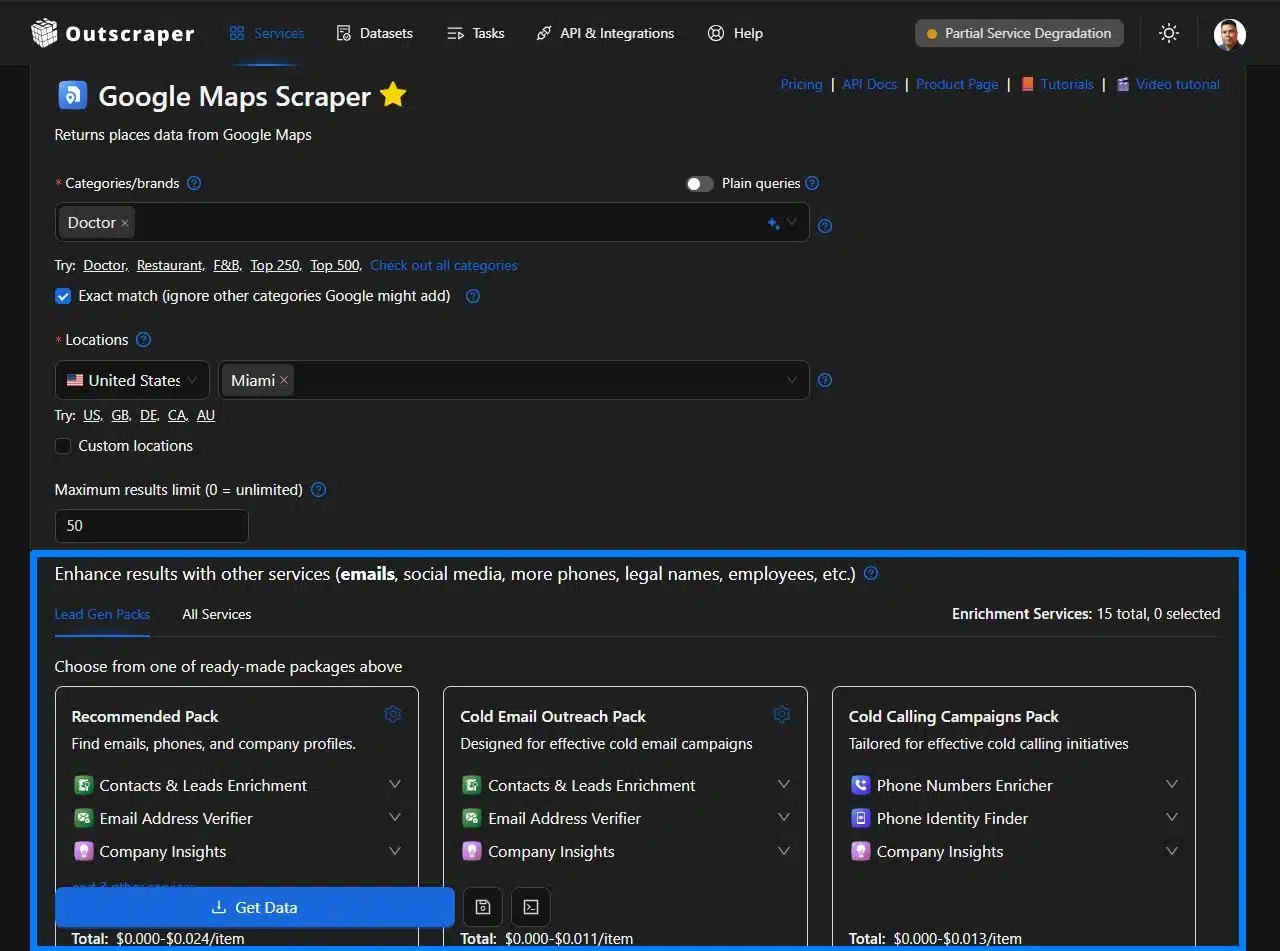
Inside the Google Maps Scraper dashboard, enrichment appears under:
“Enhance results with other services.”
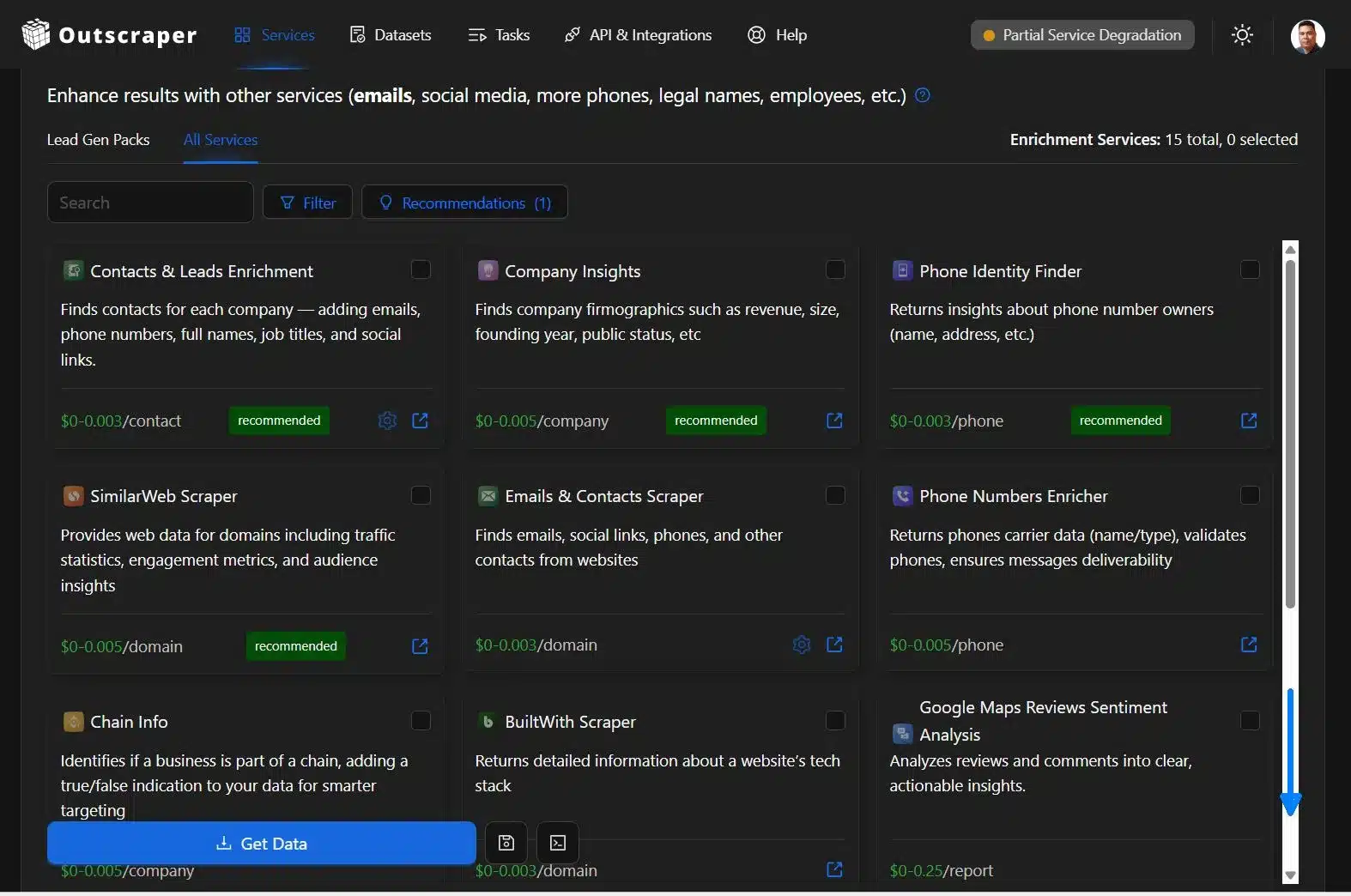
These services can add data such as emails, social media links, more phones, legal names, employees, company details, domain data, phone details, or review summaries.
If you want a closer look at what each add-on does, read our guide to enrichment services.
Use this table to separate the base scraper cost from optional enrichment usage.
For a broader pricing overview, read the guide on how Outscraper pricing works.
| Task Part | What It Does | What to Check |
|---|---|---|
| Base Google Maps Scraper | Returns Google Maps business records. | Category, location, filters, and result limit. |
| Enrichment add-ons | Add extra contact, domain, phone, or company data. | Selected service and billing unit. |
| Final task cost | Combines base scraping and selected enrichment usage. | Result count plus enrichment settings. |
Why 1,000 Results May Cost More Than 1,000 Base Records
If you scrape 1,000 Google Maps results with no enrichment, the task is based on the base scraper usage.
But if you select enrichment, the task may include:
1,000 Google Maps results + selected enrichment services
Those services may be billed by contact, company, domain, phone, or report, depending on which add-on is selected.
Before running a large task, check both:
How many Google Maps results will be extracted?
Which enrichment services are selected?
That is the easiest way to understand why the final cost may be different from the base scraper cost.
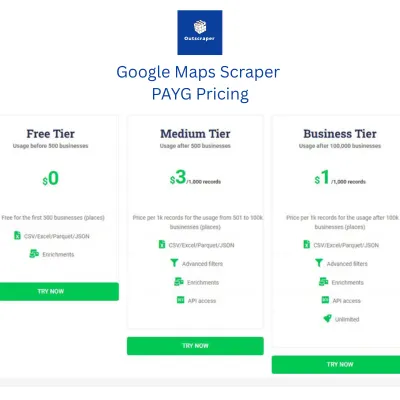
Check Google Maps Scraper pricing and enrichment settings before scaling. See what affects the final cost.
What Enrichment Actually Adds to Your Data
Enrichment adds extra details to your Google Maps results when selected.
It does not replace the base scrape. It adds another data layer on top of the business records.
Leads and Contacts Data
Some enrichment services can add emails, phone numbers, full names, job titles, and social links.
This is useful when you need a lead list, not just a list of businesses. This helps teams prepare data for outreach, CRM uploads, and client work.
For a closer look at this add-on, see Leads & Contacts Enrichment.
Company, Website, and Domain Data
Other services can add business or website details, such as company size, revenue range, founding year, domain information, website technology data, or contacts from websites.
This helps agencies, developers, and sales teams qualify records before outreach.
Phone and Review Analysis Data
Phone-related services can add phone owner data, carrier information, phone type, validation, or deliverability checks.
Some report-based services can also summarize or analyze reviews.
Each enrichment type may use a different billing unit, such as contact, company, domain, phone, ou report. Review sentiment analysis and review summaries are examples of report-based add-ons.
When Google Maps Scraper Pricing Can Increase With Enrichment
Enrichment can increase the final cost when your task processes more than the base Google Maps records.
Depending on the selected service, Outscraper may also process contacts, companies, domains, phone numbers, or reports.
Enrichment Is Selected for a Large List
If you scrape a small sample, the added cost may be small.
But if you scrape hundreds or thousands of Google Maps results with enrichment enabled, the extra usage can add up.
Example:
500 Google Maps results only
is different from:
500 Google Maps results + enrichment
The Billing Unit Is Different
Not every enrichment service is billed the same way.
Some are billed by contacter. Others are billed by company, domain, phone, ou report, depending on the selected add-on.
So the final cost depends on both:
- “How many Google Maps results are returned”
- “Which enrichment service is selected”
Broad Searches or Repeated Runs Add Usage
Broad searches can return more results than expected, especially with large categories, big locations, multiple locations, or high result limits.
Repeated tasks can also add usage. If you run the same task several times with enrichment enabled, each run may add to your total cost.
Start with a small Google Maps Scraper test. Review the base results, then add enrichment only if you need more contact, domain, phone, or company data.
Before running a large Google Maps Scraper task, check the setup first.
Most surprise costs come from three things: large result limits, broad searches, and selected enrichment services.
Start With a Small Test
Run a small sample before scraping hundreds or thousands of results.
This helps you check the output, selected fields, and enrichment usage before scaling.
Check the Enrichment Area
If you only need base Google Maps results, make sure no enrichment service is selected.
If enrichment is selected, check what it adds and what billing unit it uses, such as contact, company, domain, phone, or report.
Review the Result Limit and Search Scope
Broad categories, large locations, and high result limits can increase usage.
Before starting, check your category, location, filters, result limit, and selected enrichment services.
Quick Pre-Run Check
Answer these before clicking run.
Separate the Scrape From the Enrichment
If your Google Maps Scraper cost looks higher than expected, do not check the result count alone.
Check whether enrichment was selected.
Base scraping and enrichment are separate parts of the task. The base scrape returns Google Maps business records. Enrichment adds extra data, such as contacts, domains, phone details, company data, or review reports.
The Simple Rule
Before running a task, ask:
Am I only scraping Google Maps results?
Or am I also adding enrichment services?
If enrichment is selected, the final cost can include more than the base scraper usage.
Before You Scale: 5-Step Pricing Check
- Run a small Google Maps Scraper test.
- Check how many results were returned.
- Review which enrichment services were selected.
- Check the billing unit for each add-on.
- Scale only after the result count, add-ons, and billing units are clear.
The FAQ below answers the most common questions about Google Maps Scraper pricing, enrichment add-ons, and final task costs.
If your Google Maps Scraper pricing still looks unclear, send your task details to Outscraper support. The team can review the result count, selected enrichment services, and usage shown in your account.
FAQ
Questions et réponses les plus fréquentes
Your task may have included enrichment services in addition to the base Google Maps results. Check whether enrichment was selected, how many results were requested, and how broad the search was.
No. Enrichment is optional. If you only need base Google Maps business records, make sure no enrichment service is selected before running the task.
Enrichment is billed separately when selected. It can add extra contact, domain, phone, company, or review analysis data to the base Google Maps results.
Different enrichment services may use different billing units. Depending on the selected service, billing may be based on contact, company, domain, phone, or report.
Start with a small test. Then check the result limit, search location, filters, selected enrichment services, and the billing unit used by each add-on.