Оглавление
Building an AI mini SaaS with Google Maps data starts with a simple question: what repeatable task should the product handle for the user?
The recent popularity of Grok-style workflows shows how quickly AI can analyze competitor information, reviews, and local business signals. But the quality of that analysis still depends on the data supplied to the model. A prompt alone cannot replace a reliable data source.
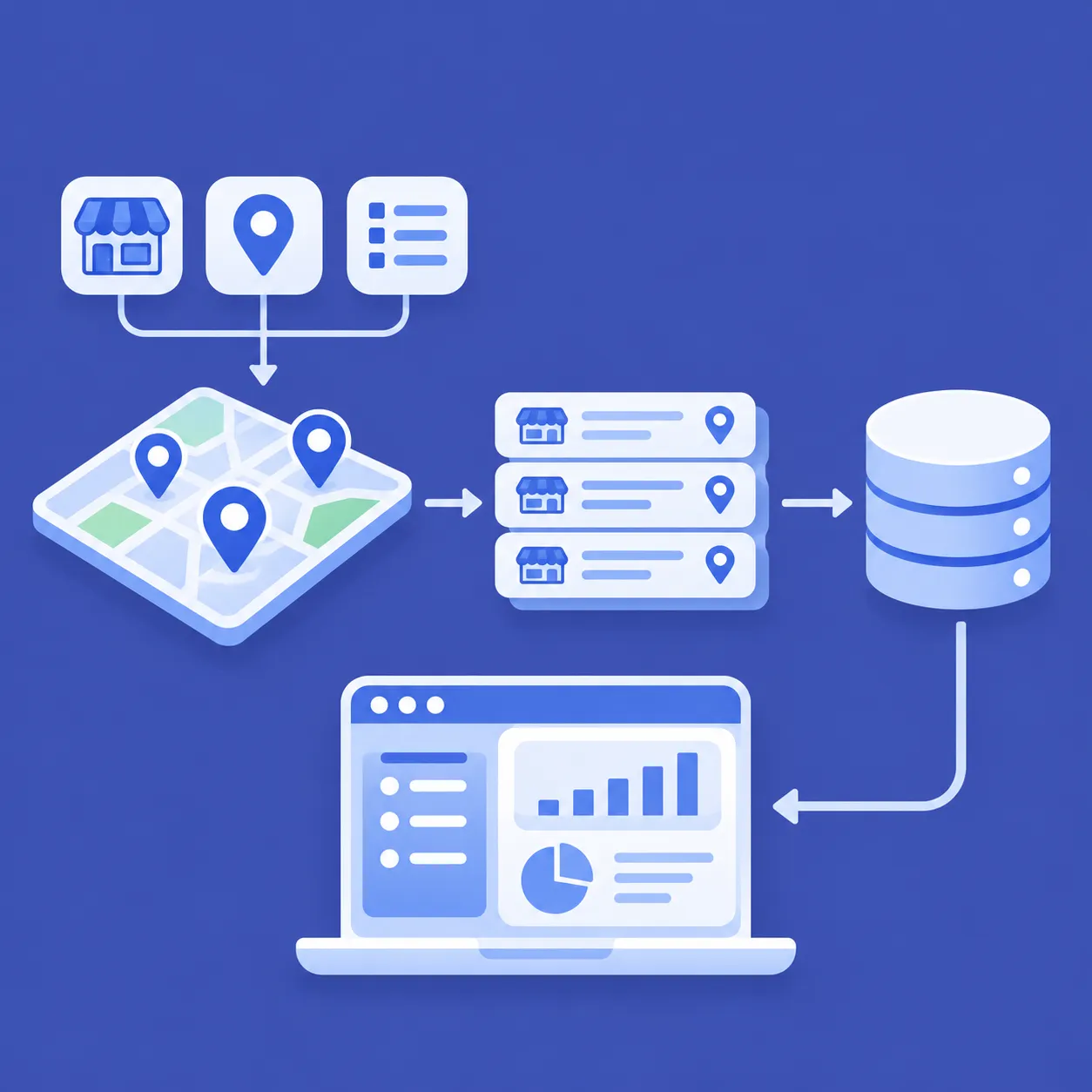
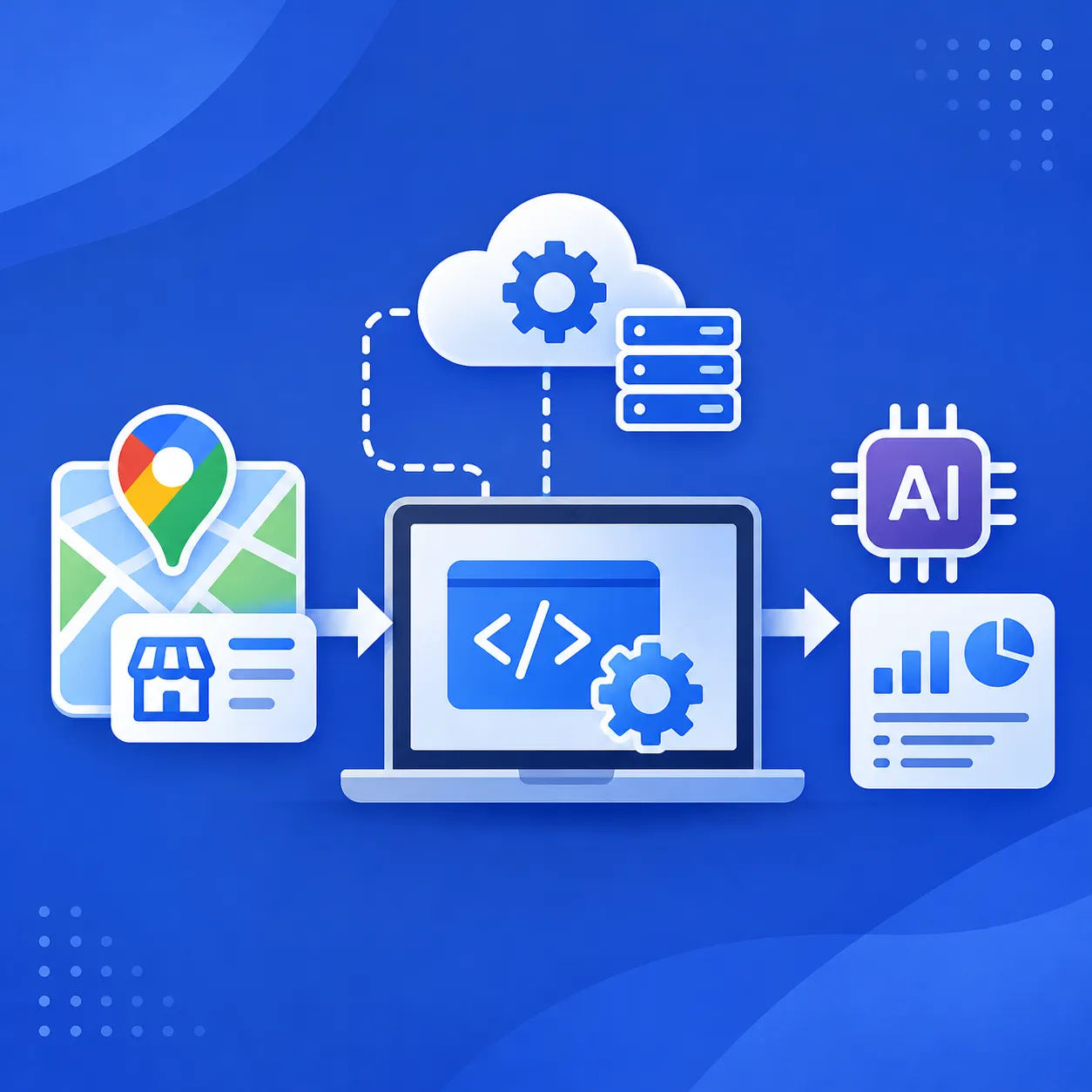
A stronger setup separates the work into layers. Outscraper collects structured Google Maps business data, your application stores the records, and an AI model such as Grok analyzes only the fields needed for the task.
For this example, the product will be a local competitor intelligence tool that turns collected business records into a repeatable AI analysis workflow.
Quick Answer: How to Build an AI-Powered Mini SaaS With Google Maps Data
- Choose one repeatable business problem, such as comparing local competitors.
- Collect the required business records with Outscraper.
- Store and structure the fields your application needs.
- Send selected records to Grok or another AI model for analysis.
- Return the result inside your app as a reusable feature, report, or dashboard.
Keep data collection and AI analysis separate. Outscraper supplies the business records, while the AI model works with those records to compare patterns and produce the output your app needs.

Outscraper’s Google Maps Scraper can collect the local business records you need before you build the AI analysis layer.
Start With One Problem Your Mini SaaS Can Solve
A mini SaaS works best when it solves one repeated problem instead of trying to cover an entire local SEO workflow.
For this article, the example product is a local competitor intelligence tool. A user selects a business category and location, the app collects relevant business records, and the AI compares those records for patterns the user can review.
That is much easier to build and explain than a tool that tries to handle categories, reviews, posts, backlinks, keywords, citations, and reporting at the same time.
Why a Mini SaaS Needs a Narrow Job
The product should start with a question the user may need to answer again and again.
Например:
- Which local competitors have the strongest review presence?
- Which businesses appear across several nearby locations?
- Which competitors have higher ratings or more reviews?
- Which businesses in a market have websites or phone numbers listed?
- Which patterns appear across the top businesses in a category?
Each question can become a feature, but the first version does not need to answer all of them.
A smaller scope also makes the data requirements clearer. If the app is built to compare local competitors, it only needs the fields required for that comparison.
Choose a Problem That Depends on Local Business Data
The best fit for Outscraper is a product that needs structured business records as part of its core workflow.
That can include:
- competitor research
- local market research
- review analysis
- business directory creation
- agency prospect research
- location-based market comparison
The data should serve a clear purpose inside the product. Collecting thousands of records without knowing what the app will do with them only adds more processing and storage work.
Example: A Local Competitor Intelligence Tool
A simple version could ask the user for:
- категория бизнеса
- city or region
- number of competitors to compare
The app could then collect matching business records and compare fields such as rating, review count, category, website presence, phone availability, and location.
For a deeper competitor comparison workflow, see how to build a Google Maps competitor benchmark from structured business data.
The AI layer can then turn those records into a short comparison, flag visible differences, and return a result the user can review inside the dashboard.
That gives the mini SaaS a clear job: collect local competitor data, compare it, and present the differences in a repeatable format.
Use Outscraper as the Google Maps Data Layer
The mini SaaS needs a dependable source of business records before the AI can compare anything.
For the local competitor intelligence example, Outscraper Парсер Google Maps handles the Google Maps data collection stage. The app can request business records for a selected category and location, then pass the returned data into the rest of the workflow.
This keeps the product focused on what happens after collection instead of requiring the developer to maintain a separate scraping system.
Define the Market, Category, and Location
Start with the inputs the user actually controls.
Например:
- category: doctors
- location: San Francisco, California
- result limit: based on the size of the comparison
- optional filters: only fields or records needed for the use case
These inputs become the search parameters used to collect the business records.
A competitor intelligence tool does not need to collect an entire market if the user only wants to compare a smaller group. The request should match the task the app is built to complete.
Choose Only the Business Fields the App Needs
More fields do not automatically make the analysis better.
For a basic competitor comparison, the app may only need:
- название компании
- категория
- рейтинг
- количество отзывов
- сайт
- номер телефона
- адрес
- широта и долгота
- статус компании
- Google Maps URL or place identifier
The exact fields should depend on what the product compares.
If the app only looks at review strength, there is little reason to send unrelated fields to the AI model. Keeping the record smaller also makes the next analysis step easier to control.
Collect and Store the Records Before AI Analysis
Once Outscraper returns the business records, the application should store the source data before sending selected fields to Grok.
This gives the app a stable record of what was collected and makes it easier to:
- rerun an analysis without collecting the same market again
- compare results from different dates
- inspect the source data when an AI response looks unusual
- add new analysis features later
- keep the AI input separate from the original dataset
The existing Outscraper tutorial on building a location-based app with Google Maps data and Supabase already covers the storage and application side in more detail. For this mini SaaS workflow, the important step is keeping the collected business records available before the AI layer starts working with them.
Use Outscraper Google Maps Scraper to collect structured business records by category and location, then use those records inside your application.
Turn Outscraper Data Into Context for Grok
Once the business records are collected, the next step is deciding what the AI model should receive.
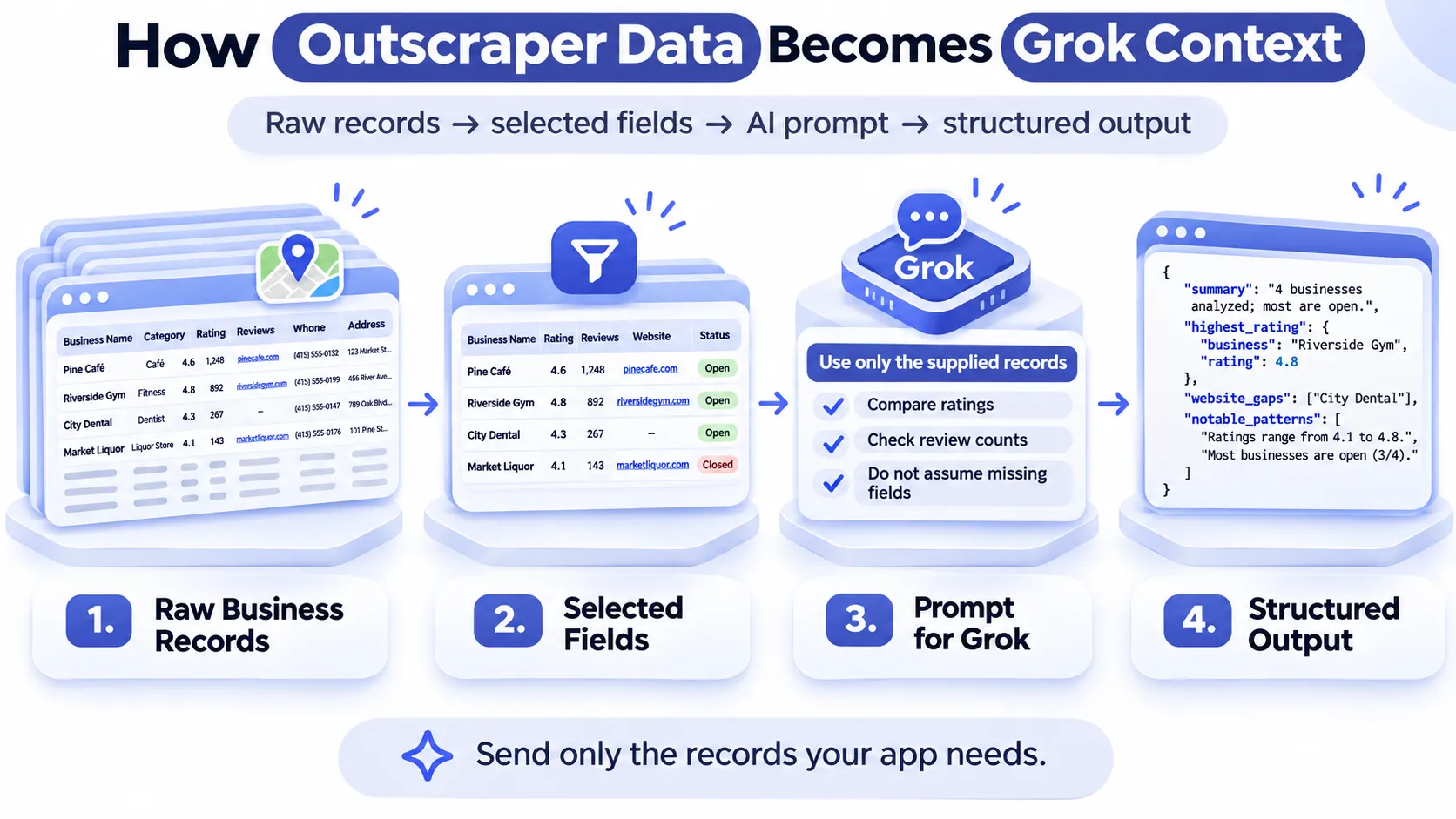
Sending a raw export with every available field can create noisy prompts and make the output harder to control. A better approach is to pass only the records and fields needed for the question the app is trying to answer.
For the local competitor intelligence example, the AI does not need to search for the businesses again. It can work from the structured data already collected by Outscraper.
If you need the collection process first, see how to get started with Google Maps scraping before connecting the data to your application.
Why Generic AI Prompts Produce Weaker Analysis
A prompt such as:”Compare doctors in San Francisco and tell me which businesses look strongest.” leaves too much room for the model to decide where the information should come from and what should count as “strongest.”
The app can make that task more specific by supplying the actual records and defining the comparison.
For example, the input can include:
- название компании
- категория
- рейтинг
- количество отзывов
- website availability
- phone availability
- статус компании
- местоположение
The prompt can then ask the model to compare only those fields.
Build Prompts From Structured Business Records
Instead of writing the prompt manually every time, the application can create it from the stored dataset.
A simplified input might look like this:
					Market: Doctors
Location: San Francisco, California

Business A
Rating: 4.8
Reviews: 620
Website: Yes
Phone: Yes

Business B
Rating: 4.5
Reviews: 280
Website: Yes
Phone: Yes

Business C
Rating: 4.9
Reviews: 95
Website: No
Phone: Yes
The analysis request could then ask Grok to:
- compare the businesses using only the supplied records
- identify visible differences
- group similar businesses
- flag unusual values
- avoid adding facts that are not present in the dataset
This makes the AI response easier to check against the source records.
Developers using OpenAI models can also use Structured Outputs to return responses that follow a defined JSON schema.
Ask the Model to Work Only From the Supplied Data
The prompt should clearly separate what the model knows from what the application has collected.
Например:
					Use only the business records below.

Do not search for additional information.
Do not assume missing fields.
Do not estimate values that are not present.

Compare the businesses based on rating, review count, website availability, and business status.
This matters when the result will appear inside a SaaS product.
A user should be able to trace the analysis back to the source records instead of wondering whether the AI added outside information.
Return Structured Output the Application Can Store
Free-form paragraphs are useful for reading, but they are harder for an application to reuse.
The AI response can instead follow a fixed structure, such as:
					{
  "summary": "Business A has the largest review count...",
  "highest_review_count": "Business A",
  "highest_rating": "Business C",
  "website_gaps": ["Business C"],
  "notable_patterns": [
    "Two of three businesses have websites",
    "Business C has the highest rating but the fewest reviews"
  ]
}
Structured output makes it easier to display the same analysis in cards, tables, reports, or dashboards.
It also gives the mini SaaS room to add new features later without rebuilding the entire data collection process.
Use Outscraper’s Google Maps Places API to bring structured business records into your application, then pass only the fields you need into your AI analysis step.
Build the AI Mini SaaS Workflow With Google Maps Data
At this point, the product already has the two parts it needs: a source of business data and an AI model that can work with selected records.
The next step is connecting those parts into one repeatable user flow.
For the local competitor intelligence example, the full process can be kept simple:
					User input
↓
Outscraper data request
↓
Stored business records
↓
Selected fields sent to Grok
↓
Structured AI response
↓
Dashboard output
Each stage should do one job and pass a clear result to the next stage.
User Submits a Market or Competitor Query
The workflow starts with a small form.
The user could enter:
- категория бизнеса
- city or region
- number of businesses to compare
- optional comparison criteria
Например:
					Category: Doctors
Location: San Francisco, California
Compare: 10 businesses
Focus: Rating, review count, website presence
These inputs define both the data request and the later AI analysis.
The user should not need to write a long prompt. The application can turn the form inputs into the required data request and analysis instructions in the background.
Outscraper Returns the Business Records
The application then sends the request to API Outscraper and receives the matching Google Maps business data.
At this stage, the app should keep the original returned records and map the fields it needs into its own database structure.
That separation helps preserve the source data while giving the application a cleaner version to work with.
For example, the app may store:
					business_name
category
rating
review_count
website
phone
address
business_status
latitude
longitude
place_id
The mini SaaS does not need to expose all of these fields to the user. Some may only support filtering, analysis, or future features.
Store and Prepare the Data
The app can create a smaller analysis dataset from the stored records.
For example, a stored record may contain 30 fields, while the AI comparison only needs:
					business_name
rating
review_count
website
business_status
Grok Analyzes the Selected Fields
The analysis request can combine:
- the selected market
- the comparison criteria
- the stored business records
- fixed instructions for how the model should respond
For example, the app could request:
					Compare the supplied businesses using rating, review count,
website availability, and business status.

Return:
1. A short market summary
2. The business with the highest review count
3. The business with the highest rating
4. Businesses without websites
5. Three notable patterns from the dataset

Use only the supplied records.
Display the Result Inside the Dashboard
The last stage turns the structured AI response into something useful inside the application.
A simple dashboard might contain:
- Market summary
- Top businesses by review count
- Highest-rated businesses
- Компании без веб-сайтов
- Notable patterns
- Source-data table
A spreadsheet export gives the user data. A mini SaaS adds a repeatable way to collect, compare, and present that data around one specific task.
Other Mini SaaS Products You Can Build With Outscraper Data
The local competitor intelligence tool is only one example. The same basic workflow can support other small products as long as each one has a clear job and a defined set of business data.
Review Intelligence Tool
A review intelligence tool could use Outscraper Парсер Отзывов Google Maps to collect review data for a group of businesses and help users compare recurring themes across competitors.
A similar workflow can be used for competitor review analysis, where review text, ratings, dates, and recurring themes are compared across businesses.
The workflow could look like this:
					Business selection
↓
Review collection
↓
Review storage
↓
Theme or sentiment analysis
↓
Summary dashboard
Possible outputs could include:
- recurring complaints
- commonly praised services
- frequently mentioned locations
- repeated service issues
- review volume comparisons
- changes in customer feedback over time
The AI layer should summarize patterns in the collected reviews rather than invent conclusions that are not supported by the source text.
Use Google Maps Reviews Scraper to collect review data before sending selected records into your review-analysis workflow.
Local Market Scanner
A local market scanner could help users compare business activity across cities, neighborhoods, or categories.
If your purpose is to compare local supply before choosing a market, check how to size a local market with business data.
For example, a user could compare:
					Doctors in San Francisco
Doctors in Los Angeles
Doctors in San Jose
The app could then present differences such as:
- number of collected businesses
- average rating
- review-count distribution
- website availability
- статус компании
- geographic spread
The result should be treated as a view of the collected dataset, not proof that one market is automatically better than another.
Agency Prospect Research Tool
An agency prospect research tool could help narrow a market before someone starts manual outreach research.
For example, a web-design agency may want to inspect local businesses with certain visible characteristics, while a reputation agency may want to study businesses with weaker review signals.
Possible filters could include:
- категория
- местоположение
- website presence
- рейтинг
- количество отзывов
- phone availability
- статус компании
Business Directory or Market Database
Another option is a small directory or searchable market database built around a specific niche.
Например:
					Independent gyms in Florida
EV charging businesses in California
Dental clinics in selected cities
Coworking spaces across Southeast Asia
Outscraper can provide the business records, while the application organizes them into searchable categories, locations, or filters.
Keep Data, AI Analysis, and Business Decisions Separate
An AI-powered mini SaaS becomes easier to trust when each part of the workflow has a clear role.
The source data should answer what was collected. Calculations should handle measurable comparisons. The AI model should explain patterns in the records. Final business or SEO decisions should stay with the user.
Mixing those stages can make the output sound more certain than the data supports.
Use Source Data for Facts
Facts should come from the collected records.
Например:
					Business A
Rating: 4.8
Reviews: 620

Business B
Rating: 4.6
Reviews: 240
The application can safely state that Business A has a higher rating and more reviews in the collected dataset.
It should not automatically turn that into a claim that Business A ranks better because of those values alone.
Use Calculations for Measurable Comparisons
Some results do not need AI at all.
The application can calculate:
- highest rating
- lowest rating
- average review count
- number of businesses with websites
- percentage of active businesses
- distance between locations
- change in review count between two collection dates
Keeping these comparisons outside the AI layer makes the result easier to check.
Use AI to Explain Patterns
The AI model is more useful when the task requires interpretation rather than simple arithmetic.
For example, it can help:
- summarize differences across several competitors
- group similar businesses
- describe repeated patterns in review text
- explain which records stand out from the rest
- turn a large comparison table into a short readable summary
The model should still work from the supplied dataset and clearly avoid filling missing fields with guesses.
Keep Final SEO or Business Decisions With the User
A dataset can show that one competitor has more reviews, another has a higher rating, and another has no website listed.
Those are observable differences.
They do not prove which competitor will rank first, which market will be most profitable, or which business is ready to buy a service.
The mini SaaS should help the user review the evidence faster, not replace the judgment needed to act on it.
A practical product can show:
					Data
↓
Comparison
↓
AI explanation
↓
User decision
That separation makes the output easier to inspect and gives the user a clearer view of where each conclusion came from.
Final Checklist on How to Build an AI-Powered Mini SaaS
Before turning Outscraper data into an AI mini SaaS, check that the workflow does these things:
- Solves one repeatable user problem.
- Collects only the Google Maps data the product needs.
- Stores the source records before AI analysis.
- Sends selected fields to Grok or another AI model.
- Uses calculations for measurable comparisons.
- Keeps AI output tied to the supplied dataset.
- Returns the result as a repeatable feature inside the app.
Использовать Outscraper to collect the business records your application needs, then build the AI analysis and product experience around that data.
Часто Задаваемые Вопросы
Наиболее частые вопросы и ответы
Yes. Grok can analyze structured business records supplied by your application. The model does not need to collect the businesses itself if the records are already available from Outscraper.
Using a separate data source gives the application a defined dataset to work from. The records can be stored, checked, reused, compared, and sent to the AI in a controlled format.
Possible examples include competitor intelligence tools, review analysis products, local market scanners, agency research tools, and niche business directories.
Storage is useful because it keeps the original records available for later checks, repeated analysis, historical comparisons, and new product features.
Yes. The workflow is not tied to Grok. The application can use another model as long as it can accept the structured data and return output in the format the product needs.