Spis treści
Finding out how to find businesses with unanswered Google reviews can be time-consuming when you need to check hundreds of business listings. For reputation management and local SEO agencies, opening each Google Maps listing, reading reviews, and checking whether the owner has responded makes it difficult to identify potential clients efficiently.
A business may have dozens of customer reviews without a single owner response. However, unanswered reviews alone do not mean the business needs reputation management services. Agencies need to examine review dates, response activity, and the number of unanswered reviews before deciding which businesses deserve further research.
You can start by checking Google Maps reviews manually or use Outscraper Skrobak do przeglądania map Google to collect review data from multiple businesses. By examining owner-response information in the exported data, you can narrow your research to businesses with repeated unanswered reviews instead of checking every listing individually.
Quick Answer: How to Find Businesses With Unanswered Google Reviews
- Find businesses: Search Google Maps by business category and location.
- Collect reviews: Check reviews manually or use Outscraper to collect review data.
- Identify unanswered reviews: Look for reviews without a recorded owner response.
- Compare response activity: Check review dates, total reviews, and the share of unanswered reviews.
- Build a shortlist: Select businesses for further research and verify the findings before outreach.
Collect business data by category and location before checking customer reviews.
What Counts as an Unanswered Google Review?
An unanswered Google review is a customer review that has no publicly visible response from the business owner. This applies to both positive and negative reviews, regardless of the star rating.
Unanswered reviews are different from negative reviews. If your research focuses on low-rated customer feedback, see our guide on how to find companies with negative reviews on Google Maps.
For reputation-management and local SEO agencies, identifying unanswered reviews is the first step in examining how businesses handle customer feedback. However, a single unanswered review does not necessarily indicate poor review management.
For example, a medical clinic with 100 reviews and five unanswered reviews has a different response pattern from one with 100 reviews and 80 unanswered reviews. The number of unanswered reviews, their dates, and the business’s overall response activity provide more context than an individual review.
How to Recognize Reviews Without Owner Responses
When checking a business on Google Maps, open its reviews and look for a response from the business beneath each customer review.
According to Google’s official review management documentation, approved business replies appear publicly beneath customer reviews.
A review without a visible owner response can be recorded as unanswered at the time of checking.
Pay attention to these details:
- Review rating: Unanswered reviews can have any star rating, including five stars.
- Review date: Recent reviews may not have received a response yet.
- Owner response: Check whether a public business response appears beneath the review.
- Review volume: A business with hundreds of reviews requires a different level of research from one with only a few.
Checking these details manually is practical for a small number of businesses. However, reviewing hundreds of listings individually becomes difficult when agencies need to compare response activity across an entire local market.
Why Review Dates and Response Patterns Matter
Not every unanswered review carries the same meaning.
A review published yesterday without a response is different from one published several months ago that remains unanswered. The first may simply be awaiting a response, while the second may deserve further examination.
Agencies should also look for repeated patterns rather than judging a business from one or two reviews.
Na przykład:
- Mostly recent unanswered reviews: The business may still be processing new customer feedback.
- Older unanswered reviews: These may indicate a longer period without publicly visible responses.
- A mix of answered and unanswered reviews: The business may respond selectively or inconsistently.
- Repeated unanswered reviews across several months: This may justify a closer review of the business’s response practices.
These observations help agencies distinguish isolated unanswered reviews from recurring patterns.
The goal is not to label every business with unanswered reviews as a potential client. It is to identify businesses worth researching further using publicly available review information.
How to Find Businesses With Unanswered Google Reviews Manually
You can find businesses with unanswered Google reviews by searching Google Maps, opening business listings, and checking whether customer reviews have received public owner responses.
This method works well when researching a small number of businesses in a specific location. However, it becomes time-consuming when an agency needs to examine hundreds of listings across multiple business categories or cities.
Search for Businesses by Category and Location
Start by choosing a business category and the area you want to research.
For example, a reputation-management agency looking for potential clients in Miami could search Google Maps for:
- Doctors in Miami
- HVAC contractors in Miami
- Auto repair in Miami
Google Maps will display businesses matching the search. Open individual listings and review their ratings, review counts, and recent customer feedback.
At this stage, focus on finding businesses with enough reviews to examine their response activity. A business with only two reviews provides less information about its response practices than one with dozens of reviews.
Check Recent Reviews for Owner Responses
Open the Recenzje section of a business listing and select the Najnowsze sorting option, when available.
Google’s Maps reviews documentation explains how to open customer reviews on a business listing and examine the feedback posted by customers.
Start with recent reviews to see whether the business is responding to current customer feedback.
For each review, check whether a response from the business appears beneath the customer’s feedback.
A review without a visible owner response can be marked as unanswered at the time of your research.
Check both positive and negative reviews. A business may respond to complaints while leaving positive feedback unanswered, or the opposite.
Important: Google Maps does not provide a general public search filter that directly lists businesses with unanswered reviews. You need to inspect individual listings and their reviews.

Collect Google Maps reviews and available owner responses for spreadsheet analysis.
Record Findings in a Simple Research Sheet
Instead of relying on memory, record the results in a spreadsheet as you examine each business.
A basic research sheet can include:
| Pole | What to Record |
|---|---|
| Nazwa firmy | Name shown on Google Maps |
| Kategoria działalności | Primary business type |
| Lokalizacja | City or research area |
| Adres URL w Google Maps | Link to the business listing |
| Total reviews | Review count shown on the listing |
| Reviews checked | Number of reviews manually examined |
| Recenzje bez odpowiedzi | Number without visible owner responses |
| Date checked | When the review check was completed |
For example, if you examine 20 reviews and find that 12 have no visible owner response, record 12 unanswered out of 20 reviews checked.
Do not describe this as 12 unanswered reviews out of the business’s entire review history unless you have examined all its reviews.
When Manual Review Checking Becomes Difficult
Manual checking is useful for testing a small market or examining a few businesses before preparing a larger research list.
The problem appears when agencies need to repeat the same process across dozens or hundreds of listings.
Each business requires opening its reviews, checking responses, recording results, and moving to the next listing. This makes it difficult to compare businesses consistently, especially when researchers examine different numbers of reviews.
For larger research projects, collecting review data in a structured format can reduce the amount of manual checking required.
The next section explains how Outscraper Google Maps Reviews Scraper can support that data-collection stage.
How to Find Unanswered Google Reviews Using Outscraper
Checking Google Maps reviews manually works for a few businesses, but it becomes difficult when an agency needs to examine dozens or hundreds of listings.
wysięgnik Skrobak do recenzji Map Google helps collect review data from multiple businesses in a structured format. Instead of opening every review individually, agencies can examine the exported records to identify reviews without recorded owner responses.
The process involves collecting the reviews, checking the owner-response fields, and separating answered reviews from those without a recorded response.
Step 1: Collect Google Maps Reviews for Selected Businesses
Start by choosing the business categories and locations you want to research. For example, an agency researching reputation-management prospects in Miami could use these searches:
- Doctors in Miami
- HVAC contractors in Miami
- Auto repair in Miami
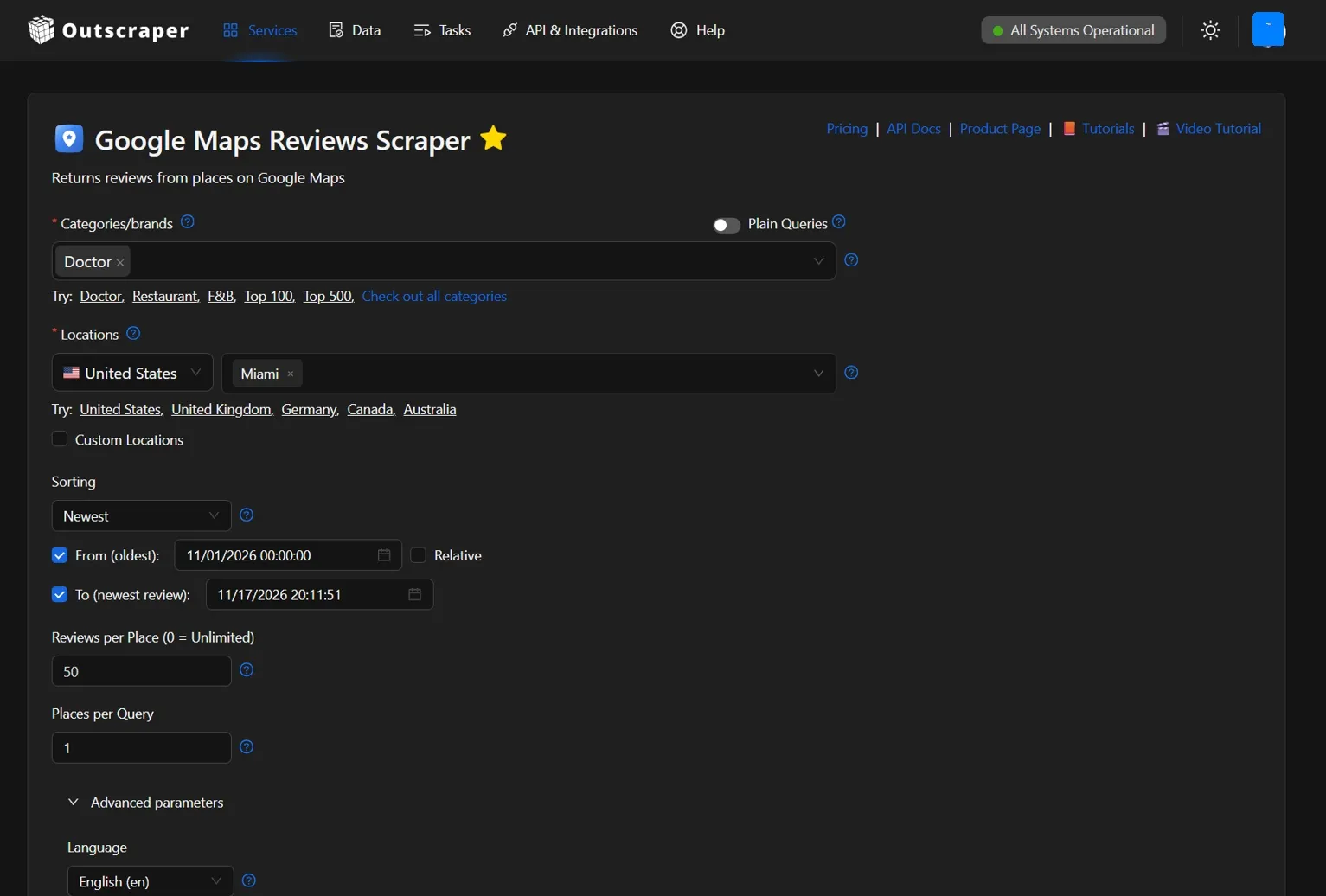
Open Outscraper Skrobak do recenzji Map Google i wybierz Lekarz under Categories/brands and Miami, United States under Locations.
Set Sortowanie do Najnowsze oraz Reviews per Place do 50 to request up to 50 recent reviews per business, where available. Use Places per Query to control how many businesses are retrieved for each generated search query.
Keep Reviews filtering set to Wszystkie and leave Reviews query search empty so reviews aren’t excluded based on their text.
Wybierz CSV as the result extension, review the generated queries and task estimates, and start the extraction. Once complete, download the results for analysis.
For more details about the available extraction settings, see our Google Maps Reviews Scraper tutorial.
Step 2: Check Owner-Response Data in the Export
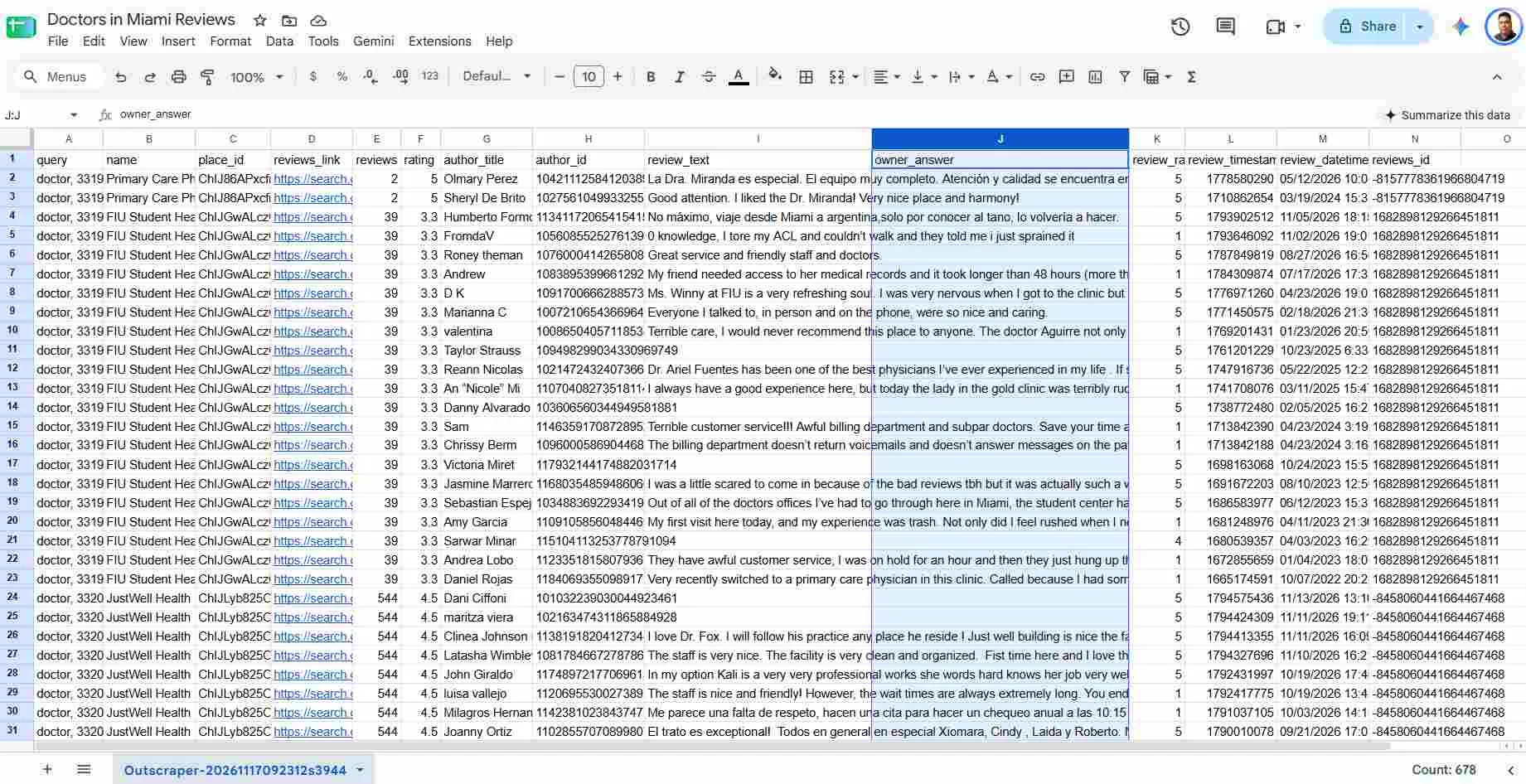
After downloading the CSV file, open it in Google Sheets or Excel and locate the columns containing review details and owner responses.
Outscraper Google Maps Reviews Scraper provides several fields that can help you examine the reviews collected from each business.
| Pole | What It Shows |
|---|---|
| place_id | Identifies the business associated with the review |
| review_id | Identifies an individual customer review |
| przegląd_oceniający | Star rating given by the reviewer |
| przegląd_czasu_daty_utc | Date and time of the customer review |
| owner_answer | Recorded public response from the business owner |
| owner_answer_timestamp_datetime_utc | Date and time of the owner response, when available |
ten właściciel_odpowiedzi field is the main column to examine. Reviews with a recorded owner response contain response text, while those without a captured response may have an empty value.
In the tested Outscraper CSV export, the owner-response timestamp columns were present but empty. Therefore, do not assume that the response date will always be available.
An empty właściciel_odpowiedzi field means no owner response was captured in that record. It does not necessarily prove that the business deliberately ignored the review.
The next step is to check for duplicate records and separate reviews with and without recorded owner responses.
Step 3: Separate Reviews With and Without Recorded Responses
After opening the CSV file in Google Sheets or Excel, check for duplicate reviews before counting unanswered responses.
The same business may appear in multiple geographic search queries, causing some reviews to appear more than once in the export.
Użyj place_id oraz review_id columns together to identify duplicate records. Keep one record for each unique business-and-review combination.
Next, locate the właściciel_odpowiedzi column and separate the remaining records into two groups:
- Answered reviews: Records containing a business owner’s response.
- Potentially unanswered reviews: Records where the
właściciel_odpowiedzifield is empty or null.
For example, suppose you collect 50 unique reviews from an HVAC contractor in Miami. If 35 have no recorded owner response, those 35 reviews can be marked for further examination.
This does not mean the business ignored 70% of its entire review history. The finding applies only to the 50 unique reviews examined.
Repeat the process for other businesses in your research list. Once the records are separated, you can compare owner-response activity without counting the same review multiple times.

Collect Google Maps Reviews and owner-response data for your business research.
How to Evaluate a Business's Google Review Response Patterns
Finding unanswered Google reviews is only the first step. Agencies also need to determine whether those reviews represent an occasional gap or a repeated pattern in how a business responds to customers.
A business with five unanswered reviews out of 100 is different from one with 40 unanswered reviews out of 50. Comparing the numbers helps agencies identify which businesses deserve closer examination.
Using the review data collected through Outscraper, you can calculate unanswered-review percentages and compare response activity across businesses in your research list.
Calculate the Share of Reviews Without Owner Responses
After removing duplicate records, count the unique reviews without recorded owner responses. Divide that number by the total number of unique reviews examined for the same business.
Unanswered Review Percentage = (Unique Reviews Without Recorded Owner Responses ÷ Total Unique Reviews Examined) × 100
For example, suppose an agency collects 50 reviews from an HVAC contractor in Miami:
- Total unique reviews examined: 50
- Reviews with owner responses: 15
- Reviews without recorded responses: 35
- Unanswered review percentage: 70%
This means 70% of the collected reviews have no recorded owner response. It does not necessarily represent the business’s entire review history.
In Google Sheets, you can calculate the percentage using:
=IFERROR(C2/B2,0)
Here, B2 contains the total number of unique reviews examined, and C2 contains the number without recorded owner responses. Format the result cell as a percentage to display 70%.
Use the same calculation for every business in your research list.
Compare Recent Reviews, Review Volume, and Response Activity
An unanswered-review percentage becomes more useful when you examine it alongside review dates and the number of reviews collected.
For a fair comparison, use the same sampling method for each business and remove duplicate records before calculating percentages.
For example, an agency researching businesses in Miami might record the following results.
| Business Category | Reviews Examined | Without Recorded Responses | Unanswered Percentage |
|---|---|---|---|
| Doctors in Miami | 50 | 10 | 20% |
| HVAC contractors in Miami | 50 | 35 | 70% |
| Auto repair in Miami | 50 | 25 | 50% |
Note: These figures are hypothetical examples for explaining the calculation. They do not represent actual Google Maps review data from businesses in Miami.
In this example, the HVAC contractor has the highest percentage of reviews without recorded owner responses. However, that percentage alone does not establish whether the business has a review-management problem.
Before comparing businesses, check three factors:
- Review dates: Are most unanswered reviews recent, or have they remained unanswered for several months?
- Review volume: Did you examine a similar number of unique reviews for each business?
- Response activity: Does the business respond regularly, occasionally, or not at all within the collected sample?
For consistency, examine up to 50 recent reviews per business and record the date range covered. Fifty reviews may represent a few weeks for one business and several years for another. Check for missing or incomplete data before drawing conclusions.
This comparison provides a snapshot of the collected reviews. For ongoing analysis of review activity across reporting periods, see our guide to monitoring Google reviews across multiple locations.
A high unanswered-review percentage can justify further research, but it does not prove that a business needs reputation-management services or is interested in purchasing them.
Need to follow review activity beyond a one-time check? See Outscraper Google Maps Reviews Tracker.
How to Build a Research Shortlist From Unanswered Reviews
After calculating unanswered-review percentages, the next step is to identify businesses worth researching further. A high percentage of unanswered Google reviews can draw attention to a business, but it should not be the only reason to add that business to your list.
For reputation-management and local SEO agencies, a useful shortlist combines review findings with basic business information. This helps reduce the time spent researching businesses that may not match the agency’s target market.
Choose Businesses Worth Checking Further
Start with businesses that match your target industry and location. Then examine their unanswered-review percentages alongside review activity and the age of their unanswered reviews.
For example, consider the three Miami business categories from the previous section:
Doctors in Miami: A 20% unanswered-review percentage may deserve a closer look if older reviews remain unanswered or if the business has recently changed its response practices.
HVAC contractors in Miami: A 70% unanswered-review percentage makes this category’s example worth examining further, particularly if unanswered reviews appear across several months.
Auto repair in Miami: A 50% unanswered-review percentage may warrant additional research to determine whether the business responds selectively or has stopped responding to recent feedback.
These percentages are hypothetical examples, not findings about actual businesses in Miami.
Before adding an individual business to your shortlist, check:
- Business relevance: Does it match the industry, location, and type of client your agency serves?
- Unanswered-review percentage: What percentage of unique reviews examined have no recorded owner response?
- Review dates: Are unanswered reviews concentrated in recent weeks, or do they extend across several months?
- Response consistency: Does the business respond to some reviews while leaving others unanswered?
- Research quality: Is the sample large and recent enough to support a useful comparison?
These checks help narrow your research without treating an unanswered-review percentage as an automatic prospect score.
Verify Findings Before Adding a Business to Your List
Before treating a business as a potential prospect, check whether the exported review data matches what is publicly visible on Google Maps.
Start with businesses showing repeated unanswered reviews in your deduplicated dataset. Open their Google Maps listings and check a sample of reviews without recorded owner responses.
Confirm whether an owner response is now visible. A business may have replied after the data was collected, so record the date of your manual verification before adding the business to your shortlist.
You should also confirm that the business is operating and that its location, category, and website match your target client profile.
Keep a short record of the verification results, including:
- Business name and Google Maps URL
- Number of unique reviews examined
- Number and percentage of unique reviews without recorded owner responses
- Review date range
- Date of the latest manual check
- Notes about response activity and business relevance
Once verified, these records form a research shortlist that your agency can examine before deciding whether outreach is appropriate.
For agencies that want to combine review findings with other business characteristics, Outscraper’s signal-based prospecting workflow explains how different business signals can support further research.
The purpose of this shortlist is to identify businesses with observable review-response patterns, not to assume they need a service or are ready to purchase one.
Final Checklist: Finding Businesses With Unanswered Google Reviews
Before adding businesses to your research shortlist, use this checklist to confirm that your findings are based on relevant review data.
- Choose your target businesses. Define the business categories and locations you want to research.
- Collect Google Maps reviews. Check reviews manually or use Outscraper Google Maps Reviews Scraper for larger datasets.
- Identify unanswered reviews. Remove duplicate reviews, check the
owner_answerfield, and identify records without captured owner responses. - Compare response patterns. Calculate unanswered-review percentages and check review dates, sample sizes, and response activity.
- Verify your shortlist. Confirm the findings on Google Maps before deciding which businesses deserve further research.
Collect Google Maps reviews and owner-response data with Outscraper. Identify unanswered reviews and compare response activity across businesses without checking every listing manually.
FAQ
Najczęściej zadawane pytania i odpowiedzi
No. Google Maps does not provide a dedicated public filter for unanswered reviews. You need to open individual business listings and check whether customer reviews have visible owner responses.
Outscraper’s Google Maps Reviews Scraper collects review data, including the właściciel_odpowiedzi field. You can examine exported records to find reviews without recorded owner responses. An empty field should be checked before treating the review as unanswered.
No. An unanswered review does not automatically indicate poor reputation management or a need for services. Agencies should examine review dates, response patterns, and business relevance before adding a company to their research shortlist.
Divide the number of unique reviews without recorded owner responses by the total number of unique reviews examined, then multiply by 100. For example, 35 out of 50 unique reviews equals 70%. This percentage applies to the examined sample, not necessarily the business’s entire review history.