Inhoudsopgave
Google Maps business data for market analysis can help you examine competitors, compare locations, evaluate public reputation, and understand how businesses operate across a market. The value of the dataset, however, depends on whether the fields you collect support the decision you need to make.
A competitor-density analysis may require business categories, operational status, addresses, and coordinates. A reputation comparison depends more heavily on ratings and review counts. If you are examining digital presence, website and phone information become more relevant. Collecting every available field can create a larger dataset without improving the analysis.
Before gathering business records, define the market question, the types of businesses that belong in the comparison, and the geographic area you want to study. You can then select a smaller group of fields and interpret each one within its limits.
The right combination of fields will depend on what you want to measure, what comparisons you plan to make, and which conclusions the available data can reasonably support.
Quick Answer: What Google Maps Business Data Matters for Market Analysis?
Choose the fields according to the question you want to answer:
- Define which businesses belong using name, category, and business status.
- Compare where they operate using addresses and coordinates.
- .Assess public reputation through ratings and review counts.
- Examine availability and services through opening hours and attributes.
- Check listed contact channels using website and phone data.
A focused dataset is easier to review, compare, and interpret.
Use the Google Maps Places API for recurring collection or application-based workflows.
Start With the Market Question Before Choosing Data Fields
Begin market analysis with the question you want the data to answer. A broad goal such as “understand the local restaurant market” may refer to business density, public reputation, operating patterns, geographic coverage, or online presence. Each subject requires different fields.
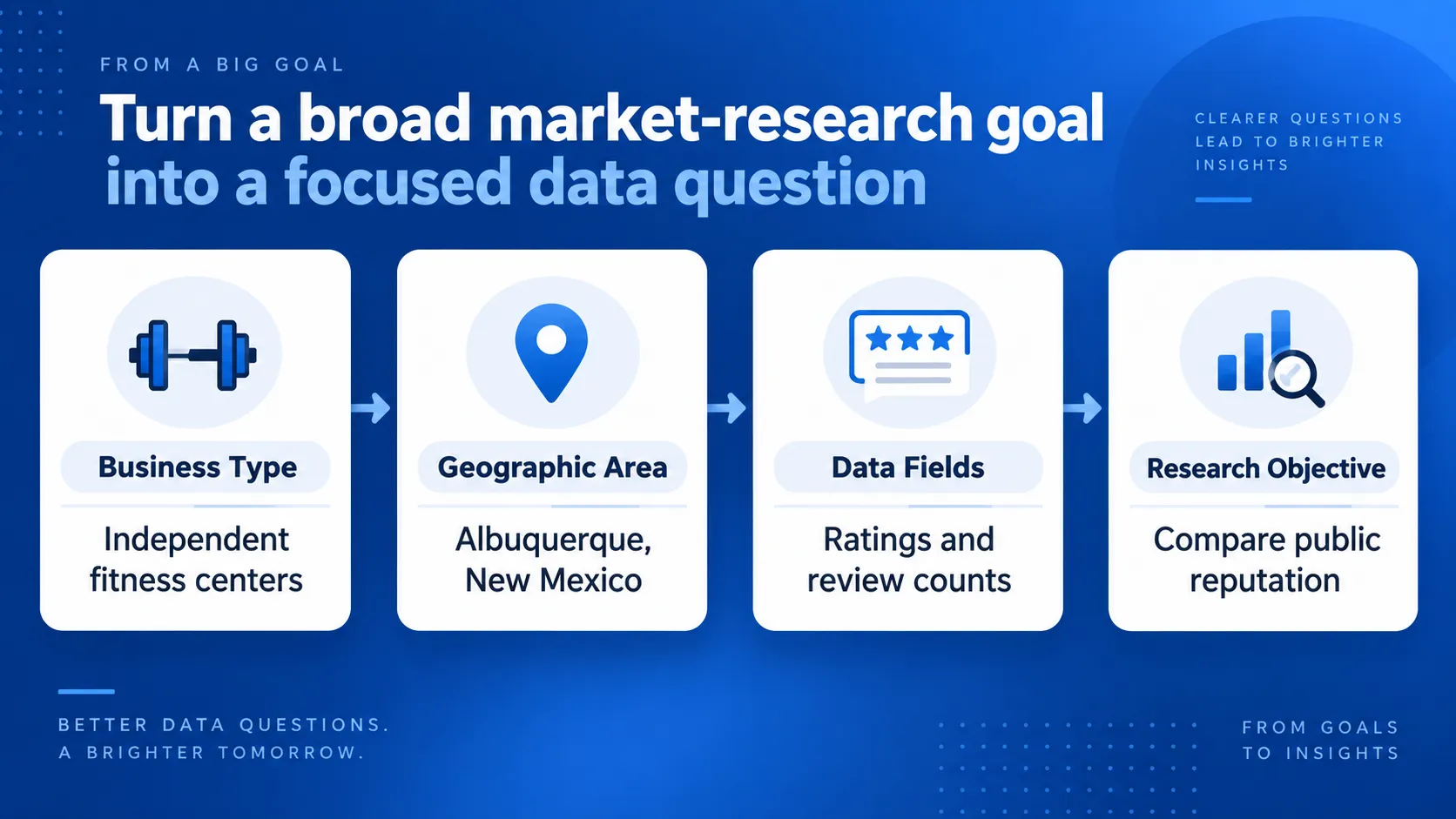
Turn a Broad Goal Into a Specific Market Question
A focused market question identifies the business type, geographic area, and comparison you plan to make. For example:
- How many operational dental clinics are listed in Boise, Idaho?
- Which neighborhoods in Richmond, Virginia, have the highest concentration of coffee shops?
- How do local gyms in Albuquerque, New Mexico, compare by rating and review count?
- Which accounting firms in Providence, Rhode Island, have a listed website and phone number?
Counting active businesses requires category, status, and location data. Geographic comparisons need addresses and coordinates, while public-reputation comparisons use ratings and review counts.
Use this structure:
I want to compare [business type] in [geographic area] using [public data fields] to support [specific decision].
For example:
I want to compare independent gyms in Albuquerque, New Mexico using ratings and review counts to assess differences in public reputation across the city.
This wording identifies the public signals being compared without treating them as proof of revenue, market share, or demand.
Define Which Businesses Belong in the Dataset
Set the inclusion rules before collecting records. Decide whether to include:
- Primary categories, related subcategories, or both
- Independent businesses, chains, or both
- Each branch as a separate location
- Temporarily closed businesses
- Businesses near the geographic boundary
These choices affect the final count. Each branch may belong in a location-density study, while a company-level comparison may count the entire chain once. Applying the same rules throughout the collection keeps the comparisons consistent.
Match the Question to What Google Maps Data Can Support
Google Maps business data can show listed businesses, locations, categories, operating details, contact channels, and public review activity. It cannot prove total customer demand, revenue, market share, or future sales.
A high review count, for example, can indicate greater review activity or public visibility compared with similar businesses in the same area. It does not confirm that the business earns more revenue. A low number of competitors can indicate lower listed business density, but it does not prove that customer demand is high.
If the research question requires a full estimate of local demand or market size, combine business records with population, spending, and industry data. Outscraper’s article on sizing a local market with public business data covers that separate process.
A focused question makes it easier to select the right fields, define which records belong in the dataset, and explain what the results can support.
Core Google Maps Business Data Fields and What They Tell You
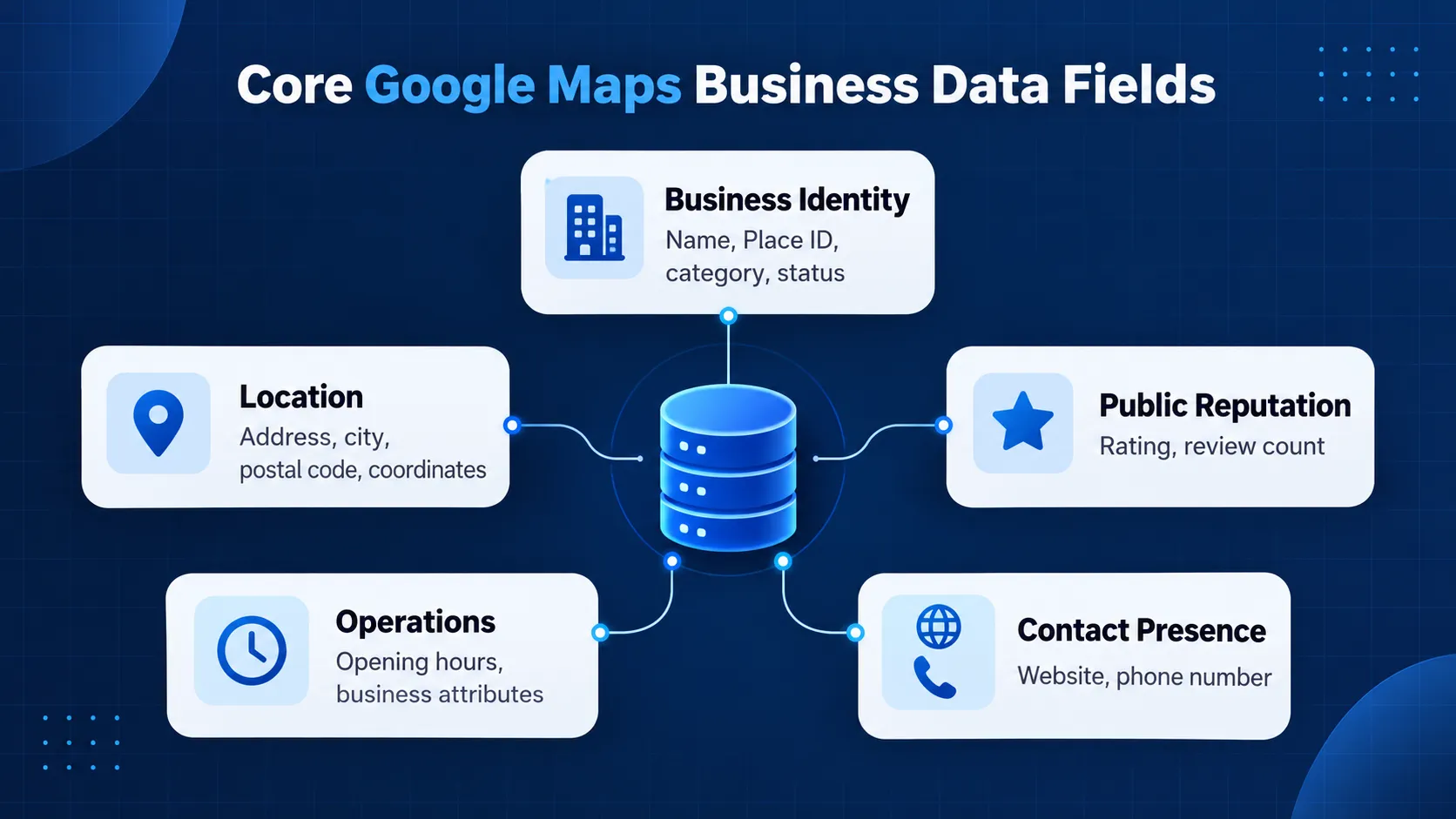
A smaller group of Google Maps business fields supports most local market comparisons. These fields identify businesses, confirm locations, compare public reputation, examine operations, and show listed contact channels.
Each field has a specific role. A rating describes public feedback, while an address identifies a listed location. Neither proves customer demand or business performance.
Business Identity, Category, and Status
Business name, Place ID, category, subcategories, and business status help define and organize the businesses in the dataset.
- Business name identifies the listing, but names are not always unique. Two unrelated businesses may use similar names, while a chain may use the same name across several locations.
- Plaats ID identifies a place in the Google Places database and provides a stronger identity field than the business name alone. Google notes that Place IDs can change and recommends refreshing stored IDs that are more than 12 months old. Review Google’s Place ID documentation when maintaining a dataset over time.
- Primary category shows the main category assigned to the listing.
- Subcategories provide added detail about other services or business types connected to the listing.
- Business status indicates whether a place is operational, temporarily closed, or permanently closed when that information is available.
Category review remains necessary. A search for veterinary clinics in Spokane, Washington, may return animal hospitals, emergency veterinary services, and general veterinarians. The market question determines which categories belong in the dataset.
Closed listings can inflate active business counts. Keep temporarily closed records in a separate group when their inclusion remains uncertain.
Address and Geographic Coordinates
Address fields may include the full address, street, city, state, postal code, and country. Latitude and longitude identify the listing’s geographic position.
Addresses support manual review, while coordinates support mapping, concentration analysis, territory assignment, and boundary checks. Using both provides a stronger location check.
An address does not confirm that a business serves the entire surrounding area. Service-area businesses, shared offices, and locations near a market boundary may require another review.
Ratings and Review Counts
The rating field shows the average score displayed on a listing. Review count shows the number of published reviews at the time of collection.
Read both fields together. A 5.0 rating from three reviews represents a different review history from a 4.8 rating based on 900 reviews.
Ratings and review counts can support public-reputation comparisons among similar businesses in the same area and collection period. They do not provide revenue, customer volume, or market share. Comparisons between unrelated industries are also weak because review behavior differs by category.
Opening Hours and Business Attributes
Opening hours show the schedule reported for each day. They can support comparisons of weekday, weekend, and evening availability.
Attributes provide other category-specific details when they appear on a listing. Missing hours or attributes should be recorded as unavailable information, not proof that a business lacks a schedule or service.
Website and Phone Information
Website and phone fields show whether a listing provides these contact channels. They can support comparisons of listed online and contact presence.
A blank field does not prove that the business lacks a website or phone number. A listed website also requires another check before it is treated as active, current, and owned by the business.
Outscraper’s Google Maps-krabber can export these fields in structured formats for analysis. The next step is to combine the fields according to the market question instead of treating every available column as equally useful.
Review the business, location, reputation, operating, and contact fields available before planning your collection.
How to Use Google Maps Business Data for Market Analysis
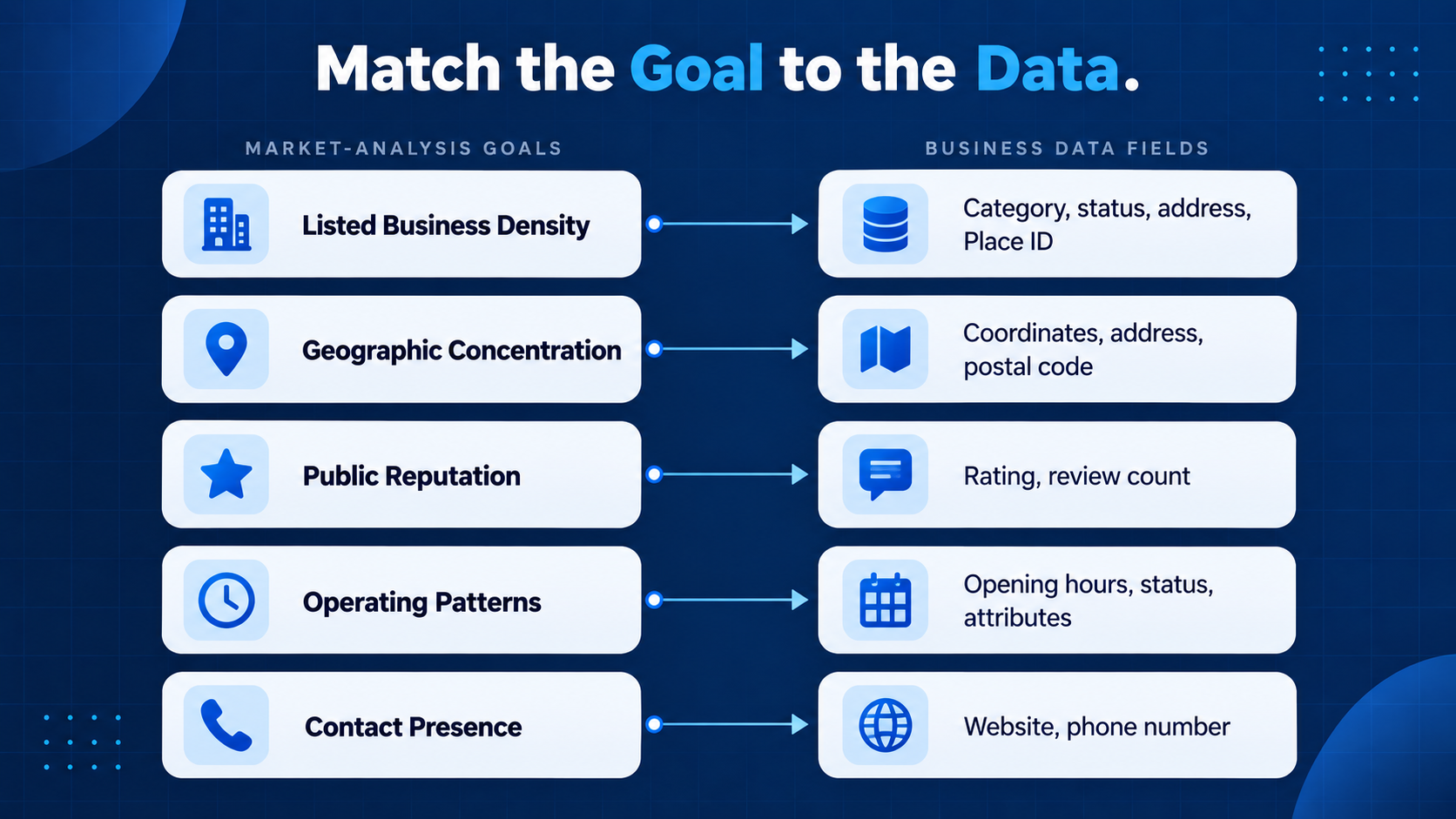
Market analysis usually combines several fields. The right combination depends on whether you are studying listed competition, geographic concentration, public reputation, operating patterns, or contact presence.
Apply the same category rules, geographic boundary, and collection period to every business being compared. This keeps differences in the results from being caused by inconsistent collection rules.
Measure Listed Business Density
Use category, subcategories, business status, address, and Place ID to count relevant operational listings within a defined area.
For example, a researcher studying independent bakeries in Tulsa, Oklahoma, may begin with a broad bakery category. The returned records may include wholesale bakeries, grocery-store bakery departments, dessert shops, and permanently closed businesses. Category and status fields help determine which records belong in the final count.
Place ID helps distinguish separate locations and identify records returned by more than one search. Address data confirms whether each location falls inside the selected area.
The final count represents businesses listed in the dataset. It should be described as listed business density or visible local supply, not total demand or market size.
For a complete process that combines business counts with demographic and spending data, refer to How to Size a Local Market With Business Data.
Compare Geographic Concentration
Use latitude, longitude, address, city, state, and postal code to examine where businesses are located.
For example, coordinates can show whether pet-grooming businesses in Grand Rapids, Michigan, cluster near residential areas, retail corridors, or major roads. Postal codes and neighborhood labels can support smaller-area comparisons.
These patterns show where mapped businesses are concentrated. Population, road access, zoning, and household data are needed to study possible reasons for that distribution.
The article on Google Maps data for geomarketing and location intelligence covers the broader location-analysis process.
Compare Public Reputation
Use rating and review count to compare public feedback among similar businesses.
An analysis of appliance-repair companies in Reno, Nevada, may group businesses by rating range and compare their review counts. This can show which listings have stronger public review histories and which have limited feedback.
A 4.9 rating with 12 reviews and a 4.7 rating with 600 reviews represent different review histories. Neither result provides revenue or customer volume.
For weighted competitor scoring or a detailed visibility comparison, refer to How to Build a Google Maps Competitor Benchmark.
Examine Operating Patterns
Use opening hours, business status, and available attributes to compare listed schedules and services.
An urgent-care study in Buffalo, New York, may compare weekday hours, weekend availability, evening service, and temporarily closed locations. This can show how many listings report availability during specific periods.
Treat missing hours as unavailable information. Check operating details against another current source when they affect a business decision.
Review Listed Website and Phone Presence
Use website and phone fields to group businesses according to the contact channels shown on their listings:
- Website and phone listed
- Phone listed but no website
- Website listed but no phone
- Neither field available
For example, this grouping can compare the listed contact presence of landscaping companies in Spokane, Washington.
The results do not confirm that a website works, a phone number reaches the business, or the company is ready to purchase a service. Lead qualification and outreach require added checks beyond market analysis.
Matching each goal to a defined set of fields keeps the findings focused and clarifies when another source is needed.
See how Outscraper supports competitor research, market mapping, and other data-driven research workflows.
What Google Maps Data Cannot Tell You by Itself
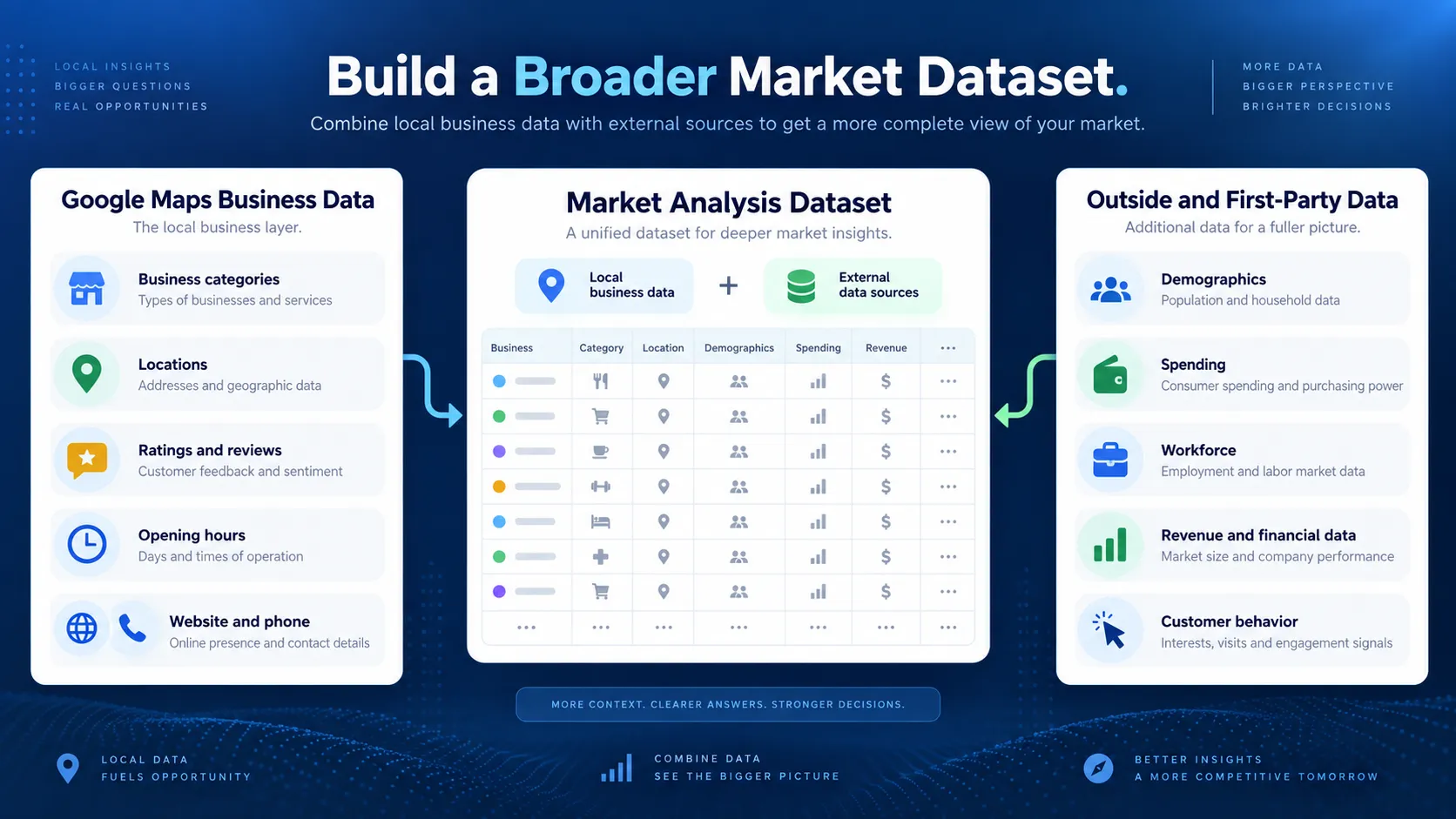
Google Maps business data can support research into listed supply, locations, public reputation, operating hours, and contact presence. A complete market analysis may also require demographic, financial, customer, workforce, or industry data.
These limits apply to the core Google Maps listing fields. Other Outscraper services can add review text, contact details, company information, or chain identification. Customer demand, purchase behavior, profitability, and verified market share still require outside or first-party sources.
Customer Demand and Purchasing Behavior
Business counts show how many relevant listings appear in the selected dataset. They do not show how many people need the service, how often they buy, or how much they spend.
Finding a small number of tutoring centers in Des Moines, Iowa, for example, does not confirm unmet demand. The result may reflect limited demand, missing businesses, different listing categories, or an actual supply gap.
Demand research may require population, income, customer surveys, search data, industry purchase rates, or internal sales records. Outscraper can provide the visible local business supply, while the Census Business Builder provides US demographic, population, and economic data.
Revenue, Profitability, and Market Share
Ratings, review counts, hours, and website presence do not reveal a business’s revenue or profitability.
A business with many reviews may have high public visibility, a long operating history, or frequent customer visits. A business with fewer reviews may serve higher-value customers or rely on referrals. Neither review history confirms sales performance.
Core Google Maps fields do not provide verified revenue, operating costs, profit margins, transaction values, or market share. Outscraper’s Company Insights enrichment can add available company-level information, but it comes from an added enrichment process and should be assessed according to its source and coverage.
Review counts can support public-visibility comparisons. They should not be presented as revenue or sales share.
Customer Demographics
A business location does not identify its customers. Nearby population data can provide context, but proximity does not confirm customer behavior.
A specialty medical clinic in Worcester, Massachusetts, may attract patients from several counties, while a neighborhood grocery store may serve a smaller area. The address alone cannot define either customer base.
Outscraper can provide business locations and coordinates that can be connected with geographic areas. Demographic characteristics must come from Census data or another demographic source. Customer-level conclusions require first-party records, surveys, or data that directly measures customer behavior.
Employment and Workforce Conditions
Google Maps listings do not normally show verified employee counts, wages, hiring demand, or labor availability.
Business counts may identify areas with many establishments in a category, but they do not show how many people work at each location. The Quarterly Census of Employment and Wages from the US Bureau of Labor Statistics provides establishment, employment, and wage data at several geographic levels.
Outscraper supplies place-level business records. BLS provides wider industry and workforce measures. Company enrichment may add firmographic information for some records, but official statistics remain the better source for regional or industry-level employment questions.
Reasons Behind Ratings and Review Counts
Average ratings and review counts show public feedback, but they do not explain why customers gave those scores.
Review text is needed to examine possible concerns such as delays, pricing, staff behavior, or product quality. Dates also provide context because older businesses have had more time to collect feedback, and review frequency differs across categories.
Outscraper’s Google Maps beoordelingen schraper can collect review text, ratings, and dates for further analysis. The results still represent people who chose to publish feedback, not every customer’s experience.
Complete or Fully Current Market Coverage
A Google Maps export should not automatically be described as a complete record of every business in a market. Some businesses may be missing, categorized differently, duplicated, recently opened, or no longer operating.
Google allows verified Business Profile owners to update addresses, hours, contact information, and photos. Other users can also suggest changes. An export therefore represents the information available during its collection period. See Google’s documentation on editing Business Profile information.
Document the collection date, search categories, geographic boundary, inclusion rules, duplicate handling, and added data sources. If a decision depends on one business, check its current status and operating details against another source.
Outscraper can provide the structured local business data needed for market analysis through our Google Maps-krabber. Depending on the research question, you can extend the dataset with review, contact, company, or chain information.
Demographic, spending, workforce, and first-party customer data should come from suitable outside sources. Our article on market research from web data shows how these sources can support a broader research process.
Build a Smaller, Cleaner Dataset Before You Scale
A large export will not improve the analysis if the categories, locations, or inclusion rules are wrong. Test the setup with a limited sample before expanding it.
Test One Category and Location
Begin with one category, one US location, and a limited number of results.
For example, a researcher studying orthodontic practices in Fayetteville, Arkansas, can test the orthodontist category before running a larger collection. Check whether:
- The businesses match the intended category.
- The records fall inside the selected area.
- The required fields contain usable values.
Related categories may return general dental clinics or other businesses that do not fit the research. City searches may also include locations near or outside the intended boundary.
Review the category, subcategories, status, address, and coordinates. Record the rules that will be used for the full dataset.
Outscraper’s Google Maps Scraper allows users to set a total results limit for this initial test.
Review Duplicates and Missing Fields
Related category searches and overlapping locations may return the same business more than once. Outscraper provides a Drop duplicates option, while Place ID or Google ID can help identify repeated places after export.
Decide whether the analysis counts locations, companies, brands, or service areas. For most location-level comparisons, one record per Place ID is a practical starting point.
Review the required fields for confirmed, missing, or uncertain values. A blank website field means no website was available in the collected record. It does not prove that the business has no website.
Report limited field coverage when it affects the findings. An hours comparison based on 60 percent of the records should be described as partial.
Checklist Before Scaling the Dataset
Before collecting the larger dataset:
- Confirm the market question and geographic boundary.
- Use the approved categories, statuses, and inclusion rules.
- Keep only the fields required for the analysis.
- Remove duplicates using the selected unit of analysis.
- Record missing-field coverage, collection date, and added sources.
- Check a sample of the final export before interpreting the results.
Outscraper can collect records across the selected categories and locations and return them in CSV, Excel, or JSON format. The researcher remains responsible for defining the market, checking field coverage, and interpreting the results.
For dashboard instructions and extraction settings, refer to How to Scrape Google Maps Data.
Choose the fields that support your market question, then use Outscraper to collect structured business records for your selected categories and locations.
FAQ
Meest voorkomende vragen en antwoorden
Useful Google Maps business data for market analysis includes business name, Place ID, category, subcategories, business status, address, coordinates, rating, review count, opening hours, website, and phone number.
The right selection depends on the market question. Business density requires category, status, and location fields, while a public-reputation comparison requires ratings and review counts.
No. Collect the fields needed to identify businesses, apply the inclusion rules, and answer the market question.
Extra columns increase the amount of data to review without automatically improving the findings. Begin with a small sample, check field coverage, and add another field only when it has a defined purpose.
No. Business counts describe the listed supply within the selected categories and geographic area. They do not measure how many customers need the service, how often they buy, or how much they spend.
Demand analysis may require population, income, industry spending, search-demand, survey, or first-party sales data.
No. Ratings represent average public scores, while review counts represent published review activity. Neither field provides verified revenue, sales volume, profitability, or market share.
These fields can support public-reputation and relative-visibility comparisons among similar businesses collected from the same area and period.
First, decide whether the analysis counts physical locations, companies, brands, or service areas. Businesses with the same name may represent separate branches and should not automatically be merged.
Outscraper provides a Drop duplicates option. Place ID or Google ID can also help identify repeated places after export. For most location-level comparisons, one record per Place ID is a practical starting point.
Outscraper’s Google Maps-krabber collects structured business records across selected categories and locations. Results can be returned in CSV, Excel, or JSON format for review and analysis.
The core records can include business, category, status, location, rating, review, operating, website, and phone data. Optional services can add review text, contact details, company information, or chain identification when those fields support the research question.
Outscraper supplies the local business data layer. Demographic, spending, workforce, and first-party customer data must come from suitable outside sources.