Table des matières
Introduction
Most local business contact data online lacks verification, a large number of bounced emails, and unresponsive phone numbers. Businesses often change their email addresses, switch phone numbers, or abandon domains. The problem sits at the data level. Many business lists rely on scraped directories, outdated spreadsheets, or manual guesses. And end up reaching businesses that closed, changed numbers, or have inactive emails.
Thus, unconfirmed contact information will lead to de nombreux complications, such as damage to the reputation of the senders, misleading marketers, and, at worst, contribute to the decline of revenue.
This article guides on how to collect contact information directly from authoritative sources, validate it across channels, and the tools such as Outscraper utilisé to extract this data. This guide explains how to collect verified contact information for local businesses.
Why Verified Contact Information Matters
The accuracy of contact information directly impacts various aspects of personal and professional life. Here’s why it’s so important:
- Effective Communication: Reaching the right person at the right time is fundamental for clear and efficient communication. Incorrect phone numbers, outdated email addresses, or wrong physical addresses can lead to missed opportunities, delays, and frustration.
- Business Operations: For businesses, accurate contact information is essential for sales, marketing, customer service, and supply chain management. Incorrect data can result in wasted resources, lost leads, and damaged customer relationships.
- Relationship Building: Whether it’s maintaining personal connections or nurturing business partnerships, accurate contact information is vital for staying in touch and fostering strong relationships.
- Data Integrity: Maintaining accurate contact information contributes to overall data integrity, which is crucial for informed decision-making and reliable reporting.
- Customer Accessibility: Accurate phone numbers, addresses, and email addresses allow customers to easily reach out with inquiries, orders, or feedback.
- Business Credibility: Verified information enhances a business’s credibility and trustworthiness. Customers are more likely to engage with a business that provides clear and accurate contact details.
- Marketing Effectiveness: Accurate contact information is vital for effective marketing campaigns. Direct mail, email marketing, and other outreach efforts rely on up-to-date contact details.
- Networking and Partnerships: Verified contact information facilitates networking opportunities and partnerships with other businesses.
- Emergency Situations: In emergency situations, having accurate contact information can be crucial for reaching the business owner or manager quickly.
Methods for Verifying Contact Information
Several methods can be employed to verify contact information, ranging from simple manual checks to sophisticated automated tools.
1. Direct Contact
The most straightforward method is to directly contact the individual or organization to confirm their contact details.
- Phone Call: Call the phone number and ask to confirm the name, title, and other relevant information.
- Email: Send an email to the email address and request confirmation of the details. A simple “Please confirm your name, title, and contact information” can suffice.
- Mail: Send a physical letter to the address and request confirmation of the details. This is particularly useful for verifying physical addresses.
2. Online Search
Utilize search engines and online directories to verify contact information.
- Google Search: Search for the individual or organization’s name and location to find their website, social media profiles, or online listings.
- Company Website: Visit the organization’s website to find contact information for specific departments or individuals.
- Online Directories: Utilisation online directories such as Yelp, Yellow Pages, or industry-specific directories to verify business contact information.
3. Third-Party Verification Services
Leverage third-party services that specialize in verifying contact information.
- Email Verification Services: These services check the validity of email addresses by verifying the domain, syntax, and existence of the mailbox.
- Phone Verification Services: These services verify phone numbers by checking their validity, carrier information, and whether they are active.
- Address Verification Services: These services verify physical addresses by comparing them to official databases and ensuring they are deliverable.
- Data Enrichment Services: These services enrich existing contact data by adding missing information and verifying existing details.
4. Database Cross-Referencing
Compare contact information against multiple databases to identify discrepancies and verify accuracy.
- CRM Systems: Cross-reference contact information in your CRM system with other sources to identify outdated or incorrect data.
- Marketing Automation Platforms: Use marketing automation platforms to track email deliverability and identify invalid email addresses.
- Internal Databases: Compare contact information against other internal databases, such as HR systems or accounting systems, to identify inconsistencies.
Strategies for Finding Verified Contact Information
1. Official Websites
The most reliable source of contact information is the business’s official website. Look for a “Contact Us” or “About Us” page, which typically includes:
- Phone Number: Check for both landline and mobile numbers.
- Physical Address: Verify the address using online maps to ensure accuracy.
- Email Address: Look for a professional email address.
- Social Media Links: Check if the website links to the business’s social media profiles, which may contain additional contact information.
2. Online Business Directories
Many online business directories compile contact information for local businesses. However, it’s essential to verify the information found in these directories, as it may not always be up-to-date. Some popular directories include:
- Google Business: Google Business listings often include verified contact information. Look for businesses with a “Verified” badge.
- Business Directories: Business Directories is a traditional directory that is also available online.
- Industry-Specific Directories: Many industries have their own directories that list businesses within that sector.
3. Social Media Platforms
Social media platforms can be a valuable source of contact information. Online visibility improves the business PR and is one of the major contributors for valid contact information.
4. Direct Verification Techniques
Direct verification involves contacting the business directly to confirm its contact information. This can be done through:
- Phone Call: Call the business to verify their phone number and other contact details.
- Email: Send an email to the business to confirm their email address and other information.
- In-Person Visit: Visit the business’s physical location to verify their address and other details.
5. Government Records
Government records can provide verified contact information for registered businesses. Check with:
- Secretary of State: The Secretary of State’s office in each state maintains records of registered businesses, including contact information.
- County Clerk’s Office: The County Clerk’s office may have records of local businesses, including contact details.
- City Hall: City Hall may have records of businesses operating within the city limits.
6. Professional Associations
Professional associations often maintain directories of their members, which can include verified contact information. Check with relevant associations in the business’s industry.
7. News Articles and Press Releases
News articles and press releases about the business may include contact information for media inquiries. This information is usually verified by the media outlet.
Using Outscraper for Contact Information Gathering
Here’s a step-by-step guide on how to use Outscraper to gather verified contact information:
Define Your Target Audience:
Clearly define your target audience, including their industry, location, job title, and other relevant characteristics. This will help you to focus your search and extract the most relevant contact information.
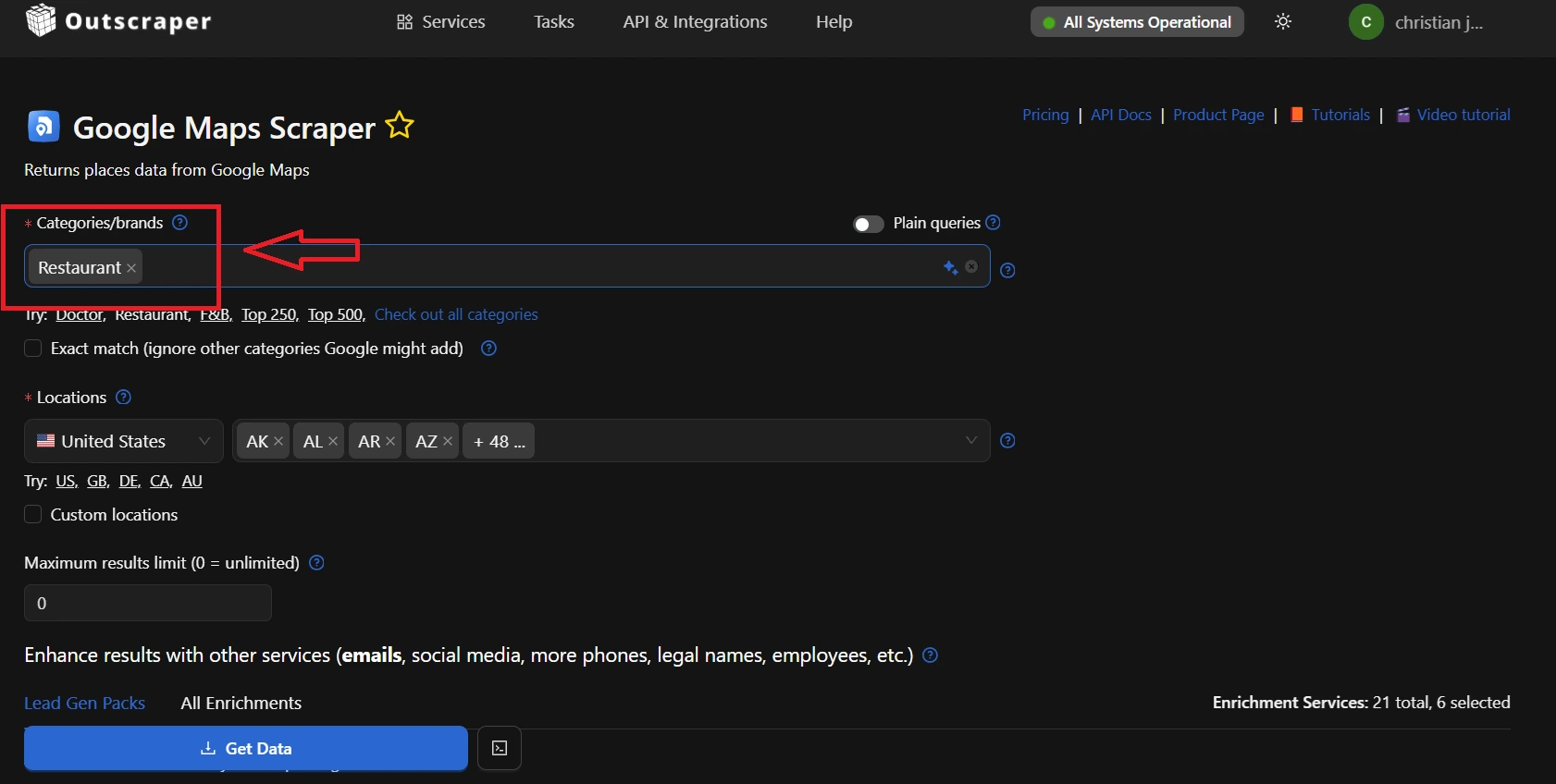
Choose Categories/Brands:
Select the Categories/Brands to specify the industry that users want to scrape. Outscraper supports a wide range of data sources, so you can choose the ones that are most relevant to your target audience.
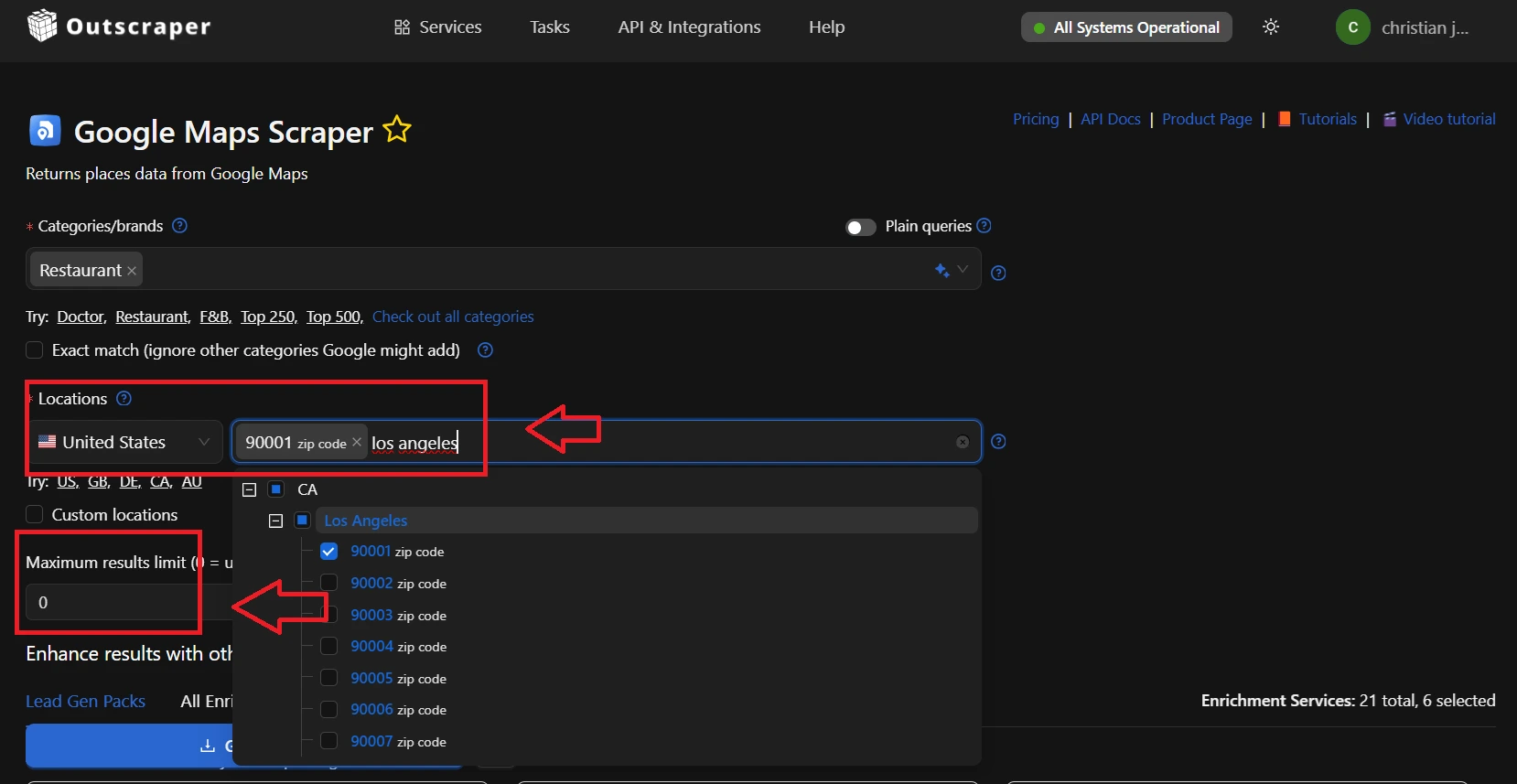
Configure Your Scraper:
Configure your Outscraper scraper to extract the specific contact information based on location and maximum results limit.
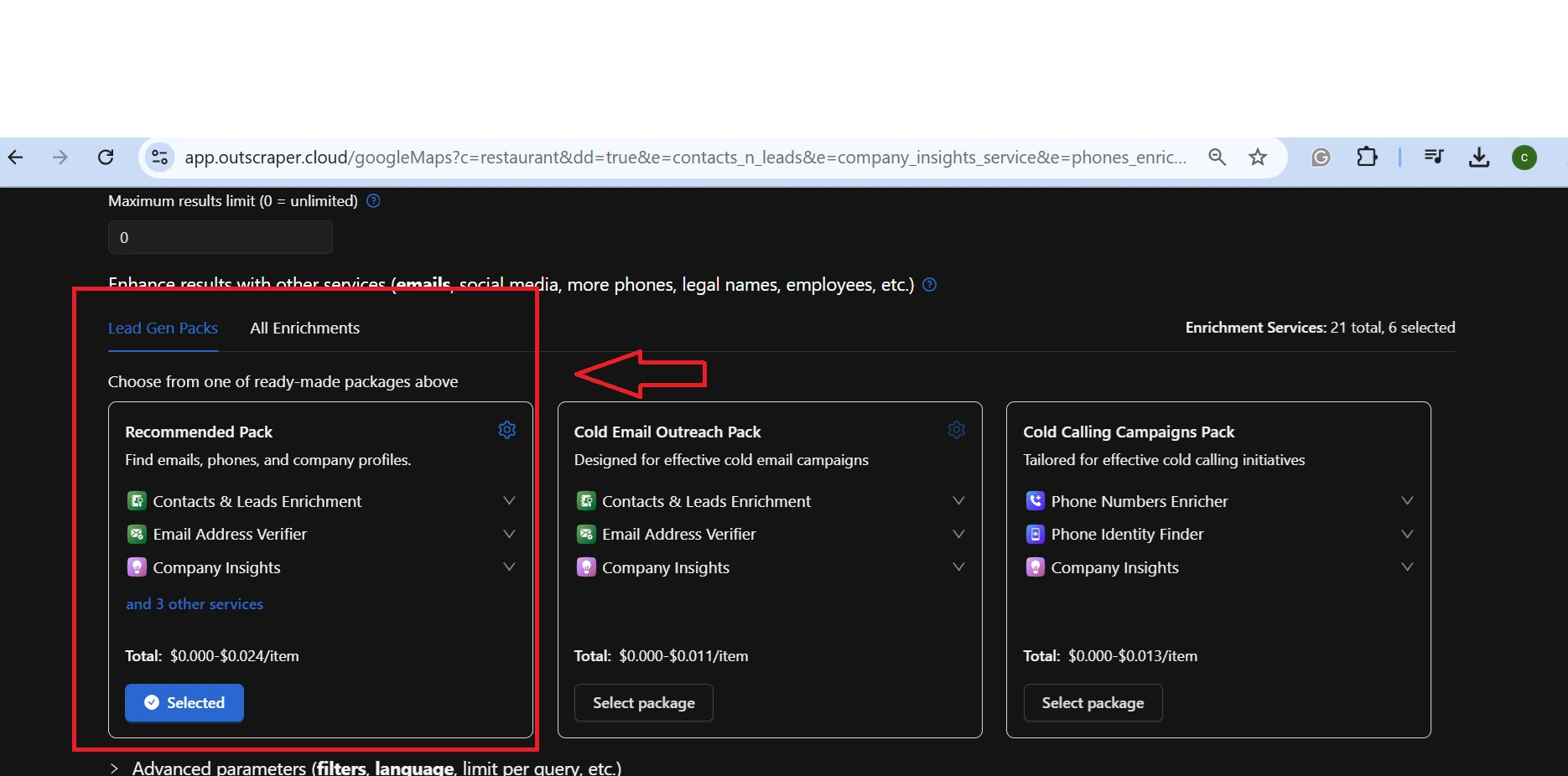
Add Your Enrichment:
Enriched results will add value to emails, social media, more phone numbers, legal names, employees, etc. It also has contact and prospects enrichment, company insights, email verifier, and many more.
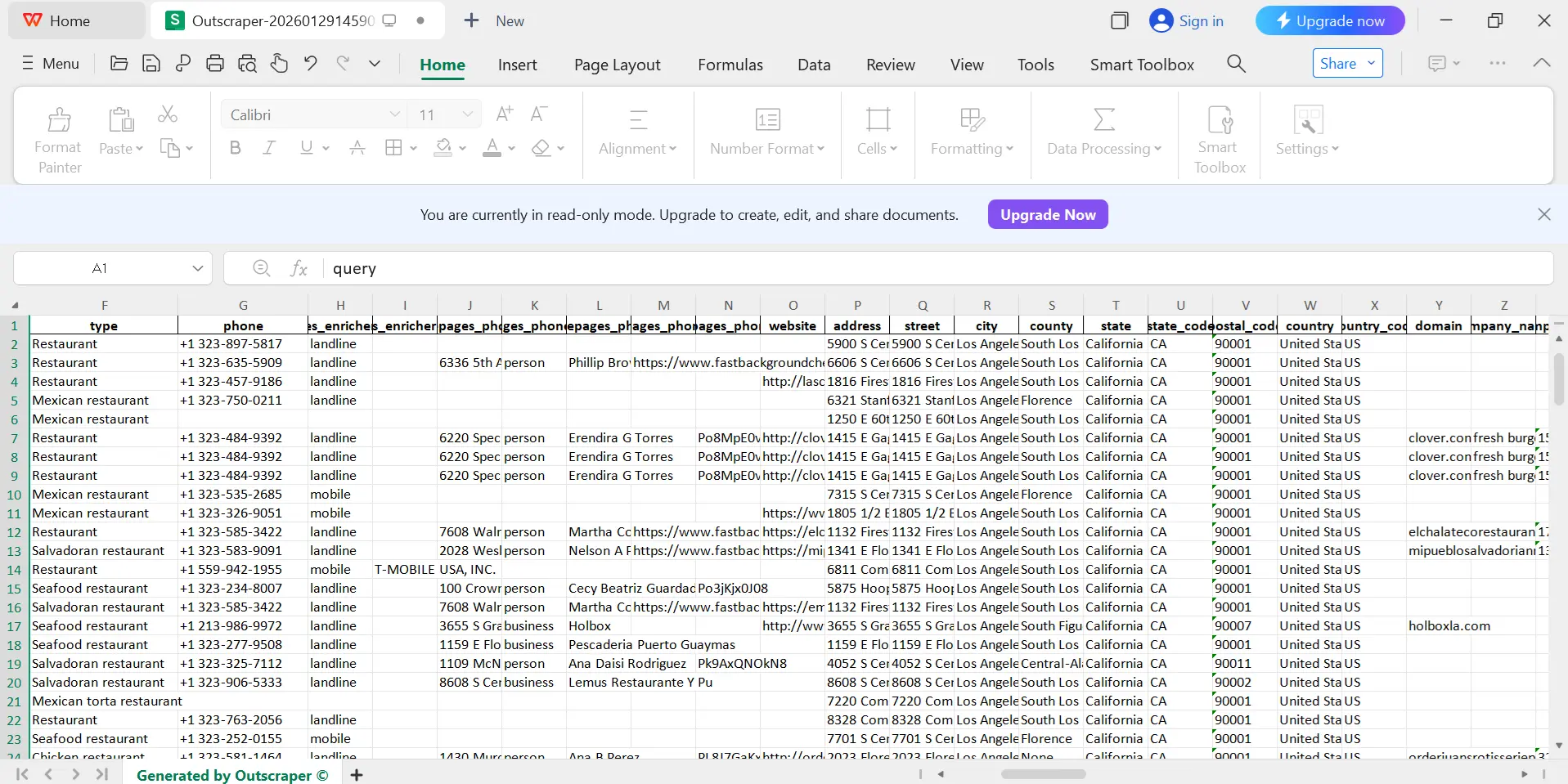
Export Your Data:
Export your verified contact information in a format that is compatible with your CRM or other marketing tools. Outscraper supports a variety of export formats, such as CSV, JSON, Excel, and Parquet.
Practical Use Cases
Outscraper can be used for a variety of practical applications, including:
- Génération de leads: Outscraper can be used to generate leads for sales and marketing teams. By extracting contact information from various online sources, businesses can identify potential customers and reach out to them with targeted offers.
- Market Research: Outscraper can be used to conduct market research and gather insights about competitors, customers, and industry trends. By extracting data from websites, social media platforms, and online directories, businesses can gain a better understanding of their market and make more informed decisions.
- Business Intelligence: Outscraper can be used to gather business intelligence and track the performance of businesses and industries. By extracting data from various online sources, businesses can monitor their competitors, identify new opportunities, and track their own performance.
- Recruiting: Outscraper can be used to find potential candidates for job openings. By extracting contact information from job sites and other professional networking platforms, recruiters can identify qualified candidates and reach out to them with job opportunities.
- Sales Prospecting: Outscraper can be used to build targeted lists of sales prospects. By extracting contact information from websites and online directories, sales teams can identify potential customers and reach out to them with personalized sales pitches.
Conclusion
Verified contact information determines whether outreach succeeds ou fails. It shows how outdated emails, inactive phone numbers, and incorrect addresses lead to wasted effort, damaged sender reputation, and lost revenue. Relying on recycled lists or unverified directories creates data risk at the source.
Accurate contact data comes from authoritative channels, cross verification, and direct confirmation. Official websites, government records, professional associations, and verified business listings provide stronger signals than generic databases. Validation across email, phone, and address data protects communication quality and preserves data integrity.
Collecting this data at scale requires structured extraction, verification, and export. Outscraper supports this process by pulling contact details from trusted platforms such as Google Maps, applying verification, and delivering clean datasets in usable formats. If you want lower bounce rates, reliable outreach, and data you can trust, use Outscraper to collect verified local business contact information.
FAQ
Questions et réponses les plus fréquentes
Verified contact information refers to contact details like email addresses, phone numbers, or physical addresses that have been confirmed as accurate and belonging to the intended person or business through validation processes.
Reputation management involves monitoring, influencing, and maintaining a positive public image for individuals, businesses, or brands, particularly online.
Sentiment analysis determines the emotional tone behind text data, classifying it as positive, negative, or neutral. Businesses apply it to customer feedback, social media, and reviews to gauge opinions and detect trends
Negative reviews signal customer dissatisfaction but can also enhance authenticity and drive sales from discerning buyers. They impact revenue by deterring impulse purchases while offering opportunities for improvement and engagement.
Qualifying opportunities from negative reviews involves scraping feedback for pain points, prioritizing high-intent signals like recent complaints, and personalizing outreach to convert dissatisfied businesses into leads.
Google Maps serves as a public mapping platform providing geospatial data on businesses, landmarks, and properties, including user-generated details like photos, reviews, and contact information, which supports lead generation in digital marketing
An API is a tool that lets you access Google Maps data automatically. With a scraper API, you can quickly gather the information you need.