Índice
Finding local businesses with Google Places API allows you to search for companies by keyword, business category, and location without checking Google Maps listings one by one. For example, you can search for independent coffee shops in San Francisco or auto repair shops in San Diego, California, and retrieve business information through structured API requests.
For sales teams, marketing agencies, and market researchers, collecting business information across multiple locations requires careful planning. Search parameters, available business details, request limits, and usage costs all affect how many records you can retrieve and how you can use them.
Com o API do Google Places, you can search for local businesses, request details such as addresses, phone numbers, websites, and ratings, and use the results within Google’s permitted usage terms.
For projects that require business data across multiple locations, Outscraper API do Google Places provides an API-based option for retrieving structured Google Maps business records for lead generation, sales prospecting, and market research.
Quick Answer: How to Find Local Businesses with Google Places API
- Set up: Enable Places API (New) and create an API key.
- Search: Find businesses by keyword, category, or location.
- Collect: Request relevant business details.
- Review: Check API limits, costs, and data usage rules.
- Compare: Check Google’s Places API and Outscraper’s API for your business data needs.
Use Outscraper Google Maps Scraper to find businesses by category and location without writing code or managing API requests.
How to Search for Local Businesses with Google Places API
Google Places API provides two search methods for finding local businesses: Text Search (New) and Nearby Search (New). Both return business listings based on the search criteria you provide, including location and business type.
Google’s Places API (New) documentation explains the available search methods and how API requests work.
Search by Keyword and City with Text Search
Text Search works when you know the type of business and the city you want to research. For example, you can search for independent coffee shops in San Francisco ou auto repair shops in San Diego.
Google’s Text Search (New) documentation provides the request parameters and additional search options.
To perform a Text Search:
- Open your API client, such as Postman, and create a POST request.
- Enter the endpoint:
https://places.googleapis.com/v1/places:searchText - Add your API key and a field mask to the request headers.
- Enter a search phrase using the
textQueryparameter. - Send the request and review the returned business listings.
Example request body:
{
  "textQuery": "independent coffee shops in San Francisco",
  "pageSize": 20
}
Search by Business Type and Radius with Nearby Search
Nearby Search is useful when you need businesses within a defined geographic area. It uses business types and geographic coordinates instead of a general text query.
For example, you can search for auto repair shops within a 5-kilometer radius of a selected point in San Diego.
A Nearby Search request requires:
- Tipo de negócio: The supported Google Places type, such as
car_repair. - Coordinates: The latitude and longitude of the search area’s center.
- Radius: The search distance in meters.
- Field mask: The business information you want returned.
The endpoint is:
https://places.googleapis.com/v1/places:searchNearby
Nearby Search supports a circular search area with a radius of up to 50,000 meters. It is useful for researching businesses around neighborhoods, commercial districts, and other selected locations.
Choose the Right Search Method
| Search Method | Best Used For |
|---|---|
| Text Search | Finding businesses using keywords, categories, and city names. |
| Nearby Search | Finding businesses of specified types within a geographic radius. |
Use Text Search when your research starts with a search phrase. Choose Nearby Search when you already know the geographic area and business type.
Both methods require an API key and field mask. Results also depend on Google’s search and pagination limits, which we will cover later.


Check the API documentation for available parameters, request examples, and instructions for working with business data.
Retrieve the Business Details You Need
After finding local businesses with Google Places API, the next step is to select the information needed for your research. Business names and addresses help identify locations, while phone numbers, websites, ratings, and opening hours provide more context for evaluating each business.
Google Places API uses field masks to control which details appear in the response. Selecting only the fields you need also helps manage API costs because different fields belong to different pricing tiers.
Select Business Names, Addresses, and Place IDs
For an initial business search, start with three fields:
- Business name (
displayName): Identifies the business in the search results. - Address (
formattedAddress): Shows where the business is located. - Place ID (
id): Provides a unique identifier for retrieving or matching business records.
For example, a Text Search for independent coffee shops in San Francisco can request these fields using the X-Goog-FieldMask header:
X-Goog-FieldMask: places.id,places.displayName,places.formattedAddress
As displayName field returns an object containing the business name under text and its language under languageCode. When processing the API response, use displayName.text to access the business name.
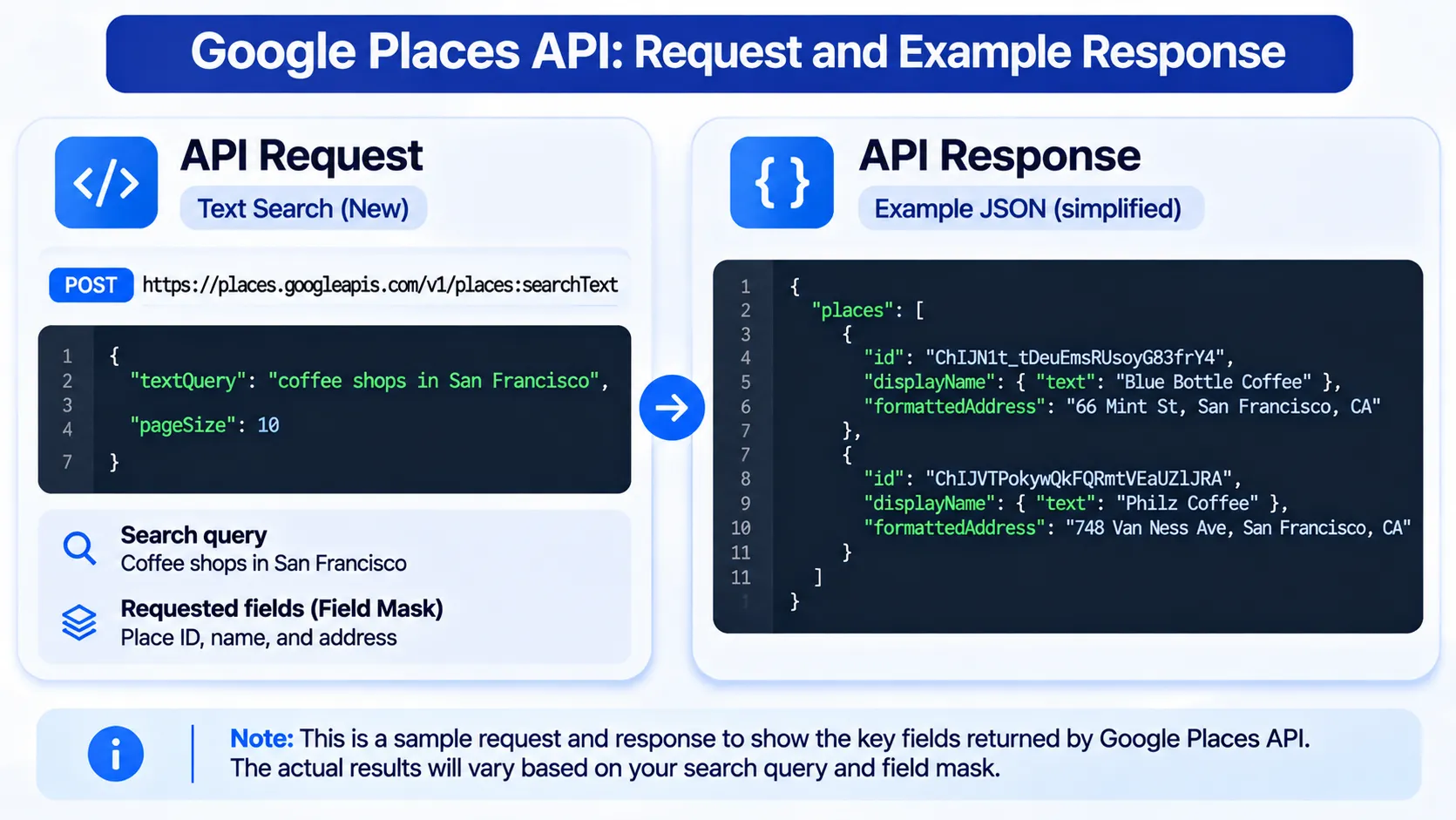
This returns the selected fields for matching businesses, where the information is available.
Place IDs are particularly useful when working with multiple searches because they help identify records referring to the same location.
Request Phone Numbers, Websites, Ratings, and Opening Hours
You can request additional fields when your research requires more than basic business information.
| Business Detail | Google Places API Field | Research Use |
|---|---|---|
| Número de telefone | nationalPhoneNumber | Business contact research |
| Local na rede Internet | websiteUri | Website and company research |
| Classificação | rating | Local competitor comparison |
| Número de avaliações | userRatingCount | Review activity comparison |
| Horário de funcionamento | regularOpeningHours | Business operating schedules |
| Coordinates | location | Geographic analysis |
These fields are not guaranteed for every business. Some listings may have missing contact details, websites, or operating hours.
For lead generation, sales prospecting, and local SEO research, the selected fields should match the information needed to assess each business. A rating or website alone does not establish whether a business is a suitable prospect.
Retrieve Additional Business Information with Place Details (New)
After finding a business through Text Search or Nearby Search, you can use its Place ID to request information about that specific location.
The Place Details (New) endpoint retrieves selected fields for a single business. The example below requests its Place ID, business name, and formatted address.
Example API request:
					curl -X GET \
  'https://places.googleapis.com/v1/places/PLACE_ID' \
  -H 'X-Goog-Api-Key: YOUR_API_KEY' \
  -H 'X-Goog-FieldMask: id,displayName,formattedAddress'
Replace PLACE_ID with the ID returned by your business search and YOUR_API_KEY with your Google Places API key.
Unlike Text Search and Nearby Search, Place Details uses field names without the places. prefix in its field mask. Additional supported fields can be requested when needed, but they may affect API pricing.
Understand Field Masks and Missing Data
Google Places API requires a field mask for Text Search (New), Nearby Search (New), and Place Details (New). The field mask specifies which information the API should return.
Three points matter when selecting fields:
- Request only what you need. Additional fields may increase the cost of a request.
- Check for missing values. A business may not have every requested field available.
Review the response before further use. Confirm that the returned information meets your research needs and follows Google’s data usage requirements.
For example, a local SEO agency researching coffee shops may need business names, websites, ratings, and review counts. A location researcher may focus on addresses, coordinates, and Place IDs.
Choosing fields based on the task helps avoid unnecessary requests and makes the results easier to review.
For more details on API setup, field masks, and request examples, see Outscraper’s Google Places API Guide.
Google Places API Examples for Local Business Research
Google Places API can help sales teams, marketing agencies, and researchers find businesses in specific industries and locations. The search method depends on whether you want to find businesses across a city or within a defined geographic area.
The following examples use Text Search and Nearby Search to find local businesses in California.
Find Coffee Shops in San Francisco
A marketing agency researching independent coffee shops in San Francisco can use Text Search to identify businesses that match its search phrase.
For example, the agency can submit the following request to Google Places API:
Endpoint:
POST https://places.googleapis.com/v1/places:searchText
Request body:
curl -X POST \
  'https://places.googleapis.com/v1/places:searchText' \
  -H 'Content-Type: application/json' \
  -H 'X-Goog-Api-Key: YOUR_API_KEY' \
  -H 'X-Goog-FieldMask: places.id,places.displayName,places.formattedAddress' \
  -d '{
    "textQuery": "independent coffee shops in San Francisco",
    "pageSize": 20
  }'
The request searches for coffee shops matching the specified phrase. Depending on the selected field mask, the response can include business names, addresses, Place IDs, ratings, and websites.
The agency can review these records to identify businesses for further research. Since Text Search uses Google’s search matching, the results should be checked individually to confirm whether each business meets the agency’s definition of an independent coffee shop.
Find Auto Repair Shops in San Diego
A sales team researching auto repair shops within a specific part of San Diego can use Nearby Search.
This method requires a supported business type, geographic coordinates, and a search radius.
Endpoint:
POST https://places.googleapis.com/v1/places:searchNearby
Example request body:
curl -X POST \
  'https://places.googleapis.com/v1/places:searchNearby' \
  -H 'Content-Type: application/json' \
  -H 'X-Goog-Api-Key: YOUR_API_KEY' \
  -H 'X-Goog-FieldMask: places.id,places.displayName,places.formattedAddress' \
  -d '{
    "includedTypes": ["car_repair"],
    "maxResultCount": 20,
    "locationRestriction": {
      "circle": {
        "center": {
          "latitude": 32.7157,
          "longitude": -117.1611
        },
        "radius": 5000.0
      }
    }
  }'
This request searches for businesses classified under car_repair within a 5-kilometer radius of the selected coordinates in San Diego.
The returned records can help the sales team review business locations, identify potential accounts, and compare businesses within the selected area.
Nearby Search does not guarantee that every business in the area will appear. Teams researching larger territories may need to adjust their search areas and review overlapping results.
Apply the Same Search Workflow to Other Industries
The same search methods can support local business research across different industries. Adjust the search parameters based on the businesses and locations you want to research.
Text Search uses a search phrase that combines the business category and location, while Nearby Search uses a supported business type, center coordinates, and search radius.
A researcher could apply these methods to find fitness centers, accounting firms, or property management companies across selected locations.
Before running additional searches, define the business categories, geographic boundaries, and information needed for the project. This keeps the research focused and makes the results easier to compare.
Projects involving business records across multiple locations can also use Outscraper’s guide on how to extract data from Google Maps through its dashboard or API.
What Limits Local Business Searches with Google Places API?
Google Places API has limits that affect how many businesses you can find, which details you can retrieve, and how the results can be used. These limits matter when researching multiple cities, comparing local markets, or collecting business information for sales prospecting.
Pagination and Result Limits
Google Places API does not return every matching business in a single request. The number of results depends on the search method.
Text Search (New): Returns up to 20 results per page, with pagination available for up to 60 results across three pages.
Nearby Search (New): Returns up to 20 results per request and does not support pagination.
To retrieve additional Text Search results, include nextPageToken in the field mask. When the response provides a token, pass it as pageToken in the next request. Keep the original search parameters unchanged, apart from the permitted pagination settings.
For example, searching for coffee shops in San Francisco may return only a portion of the businesses operating in the city.
You can run additional searches using different locations or search criteria, but overlapping searches may return the same businesses. Place IDs can help identify duplicate records during permitted processing.
These limits mean that API search results should not be treated as a complete list of businesses in a market.
Request Costs, Quotas, and Field Selection
Google Places API uses usage-based pricing. The cost depends on the API method, the fields requested, and the number of billable requests.
Three factors affect your research costs:
- Search requests: Text Search and Nearby Search have their own billing categories.
- Requested fields: Phone numbers, websites, ratings, and other details may trigger higher-priced billing categories.
- Request volume: Searching multiple locations or retrieving additional details increases the number of requests.
Google Cloud also provides quota controls to help manage API usage.
Before running a large research project, review Google’s Places API usage and billing documentation, select only the fields you need, and estimate how many requests the project requires.
Data Storage, Export, and Usage Restrictions
Google Places API results are subject to Google Maps Platform terms, including restrictions on storing and reusing certain types of content.
Place IDs can generally be stored for later use, while other business information may have additional storage and usage restrictions.
For teams building lead lists, business directories, or market research datasets, these rules affect how API responses can be retained, exported, and used outside an application.
Review the Termos de Serviço da Plataforma do Google Maps before building a workflow that stores or redistributes business information.
If your project requires downloadable business datasets, assess the available data collection methods and their terms before choosing a tool.

See how Outscraper Google Places API can support business searches by category and location.
When to Use Outscraper Google Places API for Business Discovery
Google’s official Places API allows developers to search for businesses and retrieve place details, but collecting data across multiple locations requires managing API requests, pagination, and usage costs.
Outscraper API do Google Places provides another option for developers and businesses that need Google Maps business data for sales prospecting, market research, and location-based applications.
Using Outscraper API for Business Data Collection
Outscraper Google Places API supports business searches using keywords and locations. Developers can use it to retrieve structured business records without building their own Google Maps data extraction system.
For example, a sales team researching coffee shops in San Francisco and auto repair shops in San Diego can define separate search queries for each business category and location.
A typical API-based workflow involves:
- Define the search criteria: Specify the business category and geographic location.
- Submit the API request: Send the search parameters using Outscraper documented API.
- Retrieve business records: Access available details such as business names, addresses, phone numbers, websites, and ratings.
- Process the results: Review the returned records and prepare the information for the intended research or application.

This approach is suitable for teams that need repeated business searches or want to connect business data collection to their own applications.
For sales prospecting, Outscraper’s lead scraping guide explains how to identify target businesses, collect relevant information, and prepare prospect lists for outreach.
Choosing Between Google's Places API and Outscraper API
Both services provide access to place-related business information, but their workflows and usage requirements differ.
Google’s official Places API is designed for applications that need Google’s place search and details features. Developers must account for field-based billing, request limits, and Google’s data storage and usage policies.
Outscraper API do Google Places focuses on retrieving structured Google Maps business data through an API. It is an option for teams that need business records for prospect research, market analysis, or their own data processing workflows.
Before choosing a service, review its current documentation, pricing, available fields, and data usage requirements. The appropriate choice depends on the information you need, how frequently you collect it, and how you plan to use the results.
Final Checklist: Finding Local Businesses with Google Places API
- Set up API access: Enable Places API (New) and configure your API key.
- Choose a search method: Use Text Search or Nearby Search based on your target businesses and locations.
- Select business details: Request the fields needed for your research.
- Check API limits: Review pagination, pricing, quotas, and data usage rules.
- Choose the right API: Compare Google’s official Places API with Outscraper Google Places API based on your data collection needs.
Search for local businesses by category and location, and collect structured business data using Outscraper Google Places API.
Perguntas frequentes
Perguntas e respostas mais frequentes
No. Google Places API returns matching businesses based on the search method, location, and result limits. A single search does not provide a complete list of every business in a city.
Yes. You can include a ZIP code in a Text Search query. For Nearby Search, use coordinates and a search radius to define the area.
No. Google’s official Places API does not provide business email addresses as a standard field. It may return a business website, which can be used for further contact research.
You can process API responses in your application, but Google’s terms restrict how certain Places data can be stored, exported, and reused. Check the applicable usage policies before creating downloadable datasets.
Yes. Outscraper’s Google Places API supports business searches by keyword and location and returns structured business records. It can be used for business discovery, prospect research, and location-based data workflows.